







Question: C# ProgramGeneral Background Information:CMS Systems, Inc. is a company that provides information systems consulting services to companies in the telecom industry in the United States
C# ProgramGeneral Background Information:CMS Systems, Inc. is a company that provides information systems
consulting services to companies in the telecom industry in the
United States and the United Kingdom. Due to its success, CMS
is hoping to expand its operations into other parts of
Europe. Despite its large size, CMS currently uses a
manualspreadsheetbased process for maintaining employee and
client data. Management has now decided to implement a
companywide application that will keep track of all of its
employees hours, calculate employee payroll, and produce invoices
for clients based on hours worked by employees.CMS currently employs individuals in the US and
in the UK who serve as systems analysts, developers, managers,
testers, maintenance engineers, accountants, lawyers, and sales
representatives.The company also has more than clients in the US and
UKx. Clients can have one or more contracts with CMS to
provide a variety of consulting services. For example, a
single client might have one contract for maintenance of an
existing system and also have another contract sometimes called a
work order by the sales force for the development of a new
system.Some clients are billed based upon negotiated contracts, which
stipulate a predetermined amount for charges regardless of the
number of hours that employees actually work on the
contracts. Such contracts are called fixed
price contracts. Other clients are billed based on the total
number of hours provided by CMS employees multiplied by a rate per
employee type per employee hour. These arrangements are
called T&M Time and Materials contracts. T&M
contracts specify a maximum of forty hours per week for which the
client is willing to pay. Any amounts over hours per week
are not billable, but are considered discounted hours.For T&M contracts, the rate per hour for each consultant is
determined by the employees level of expertise. For example,
a client pays $hour for an employee who is at the level of
Systems Analyst I. That same client pay $hour for an
employee designated as a Manager IIT&M and Fixed Price contracts are the only two types of
contracts currently used by CMSAll CMS employees must keep a record of the time they spend
working for each client on a weekly basis. Because
employees can work for more than one client and perform different
functions for each client, CMS utilizes project management to
keep track of employee assignments to client contracts.
Employees can be assigned to work on more than one project at a
given time. In fact, it is not unusual for an employee to
spend time on two or more different projects within the same
day.Just as a client can have more than one contract with CMS a
contract can consist of more than one project. For example, a
contract for the development of a new system could be fulfilled in
multiple phases. Phase I could include implementation at one
client site using a group of consultants in close proximity to that
site. Phase II could include implementation at a different
site with a potentially different set of consultants. Both of
these phases are considered separate projects, even though they are
governed by the same contract.The number of hours worked for each employee on each project
must be recorded on a weekly basis. Employees currently log
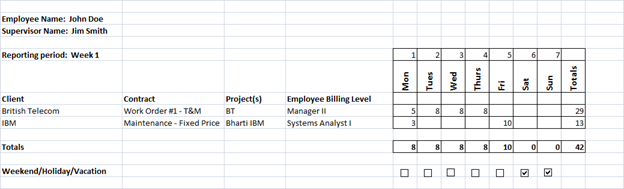
their time using an Excel worksheet. An example of this
worksheet is presented below. Notice that the employees
supervisor is listed on the worksheet. A supervisor is
currently required to approve his employees timesheets by placing
his initials beside his name.Deliverable:For this assignment, you are required to create the GUI for a
timekeepingpayroll system for CMSThe system should first allow an employee to enter his name and
record the time he worked on each project for a given week.
Using the spreadsheet above as a guideline, the system must allow
the user to enter his name and the name of his
supervisor. Next, the user must enter the number of the
week for which he is entering time. Assume a maximum of
weeks in a year. Make sure the employee enters only a valid
week number.To record an employees hours, the user must enter the name of a
client, a clients contract and a project. For each of the
seven days in a week, the user must enter hours worked or check a
box that indicates the day is a weekend, a holiday, or a vacation
day. If the employee fails to enter any hours for a day and
fails to check the weekendholidayvacation box for that day, the
system should warn the user that the given day is missing
information. The system should also ensure that if any work
hours are entered for a day, the checkbox for that day should NOT
be checked. Finally, the system should ensure that a user
cannot enter more than hours in a single day. Once the
hours are entered, the user should be able to Submit his hours by
clicking a button that will calculate his payroll information for
the week and display it on the same screen.Payroll information is calculated as
follows:All employees are paid for hours worked at a rate of $ US
dollars per hour. If the number of hours worked in the week
exceeds the employee is paid time and a half for his overtime
hours. For example, assume an employee works hours during
a week, he will receive X $ overtime hours X X
$ $ If an employee works less than hours in a
week, the system should make note of this fact in a label beside
the supervisors name. An example payroll calculation is
shown below:Payroll information for John Doe for the week ending
Week :Total Hours Worked:
Regular Hours Worked:
Rate per regular work hour:
$
Regular Hourly Pay:
$
OverTime Hours Worked:
Rate per overtime work hour:
$
Overtime Hourly Pay:
$
Gross Pay:
$
Number of WeekendHolidayVacation days
claimed:
Step by Step Solution
There are 3 Steps involved in it
1 Expert Approved Answer
Step: 1 Unlock

Question Has Been Solved by an Expert!
Get step-by-step solutions from verified subject matter experts
Step: 2 Unlock
Step: 3 Unlock
 Study Help