







Question: C programming ConvertDec to Hex-Oct-Bin.c ConvertDec_to_Hex-Oct-Bin.c is a simple conversion program that prompts the user for their name, followed by a prompt for an integer
C programming
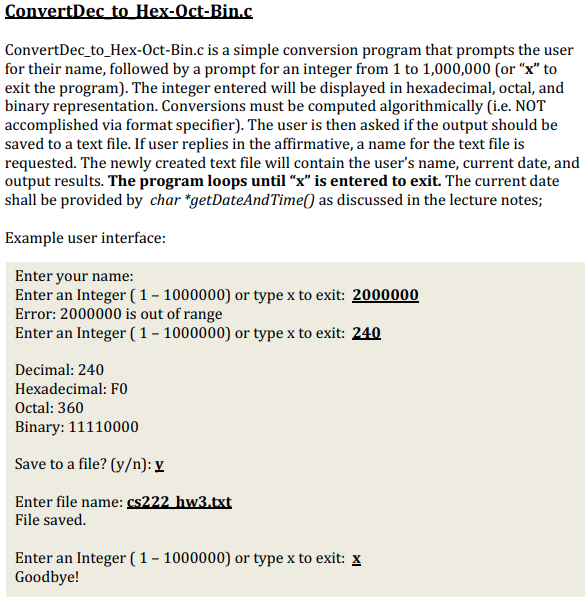
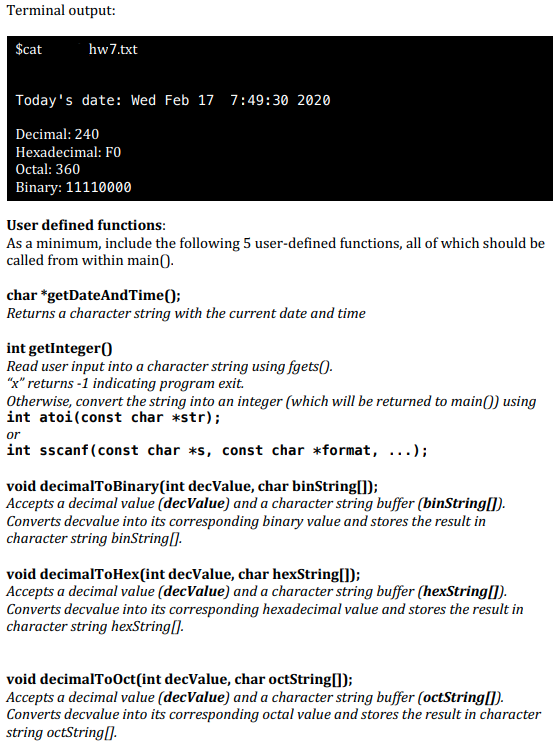
ConvertDec to Hex-Oct-Bin.c ConvertDec_to_Hex-Oct-Bin.c is a simple conversion program that prompts the user for their name, followed by a prompt for an integer from 1 to 1,000,000 (or x to exit the program). The integer entered will be displayed in hexadecimal, octal, and binary representation. Conversions must be computed algorithmically (i.e. NOT accomplished via format specifier). The user is then asked if the output should be saved to a text file. If user replies in the affirmative, a name for the text file is requested. The newly created text file will contain the user's name, current date, and output results. The program loops until x is entered to exit. The current date shall be provided by char *getDateAndTime() as discussed in the lecture notes; Example user interface: Enter your name: Enter an Integer (1 - 1000000) or type x to exit: 2000000 Error: 2000000 is out of range Enter an Integer (1 - 1000000) or type x to exit: 240 Decimal: 240 Hexadecimal: FO Octal: 360 Binary: 11110000 Save to a file? (y): v Enter file name: cs222 hw3.txt File saved. Enter an Integer ( 1 - 1000000) or type x to exit: x Goodbye! Terminal output: $cat hw 7.txt Today's date: Wed Feb 17 7:49:30 2020 Decimal: 240 Hexadecimal: FO Octal: 360 Binary: 11110000 User defined functions: As a minimum, include the following 5 user-defined functions, all of which should be called from within main(). char *getDateAndTime(); Returns a character string with the current date and time int getInteger Read user input into a character string using fgets(). "x" returns -1 indicating program exit. Otherwise, convert the string into an integer (which will be returned to main() using int atoi(const char *str); int sscanf(const char *s, const char *format, ...); or void decimalToBinary(int decValue, char binString(); Accepts a decimal value (decValue) and a character string buffer (binString[]). Converts decvalue into its corresponding binary value and stores the result in character string binString. void decimalToHex(int decValue, char hexString[]); Accepts a decimal value (decValue) and a character string buffer (hexString[]). Converts decvalue into its corresponding hexadecimal value and stores the result in character string hexString). void decimalToOct(int decValue, char octString[]); Accepts a decimal value (decValue) and a character string buffer (octString(). Converts decvalue into its corresponding octal value and stores the result in character string octString
Step by Step Solution
There are 3 Steps involved in it

Get step-by-step solutions from verified subject matter experts
 Study Help