







Question: C# Q2 is not working correctly please help it should when selected one of the item from listbox the output label down should change answer
C# Q2 is not working correctly please help
it should when selected one of the item from listbox the output label down should change answer
the part is needed help in bold text
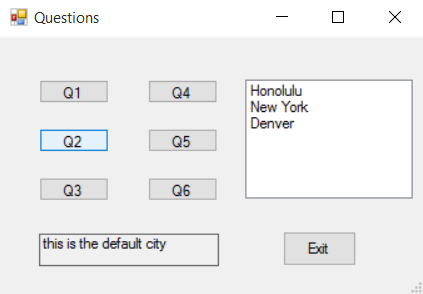
using System;
using System.Collections.Generic;
using System.ComponentModel;
using System.Data;
using System.Drawing;
using System.Linq;
using System.Text;
using System.Threading.Tasks;
using System.Windows.Forms;
namespace Alshafie_sp2017
{
public partial class mySecondForm : Form
{
public mySecondForm()
{
InitializeComponent();
}
private void Q1()
{
int count = 0;
for (count = 0; count
{
SecondLst.Items.Add("Walla Alshafie ");
}
}
private void q1_Btn_Click(object sender, EventArgs e)
{
Q1();
}
private void LoadList()
{
//load the cities that the users going to choice
SecondLst.Items.Add("Honolulu");
SecondLst.Items.Add("New York");
SecondLst.Items.Add("Denver");
}
private void q2_Btn_Click(object sender, EventArgs e)
{
Q2();
LoadList();
}
private void Q2()
{
string choice = SecondLst.SelectedItems.ToString();
switch (choice)
{
case "Honolulu":
secondOutputLbl.Text = "Hawali";
break;
case "New York":
secondOutputLbl.Text = "New York";
break;
case "Denver":
secondOutputLbl.Text = "Denver";
break;
default:
secondOutputLbl.Text = "this is the default city";
break;
}
}
private void Q3()
{
double result;
result = Math.Pow(12.0, 2.0);
secondOutputLbl.Text = result.ToString("n2");
}
private void q3_Btn_Click(object sender, EventArgs e)
{
Q3();
}
private void Q4()
{
decimal pricePerFoot = 2.99m;
double boardLength = 10.5;
decimal totalCost;
totalCost = (decimal)boardLength * pricePerFoot;
}
private void q4_Btn_Click(object sender, EventArgs e)
{
Q4();
}
private void Q5()
{
int[] scores = { 70, 55, 100, 93 };
int total = 0;
for(total=0;total { secondOutputLbl.Text = total.ToString("n2"); } } private void q5_Btn_Click(object sender, EventArgs e) { Q5(); } private int Square(int value) { return value * value; } private void q6_Btn_Click(object sender, EventArgs e) { int result; result = Square(10); secondOutputLbl.Text = result.ToString(); } private void exitBtn_Click(object sender, EventArgs e) { this.Close(); } } }
Step by Step Solution
There are 3 Steps involved in it

Get step-by-step solutions from verified subject matter experts
 Study Help