







Question: C++ Specifications: The input should read in integer values for the hours, read in the colon character and discard it, and eger values for the
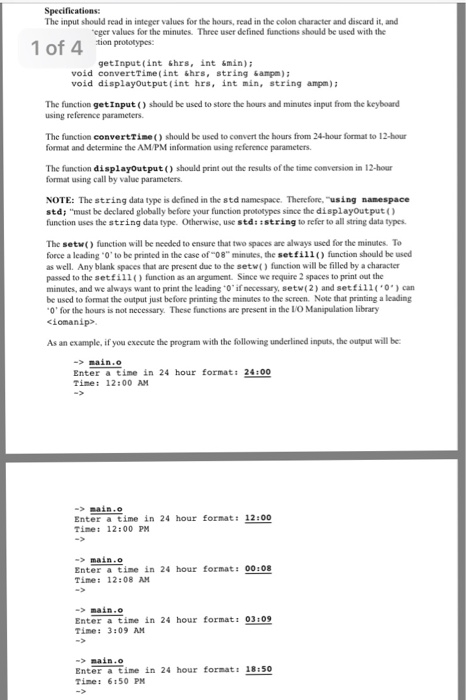
Specifications: The input should read in integer values for the hours, read in the colon character and discard it, and eger values for the minutes. Three user defined functions should be used with the of 4 tion prototypes: getInput (int &hrs, int &min) void convertTime(int Shrs, string &m)i void displayoutput (int hrs, int min, string ampm)1 The function getInput() should be used to store the hours and minutes input from the keyboard using reference parameters The function convertTie) should be used to convert the hours from 24-hour format to 12-hour format and determine the AM/PM information using reference parameters The function displayoutput) should print out the results of the time conversion in 12-hour format using call by value parameters. NOTE: The string data type is defined in the std namespace. Therefore, "using nanespace std; "must be declared globally before your function prototypes since the displayoutput function uses the string data type. Otherwise, use std:istring to refer to all string data types The setw) function will be needed to ensure that two spaces are always used for the minutes. To force a leading "0' to be printed in the case of 08 minutes, the setfill) function should be used as well. Any blank spaces that are present due to the setw) function will be filled by a character passed to the setfill() function as an argument. Since we require 2 spaces to print out the minutes, and we always want to print the leading .0' if necessary, setw( 2 and set fill (' ') can be used to format the output just before printing the minutes to the screen. Note that printing a leading O' for the hours is not necessary. These functions are present in the LO Manipulation library ciomanip> As an example, if you execute the program with the following underlined inputs, the output will be. ->main.o Enter a time in 24 hour formats 24:00 Tine: 12:00 AM main.o Enter a time in 24 hour format: 12:00 Tine: 12:00 PM main.o Enter a time in 24 hour format: 00108 Time: 12:08 AM - main. Enter a time in 24 hour format: 03109 Time: 3:09 AM main.o Enter a time in 24 hour format: 18:50 Tine: 6:50 PM
Step by Step Solution
There are 3 Steps involved in it

Get step-by-step solutions from verified subject matter experts
 Study Help