







Question: C++ There are two activities to do with this code. First, change the color of the objects (you get to choose the colors). For the
C++
There are two activities to do with this code. First, change the color of the objects (you get to choose the colors). For the triangle, the color is set on the even numbered lines from 64 to 86. For the square, lines 94, 99, 104, 109, 114, and 119 contain the color property. Second, change the rotation speed of the objects using lines 126 and 127. The higher the number, the faster the speed; the lower the number, the slower the speed. How can I change them? Do I change the 0 or the F.
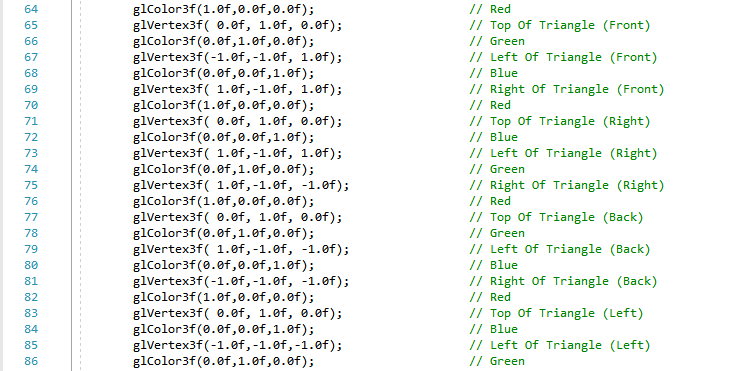
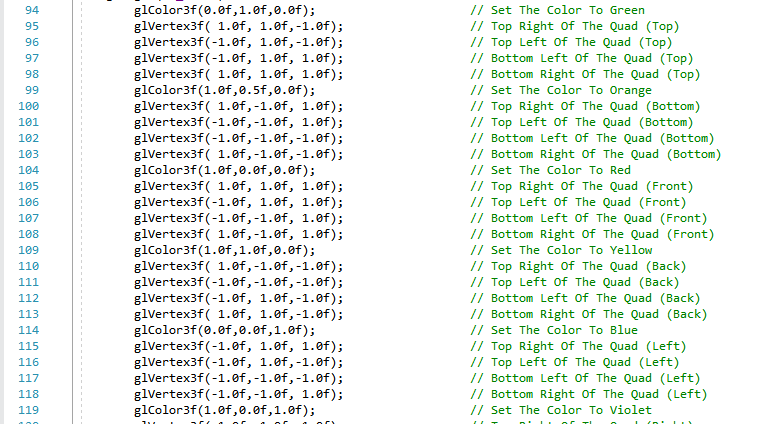

glColor3f (1.0f,0.0f,0.of); glVertex3f( e.0f, 1.0f, e.of); glColor3f (0.0f,1.0f,0.0f); glVertex3f(-1.0f,-1.0f, 1.0f); glColor3f (0.0f,0.0f,1.0f); glVertex3f( 1.0f,-1.0f, 1.0f); glColor3f (1.0f,0.0f,0.0f); glVertex3f( e.0f, 1.0f, e.of); glColor3f (0.0f,0.0f,1.0f); glVertex3f( 1.0f,-1.0f, 1.0f); glColor3f (0.0f,1.0f,0.0f); glVertex3f( 1.0f,-1.0f, -1.0f); glColor3f (1.0f,0.0f,0.0f); glVertex3f( e.0f, 1.0f, e.of); glColor3f (0.0f,1.0f,0.0f); glVertex3f( 1.0f,-1.0f, -1.0f); glColor3f (0.0f,0.0f,1.0f); glVertex3f(-1.0f,-1.0f, -1.0f); glColor3f (1.0f,0.0f,0.0f); glVertex3f( e.0f, 1.0f, e.of); glColor3f (0.0f,0.0f,1.0f); glVertex3f(-1.0f,-1.0f,-1.0f); glColor3f (0.0f,1.0f,0.0f); // Red // Top of Triangle (Front) // Green // Left of Triangle (Front) // Blue // Right of Triangle (Front) // Red // Top of Triangle (Right) // Blue // Left of Triangle (Right) // Green // Right of Triangle (Right) // Red // Top of Triangle (Back) // Green // Left of Triangle (Back) // Blue // Right of Triangle (Back) // Red // Top of Triangle (Left) // Blue // Left of Triangle (Left) // Green 64 65 67 68 69 70 71 72 73 74 75 76 78 79 80 81 82 83 84 85 86 glColor3f (0.0f,1.0f,0.0f); glVertex3f( 1.0f, 1.0f,-1.0f); glVertex3f(-1.0f, 1.0f, -1.0f); glVertex3f(-1.0f, 1.0f, 1.0f); glVertex3f( 1.0f, 1.0f, 1.0f); glColor3f (1.0f,0.5f,0.0f); glVertex3f( 1.0f,-1.0f, 1.0f); glVertex3f(-1.0f,-1.0f, 1.0f); glVertex3f(-1.0f,-1.0f,-1.0f); glVertex3f( 1.0f,-1.0f,-1.0f); glColor3f (1.0f,0.f,0.0f); glVertex3f( 1.0f, 1.0f, 1.0f); glVertex3f(-1.0f, 1.0f, 1.0f); glVertex3f(-1.0f,-1.0f, 1.0f); glVertex3f( 1.0f,-1.0f, 1.0f); glColor3f (1.0f,1.f,0.0f); glVertex3f( 1.0f,-1.0f,-1.0f); glVertex3f(-1.0f,-1.0f,-1.0f); glVertex3f(-1.0f, 1.0f, -1.0f); glVertex3f( 1.0f, 1.0f,-1.0f); glColor3f(0.0f,0.0f,1.0f); glVertex3f(-1.0f, 1.0f, 1.0f); glVertex3f(-1.0f, 1.0f, -1.0f); glVertex3f(-1.0f,-1.0f,-1.0f); glVertex3f(-1.0f,-1.0f, 1.0f); glColor3f (1.0f,0.0f,1.0f); // Set The Color To Green // Top Right of The Quad (Top) // Top Left Of The Quad (Top) // Bottom Left of The Quad (Top) // Bottom Right of The Quad (Top) // Set The Color To Orange // Top Right of The Quad (Bottom) // Top Left Of The Quad (Bottom) // Bottom Left of The Quad (Bottom) // Bottom Right of The Quad (Bottom) // Set The Color To Red // Top Right of The Quad (Front) // Top Left Of The Quad (Front) // Bottom Left of The Quad (Front) // Bottom Right of The Quad (Front) // Set The Color To Yellow // Top Right of The Quad (Back) // Top Left Of The Quad (Back) // Bottom Left of The Quad (Back) // Bottom Right of The Quad (Back) // Set The Color To Blue // Top Right of The Quad (Left) // Top Left Of The Quad (Left) // Bottom Left of The Quad (Left) // Bottom Right of The Quad (Left) // Set The Color To Violet 94 95 96 97 98 100 101 102 103 104 105 106 107 108 109 110 112 113 114 115 116 118 119 126 127 rtri+-0.2f; rquad-0.15f; // Increase The Rotation Variable For The Triangle (NEW ) // Decrease The Rotation Variable For The Quad NEW) glColor3f (1.0f,0.0f,0.of); glVertex3f( e.0f, 1.0f, e.of); glColor3f (0.0f,1.0f,0.0f); glVertex3f(-1.0f,-1.0f, 1.0f); glColor3f (0.0f,0.0f,1.0f); glVertex3f( 1.0f,-1.0f, 1.0f); glColor3f (1.0f,0.0f,0.0f); glVertex3f( e.0f, 1.0f, e.of); glColor3f (0.0f,0.0f,1.0f); glVertex3f( 1.0f,-1.0f, 1.0f); glColor3f (0.0f,1.0f,0.0f); glVertex3f( 1.0f,-1.0f, -1.0f); glColor3f (1.0f,0.0f,0.0f); glVertex3f( e.0f, 1.0f, e.of); glColor3f (0.0f,1.0f,0.0f); glVertex3f( 1.0f,-1.0f, -1.0f); glColor3f (0.0f,0.0f,1.0f); glVertex3f(-1.0f,-1.0f, -1.0f); glColor3f (1.0f,0.0f,0.0f); glVertex3f( e.0f, 1.0f, e.of); glColor3f (0.0f,0.0f,1.0f); glVertex3f(-1.0f,-1.0f,-1.0f); glColor3f (0.0f,1.0f,0.0f); // Red // Top of Triangle (Front) // Green // Left of Triangle (Front) // Blue // Right of Triangle (Front) // Red // Top of Triangle (Right) // Blue // Left of Triangle (Right) // Green // Right of Triangle (Right) // Red // Top of Triangle (Back) // Green // Left of Triangle (Back) // Blue // Right of Triangle (Back) // Red // Top of Triangle (Left) // Blue // Left of Triangle (Left) // Green 64 65 67 68 69 70 71 72 73 74 75 76 78 79 80 81 82 83 84 85 86 glColor3f (0.0f,1.0f,0.0f); glVertex3f( 1.0f, 1.0f,-1.0f); glVertex3f(-1.0f, 1.0f, -1.0f); glVertex3f(-1.0f, 1.0f, 1.0f); glVertex3f( 1.0f, 1.0f, 1.0f); glColor3f (1.0f,0.5f,0.0f); glVertex3f( 1.0f,-1.0f, 1.0f); glVertex3f(-1.0f,-1.0f, 1.0f); glVertex3f(-1.0f,-1.0f,-1.0f); glVertex3f( 1.0f,-1.0f,-1.0f); glColor3f (1.0f,0.f,0.0f); glVertex3f( 1.0f, 1.0f, 1.0f); glVertex3f(-1.0f, 1.0f, 1.0f); glVertex3f(-1.0f,-1.0f, 1.0f); glVertex3f( 1.0f,-1.0f, 1.0f); glColor3f (1.0f,1.f,0.0f); glVertex3f( 1.0f,-1.0f,-1.0f); glVertex3f(-1.0f,-1.0f,-1.0f); glVertex3f(-1.0f, 1.0f, -1.0f); glVertex3f( 1.0f, 1.0f,-1.0f); glColor3f(0.0f,0.0f,1.0f); glVertex3f(-1.0f, 1.0f, 1.0f); glVertex3f(-1.0f, 1.0f, -1.0f); glVertex3f(-1.0f,-1.0f,-1.0f); glVertex3f(-1.0f,-1.0f, 1.0f); glColor3f (1.0f,0.0f,1.0f); // Set The Color To Green // Top Right of The Quad (Top) // Top Left Of The Quad (Top) // Bottom Left of The Quad (Top) // Bottom Right of The Quad (Top) // Set The Color To Orange // Top Right of The Quad (Bottom) // Top Left Of The Quad (Bottom) // Bottom Left of The Quad (Bottom) // Bottom Right of The Quad (Bottom) // Set The Color To Red // Top Right of The Quad (Front) // Top Left Of The Quad (Front) // Bottom Left of The Quad (Front) // Bottom Right of The Quad (Front) // Set The Color To Yellow // Top Right of The Quad (Back) // Top Left Of The Quad (Back) // Bottom Left of The Quad (Back) // Bottom Right of The Quad (Back) // Set The Color To Blue // Top Right of The Quad (Left) // Top Left Of The Quad (Left) // Bottom Left of The Quad (Left) // Bottom Right of The Quad (Left) // Set The Color To Violet 94 95 96 97 98 100 101 102 103 104 105 106 107 108 109 110 112 113 114 115 116 118 119 126 127 rtri+-0.2f; rquad-0.15f; // Increase The Rotation Variable For The Triangle (NEW ) // Decrease The Rotation Variable For The Quad NEW)
Step by Step Solution
There are 3 Steps involved in it

Get step-by-step solutions from verified subject matter experts
 Study Help