







Question: ******************C++, Using FUNCTIONS (No classes or inheritance)************** Develop an object-oriented programming (OOP) application to create two clocks that display simultaneously and allow for user input
******************C++, Using FUNCTIONS (No classes or inheritance)**************
Develop an object-oriented programming (OOP) application to create two clocks that display simultaneously and allow for user input using secure and efficient C++ code.
- Review the Chada Tech Clocks Functional Requirements, located in the Supporting Materials section.
- Review the following flowchart, as it is a graphical representation of the logic you will use in relation to your applications sequence of functions. A text version of this flowchart is available: Project One Flowchart Text Version.
Title: Clocks Flowchart Top of chart begins: Clear Screen
-
Display time in two formats.
-
Decision: Button Pressed?
-
If No to button pressed, then to Add 1 Second. Then Wait 1 second. Then back to Clear Screen.
-
If Yes to button pressed, then to Display Menu. Then Read user input. Then to Decision: User input = exit?.
-
If Yes to exit, then endpoint: End program.
-
If No to exit, then Decision: Add Hour?
-
If Yes to hour, then Add 1 hour. Then back to Clear screen.
-
If No to hour, then Decision: Add Minute?.
-
If Yes to minute, then Add 1 minute. Then back to Clear screen.
-
If No to minute, then Decision: Add Second?.
-
If Yes to second, then Add 1 Second. Then back to
Clear screen.
-
If No to second, then back to Clear screen.
-
-
-
-
-
- Your code should be properly modularized and written in functions so that your main() has the least amount of code.
- Before you begin coding, remember that you must demonstrate industry standard best practices in all your code to ensure clarity, consistency, and efficiency. This includes:
- Inserting in-line comments to denote your changes and to briefly describe the functionality of the code
- Using appropriate variable, parameter, and other naming conventions throughout your code
- When your solution is finished, zip your project including all components (CPP, H, and any other files used).
- Upload your zipped project file to the project submission area.
Clocks should look like this:
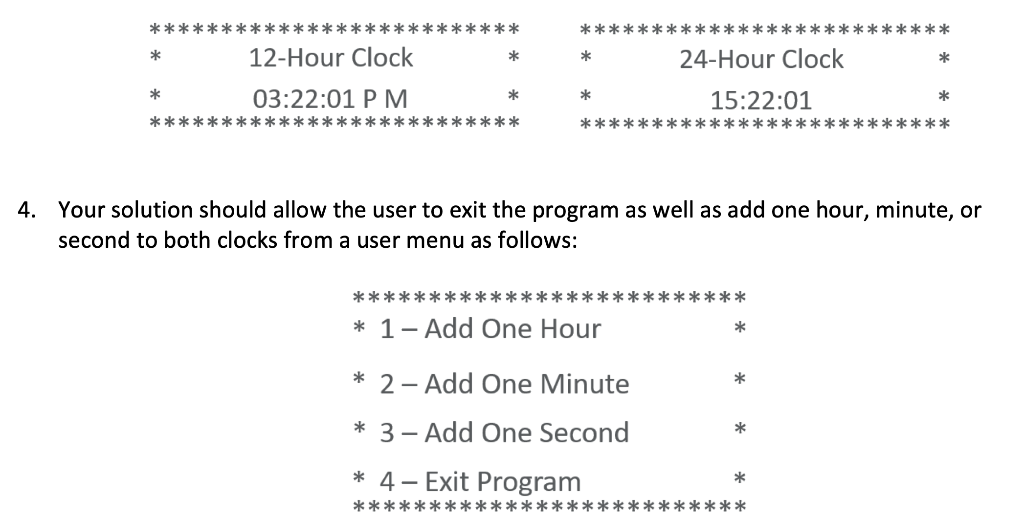
************************** 12-Hour Clock * ************************** 24-Hour Clock * ** ** 03:22:01 PM ** ************************** 15:22:01 * ************** ********** 4. Your solution should allow the user to exit the program as well as add one hour, minute, or second to both clocks from a user menu as follows: ***** *** ****** * 1- Add One Hour * * 2 - Add One Minute * 3- Add One Second * * 4 - Exit Program **************************
Step by Step Solution
There are 3 Steps involved in it

Get step-by-step solutions from verified subject matter experts
 Study Help