







Question: C# Visual Studio 2015 Book Search by Keyword: Any tips, code, or guidance would be grateful and appreciated. Especially with the clicking of the execute
C# Visual Studio 2015 Book Search by Keyword:
Any tips, code, or guidance would be grateful and appreciated. Especially with the clicking of the execute button then creating a bookobject then storing it in an empty array. That seesm really tricky.
Basically, what this program should do is allow the user to create a new book or search for an existing one. When the user enters their name (error message if button is clicked and name is empty), they choose either 'Create' or 'Search book'.
If 'Create' was clicked and validation passes, The three fields under 'Create a new book' become enabled. The user then must put in the book name, author name, and keywords (keywords must be seperated by a ',' ex: funny , fiction , mystery). there must be more than one keyword. Then the user will click the execute button and that should create a Book object and then is stored in an empty BookList array or list (your preference).
If 'Search' was clicked and validation passes, The textbox field under 'Search for book' becomes enabled. The user just has to enter in one keyword and then click the execute button. That button execution should call some method that searchings through the BookList array and sees if that keyword is found within any of the book entries. If the keyword was found, display all the books, stored in the booklist array or list. If there are no books, saying there are no books found that contain that keyword.
There should only be two class. Book class that handles the Book object/creation of the books and BookList class that creates the empty array for the book objects to be stored in.
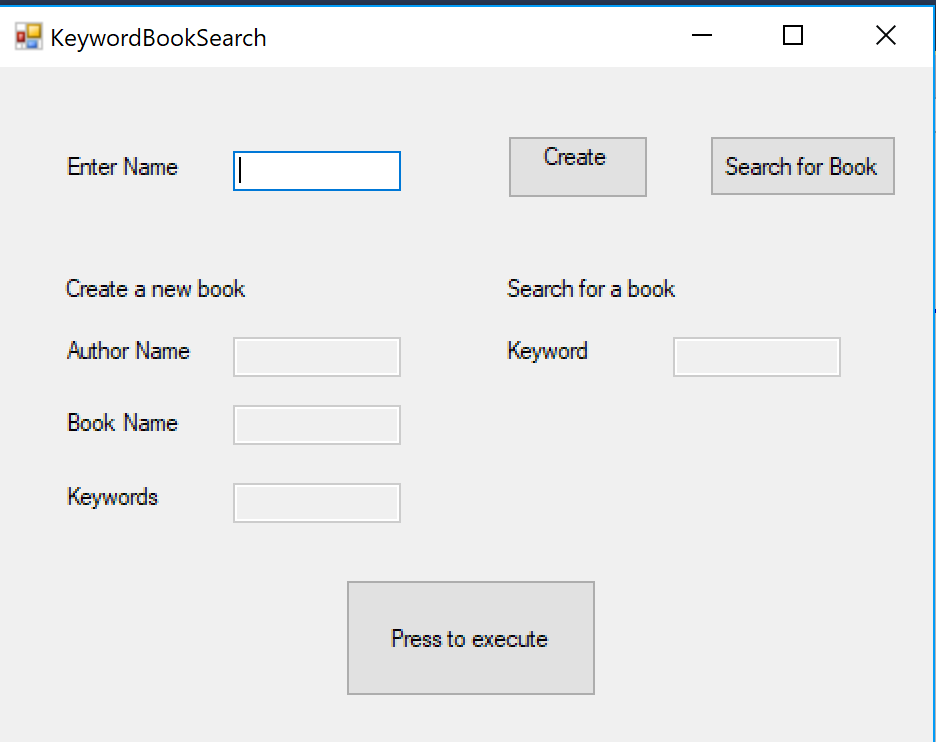
KeywordBookSearch Create Enter Name Search for Book Create a new book Search for a book Author Name Keyword Book Name Keywords Press to execute KeywordBookSearch Create Enter Name Search for Book Create a new book Search for a book Author Name Keyword Book Name Keywords Press to execute
Step by Step Solution
There are 3 Steps involved in it

Get step-by-step solutions from verified subject matter experts
 Study Help