







Question: C++ (Visual Studio) FedEx has hired you to write a little utility program to help out shipping locations without digital (Internet) connection to outside world.
C++ (Visual Studio)
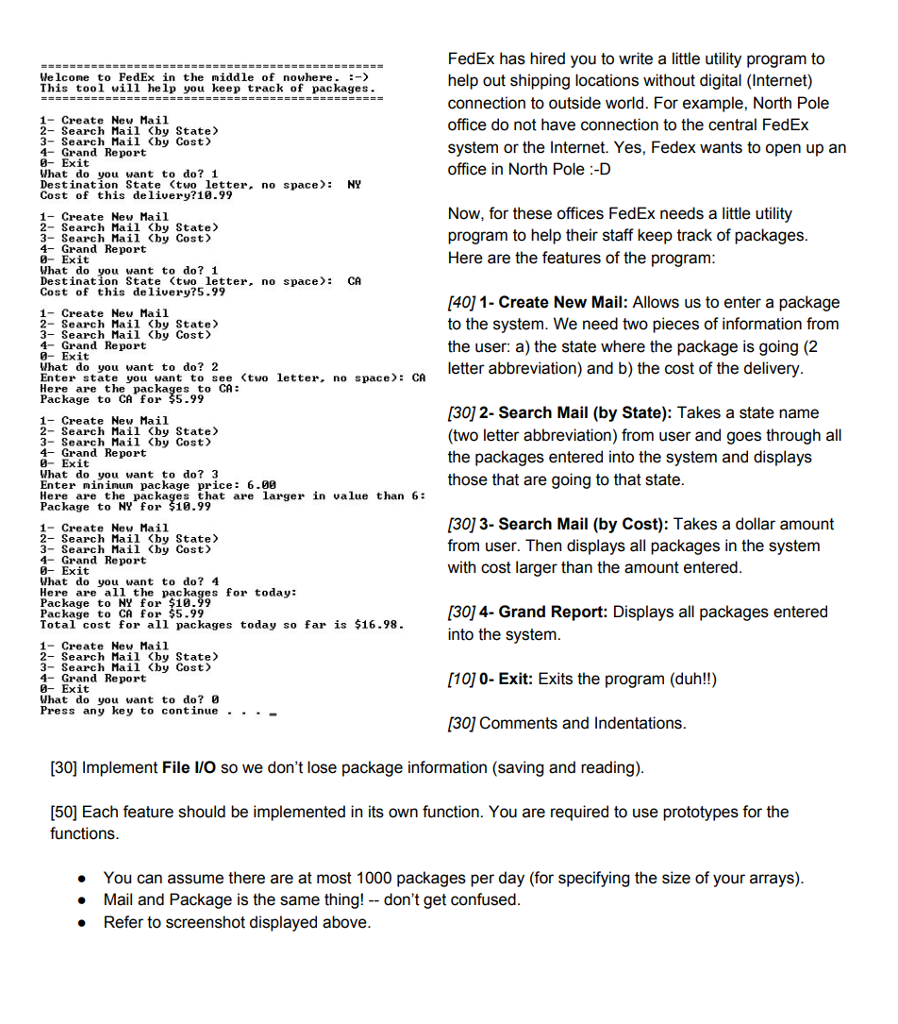
FedEx has hired you to write a little utility program to help out shipping locations without digital (Internet) connection to outside world. For example, North Pole office do not have connection to the central FedEx system or the Internet. Yes, Fedex wants to open up an office in North Pole :D Welcome to FedEx in the middle of nowhere. - This tool will help you keep track of packages. 1-Create New Mail 2- Search Mail (by State> 3- Search Mail Cby Cost) 4-Grand Report -Exit What do you want to do? 1 Destination State (two letter, no space NY Cost of this delivery?18.99 1- Create New Mai1 2- Search Mail (by State 3- Search Mail (by Cost 4- Grand Report 0-Exit What do you want to do? 1 Destination State (tuo letter. no space CA Cost of this delivery?5.99 Now, for these offices FedEx needs a little utility program to help their staff keep track of packages Here are the features of the program 1- Create New Mail 2- Search Mail Cby State> 3- Search Mail (by Cost> 4- Grand Report 0-Exit What do you want to do? 2 Enter state you want to see (tuo letter, no space Here are the packages to CA Package to CA for 55.99 [40]1- Create New Mail: Allows us to enter a package to the system. We need two pieces of information from the user: a) the state where the package is going (2 letter abbreviation) and b) the cost of the delivery CA 1- Create New Mail 2- Search Mail Cby State> 3- Search Mail (by Cost 4- Grand Report 0- Exit What do you want to do? 3 Enter nininum package price: 6.08 Here are the packages that are larger in value than 6: Package to NY for $10.99 [30] 2- Search Mail (by State): Takes a state name (two letter abbreviation) from user and goes through all the packages entered into the system and displays those that are going to that state 1-Create New Mail 2- Search Mail
Step by Step Solution
There are 3 Steps involved in it

Get step-by-step solutions from verified subject matter experts
 Study Help