







Question: C++, Visual Studio Hello, i need help with code. 1) removing #include and ALL of the stoi in the code. 2) Average won't calculate
C++, Visual Studio
Hello, i need help with code.
1) removing "#include
2) Average won't calculate correctly. This is what is shown when calculating the average compared to what it's supposed to calculate:
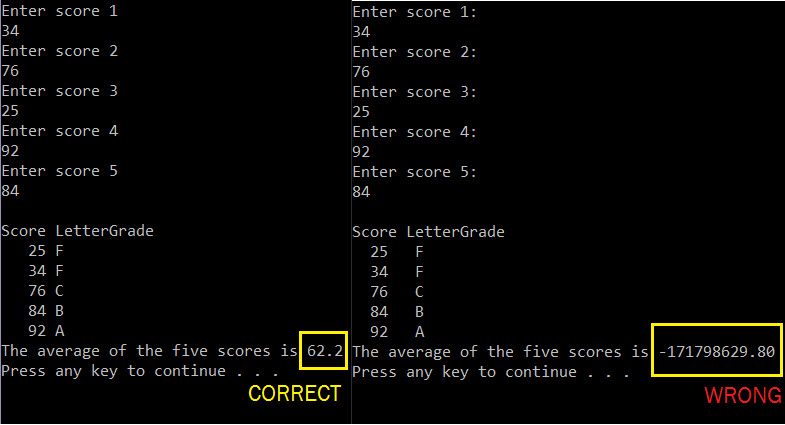
RESTRICTIONS:
No global variables
No labels or go-to statements
No infinite loops
No break statements
This is the code:
#include
#include
#include
#include
using namespace std;
// Function Prototypes
double calcAverage(int testScore[], int& sum, double& average);
void validateUserInput(string& userEntry);
void determineGrade(int testScore[], char grade[]);
void bubbleSort(int testScore[]);
void displayTestScores(int testScore[], char grade[], int sum, double average);
int main()
{
// declare Array to hold test scores
int testScore[5];
// declare Array to hold grades
char grade[5];
// Initializations and declarations
string userEntry;
int i = 0;
double average;
int sum;
while (i
{
// Lets the user input each test score one by one
cout
getline(cin, userEntry);
validateUserInput(userEntry); // Calls validateUserInput function
int userEntryInt = atoi(userEntry.c_str()); // CHANGE / REMOVE!!!
testScore[i] = userEntryInt; // Scores each score in an array called testScore
i++;
}
bubbleSort(testScore); // Calls bubbleSort function
calcAverage(testScore, sum, average); // Calls calcAverage function
determineGrade(testScore, grade); // Calls determineGrade function
displayTestScores(testScore, grade, sum, average); // Calls displayTestScores function
system("pause");
return 0;
}
double calcAverage(int testScore[], int& sum, double& average)
{
for (int i = 0; i
{
// Adds all the test scores
sum = sum + testScore[i];
}
average = sum / 5;
return average;
}
void validateUserInput(string& userEntry)
{
int counter = 0;
int userEntryLength = userEntry.length();
while (counter
{
int userEntryInt = atoi(userEntry.c_str()); //CHANGE / REMOVE!!
if (!isdigit(userEntry[counter]))
{
cout
getline(cin, userEntry);
userEntryLength = userEntry.length();
counter = 0;
}
else if (userEntryInt 100)
{
cout
getline(cin, userEntry);
userEntryLength = userEntry.length();
counter = 0;
}
else
{
counter++;
}
}
}
void determineGrade(int testScore[], char grade[])
{
for (int i = 0; i
{
// When the test score is 90 or above, the letter grade is an A
if (testScore[i] >= 90)
{
grade[i] = 'A';
}
// When the test score is 80 or above but less than 90, the letter grade is a B
if (testScore[i] >= 80 && testScore[i]
{
grade[i] = 'B';
}
// when the test score is 70 or above but less than 80, the letter grade is a C
if (testScore[i] >= 70 && testScore[i]
{
grade[i] = 'C';
}
// When the test score is 60 or above, but less than 70, the letter grade is a D
if (testScore[i] >= 60 && testScore[i]
{
grade[i] = 'D';
}
// When the test score is less 60, the letter grade is a D
if (testScore[i]
{
grade[i] = 'F';
}
}
}
void bubbleSort(int testScore[])
{
int temp = 0;
for (int i = 0; i
{
for (int j = 1; j
{
// Swaps numbers to display them in ascending order
if (testScore[j - 1] > testScore[j])
{
temp = testScore[j - 1];
testScore[j - 1] = testScore[j];
testScore[j] = temp;
}
}
}
}
void displayTestScores(int testScore[], char grade[], int sum, double average)
{
cout
for (int i = 0; i
{
cout
}
cout
cout
cout
}
Enter score 1 34 Enter score 2 76 Enter score 3 25 Enter score 4 92 Enter score 5 84 Enter score 1: Enter score 2: 76 Enter score 3: 25 Enter score 4: 92 Enter score 5: 84 Score LetterGrade Score LetterGrade 25 F 34 F 76 C 84 B 92 A 25 F 76 C 84 B 92 A The average of the five scores is 62.2 The average of the five scores is -171798629.80 Press any key to continue . Press any key to continue . CORRECT WRONG
Step by Step Solution
There are 3 Steps involved in it

Get step-by-step solutions from verified subject matter experts
 Study Help