







Question: c# visual studio program codes for calculte the price total ordered total due 1.5 Design and code a windows application for a small coffee shop
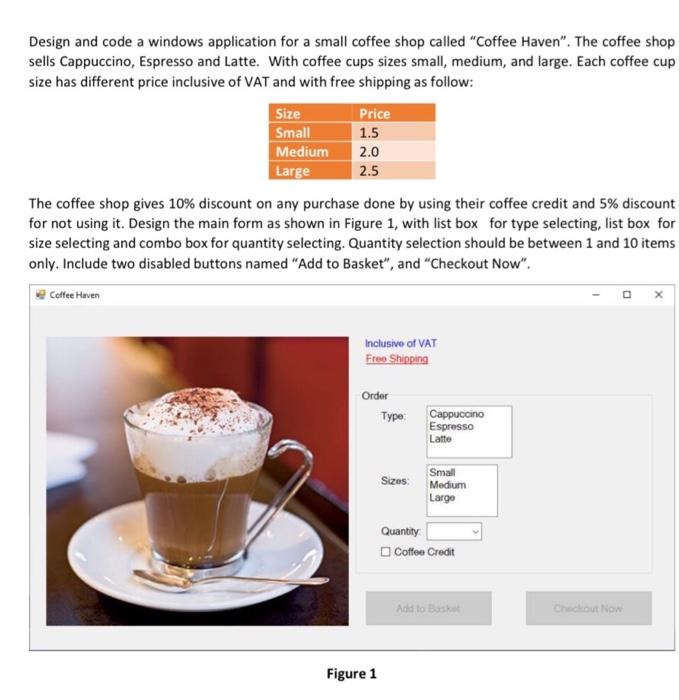
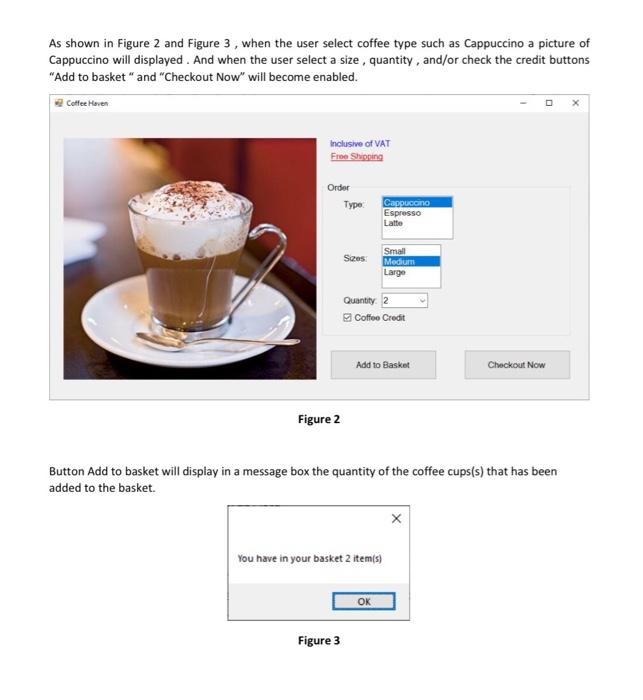
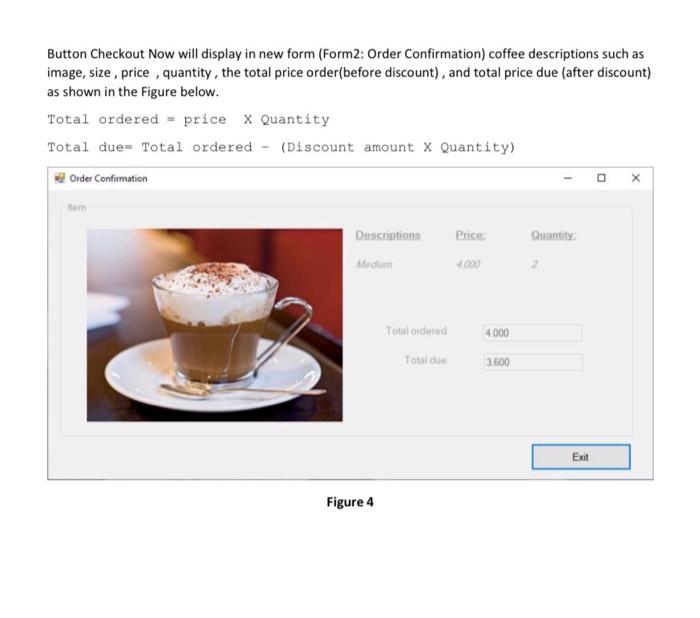
1.5 Design and code a windows application for a small coffee shop called "Coffee Haven". The coffee shop sells Cappuccino, Espresso and Latte. With coffee cups sizes small, medium, and large. Each coffee cup size has different price inclusive of VAT and with free shipping as follow: Size Price Small Medium 2.0 Large 2.5 The coffee shop gives 10% discount on any purchase done by using their coffee credit and 5% discount for not using it. Design the main form as shown in Figure 1, with list box for type selecting, list box for size selecting and combo box for quantity selecting. Quantity selection should be between 1 and 10 items only. Include two disabled buttons named "Add to Basket", and "Checkout Now". Coffee Haven Inclusive of VAT Free Shipping Order Type: Cappuccino Espresso Latte Sizes: Small Medium Largo Quantity Coffee Credit Add to Basket Checkout Now Figure 1 As shown in Figure 2 and Figure 3, when the user select coffee type such as Cappuccino a picture of Cappuccino will displayed. And when the user select a size , quantity, and/or check the credit buttons "Add to basket " and "Checkout Now" will become enabled. Coffee Haven Inclusive of VAT Free Shipping Order Type Cappuccino Espresso Latte Szes Small Medium Largo Quantity: 2 Coffee Credit Add to Basket Checkout Now Figure 2 Button Add to basket will display in a message box the quantity of the coffee cups(s) that has been added to the basket. You have in your basket 2 item(s) OK Figure 3 Button Checkout Now will display in new form (Form2: Order Confirmation) coffee descriptions such as image, size , price , quantity, the total price order(before discount), and total price due (after discount) as shown in the Figure below. Total ordered - price X Quantity Total due= Total ordered - (Discount amount x Quantity) Order Confirmation a Them Descriptions Price Quantity Medium OX Total ordered 4000 Total de 3600 Exit Figure 4
Step by Step Solution
There are 3 Steps involved in it

Get step-by-step solutions from verified subject matter experts
 Study Help