







Question: C++ Working with Vectors Write a program that accepts two integer values, called vectorSize and multiplier, as user input. Create a vector of integers with
C++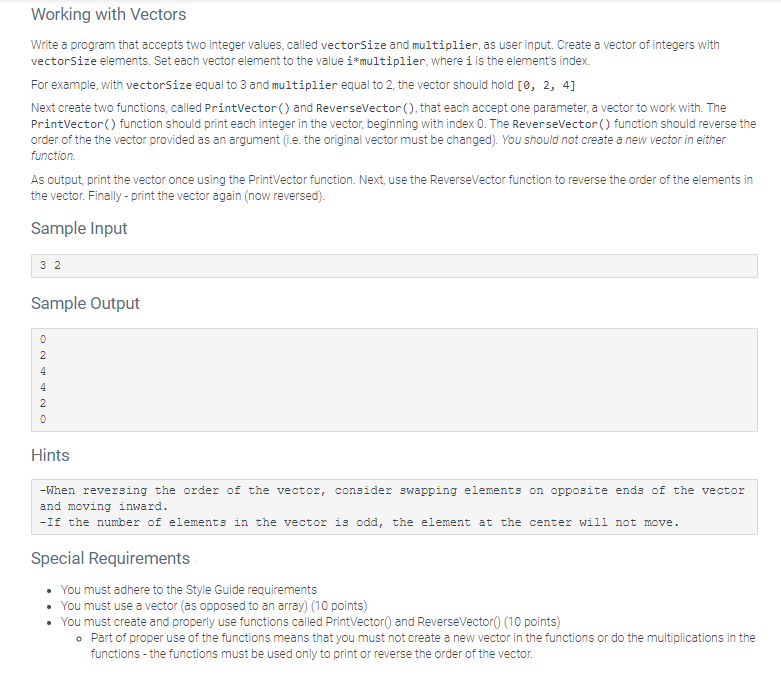
Working with Vectors Write a program that accepts two integer values, called vectorSize and multiplier, as user input. Create a vector of integers with vectorSize elements. Set each vector element to the value i*multiplier where i is the element's index. For example, with vectorSize equal to 3 and multiplier equal to 2, the vector should hold [, 2, 4] Next create two functions, called Printvector and ReverseVector(), that each accept one parameter, a vector to work with. The PrintVector() function should print each integer in the vector, beginning with index 0. The ReverseVector() function should reverse the order of the the vector provided as an argument (i.e. the original vector must be changed). You should not create a new vector in either function As output, print the vector once using the Printvector function. Next, use the ReverseVector function to reverse the order of the elements in the vector. Finally-print the vector again (now reversed). Sample Input 32 Sample Output 0 2 4 4 2 0 Hints -When reversing the order of the vector, consider swapping elements on opposite ends of the vector and moving inward. -If the number of elements in the vector is odd, the element at the center will not move. Special Requirements You must adhere to the Style Guide requirements You must use a vector (as opposed to an array) (10 points) You must create and properly use functions called Printvector() and ReverseVector (10 points) o Part of proper use of the functions means that you must not create a new vector in the functions or do the multiplications in the functions - the functions must be used only to print or reverse the order of the vector
Step by Step Solution
There are 3 Steps involved in it

Get step-by-step solutions from verified subject matter experts
 Study Help