







Question: C# Write compile and test a GUI program named EmmasEmbroidery. This GUI form uses two ListBox controls, a Button control, and several Label controls. Upon
C#
Write compile and test a GUI program named EmmasEmbroidery.
This GUI form uses two ListBox controls, a Button control, and several Label controls. Upon loading, the GUI form should appear similar to that shown below. The right-hand ListBox will be disabled at this point.
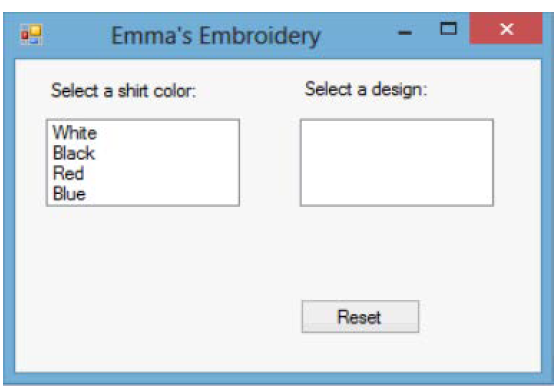
After selecting a shirt color from the left hand ListBox, the right hand ListBox will be populated with the correct designs for the selected shirt color. Also, the shirt color ListBox will be disabled, and a label will be updated to document the shirt color selection.
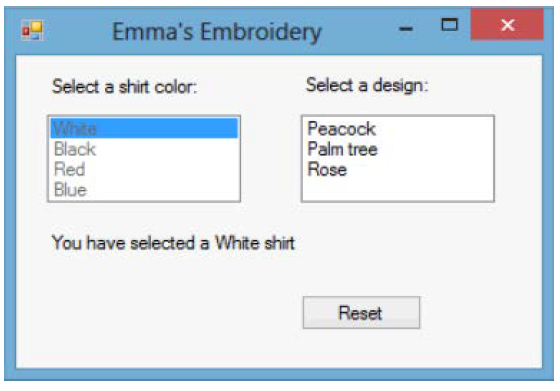
When a design is selected from the right hand ListBox, the design selection will be appended to the label. Also, the design ListBox will be disabled.
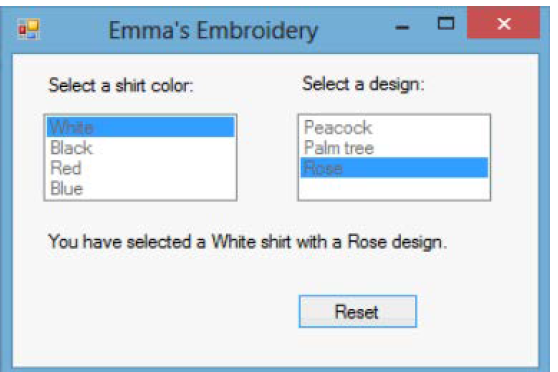
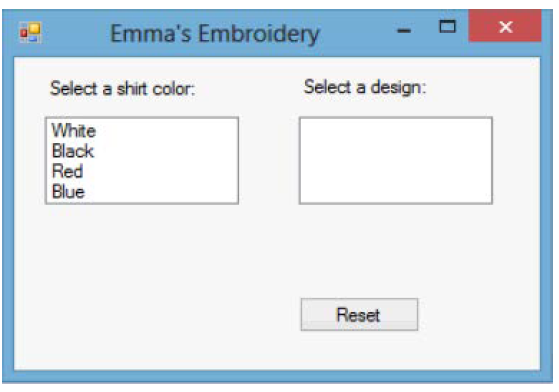
Clicking the reset Button will return the form to the starting condition.
1. The shirt color ListBox will be enabled.
2. The design ListBox will be cleared and disabled.
3. The label text will be set to an empty string.
The following table lists the available designs for each shirt color:
White Shirt Peacock, Palm Tree, Rose
Black Shirt Race Car, Star, Moon
Red Shirt Palm Tree, Moon
Blue Shirt eacock, Moon
Emma's Embroidery Select a shirt color: Select a design: White Black Red Blue Reset
Step by Step Solution
There are 3 Steps involved in it

Get step-by-step solutions from verified subject matter experts
 Study Help