







Question: Caculate COGS please - This will give you a table that shows the total period cost and total product cost. The total product cost is
Caculate COGS please
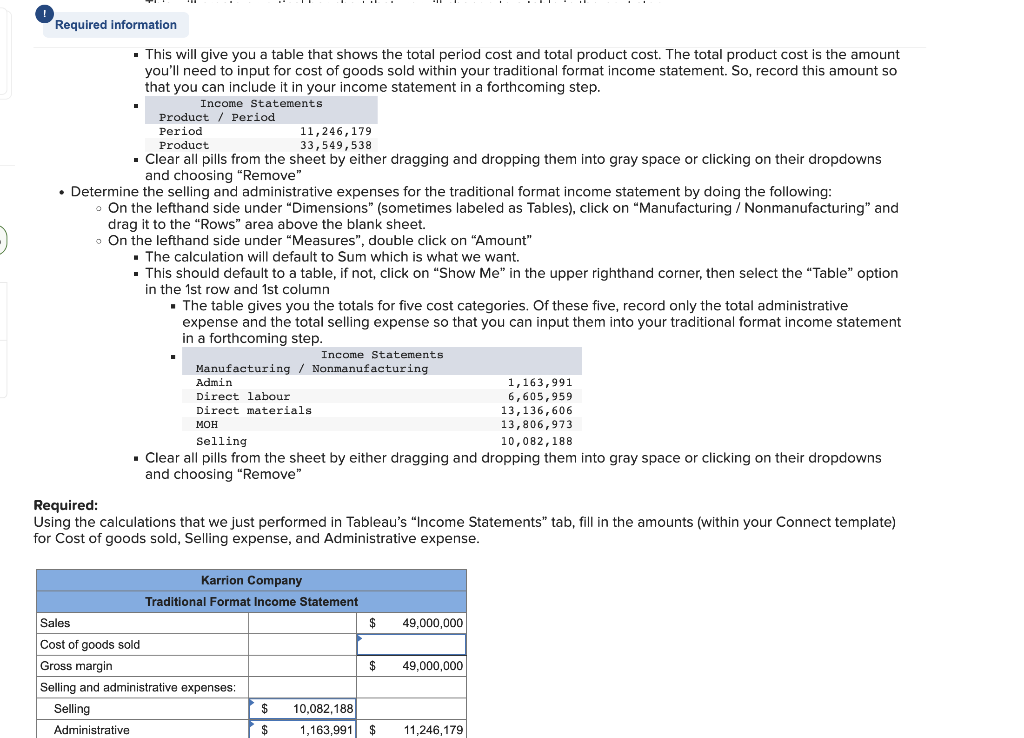
- This will give you a table that shows the total period cost and total product cost. The total product cost is the amount you'll need to input for cost of goods sold within your traditional format income statement. So, record this amount so that you can include it in your income statement in a forthcoming step. - - Clear all pills from the sheet by either dragging and dropping them into gray space or clicking on their dropdowns and choosing "Remove" - Determine the selling and administrative expenses for the traditional format income statement by doing the following: - On the lefthand side under "Dimensions" (sometimes labeled as Tables), click on "Manufacturing / Nonmanufacturing" and drag it to the "Rows" area above the blank sheet. - On the lefthand side under "Measures", double click on "Amount" - The calculation will default to Sum which is what we want. - This should default to a table, if not, click on "Show Me" in the upper righthand corner, then select the "Table" option in the 1st row and 1st column - The table gives you the totals for five cost categories. Of these five, record only the total administrative expense and the total selling expense so that you can input them into your traditional format income statement in a forthcoming step. - Clear all pills from the sheet by either dragging and dropping them into gray space or clicking on their dropdowns and choosing "Remove" Required: Using the calculations that we just performed in Tableau's "Income Statements" tab, fill in the amounts (within your Connect template) for Cost of goods sold, Selling expense, and Administrative expense. - This will give you a table that shows the total period cost and total product cost. The total product cost is the amount you'll need to input for cost of goods sold within your traditional format income statement. So, record this amount so that you can include it in your income statement in a forthcoming step. - - Clear all pills from the sheet by either dragging and dropping them into gray space or clicking on their dropdowns and choosing "Remove" - Determine the selling and administrative expenses for the traditional format income statement by doing the following: - On the lefthand side under "Dimensions" (sometimes labeled as Tables), click on "Manufacturing / Nonmanufacturing" and drag it to the "Rows" area above the blank sheet. - On the lefthand side under "Measures", double click on "Amount" - The calculation will default to Sum which is what we want. - This should default to a table, if not, click on "Show Me" in the upper righthand corner, then select the "Table" option in the 1st row and 1st column - The table gives you the totals for five cost categories. Of these five, record only the total administrative expense and the total selling expense so that you can input them into your traditional format income statement in a forthcoming step. - Clear all pills from the sheet by either dragging and dropping them into gray space or clicking on their dropdowns and choosing "Remove" Required: Using the calculations that we just performed in Tableau's "Income Statements" tab, fill in the amounts (within your Connect template) for Cost of goods sold, Selling expense, and Administrative expense
Step by Step Solution
There are 3 Steps involved in it

Get step-by-step solutions from verified subject matter experts
 Study Help