







Question: Calculate all values in RED using an excel fuction. MARR=5% begin{tabular}{|c|c|c|} hline Year & Cash Flond & How + Salvage hline 9 & 13390%
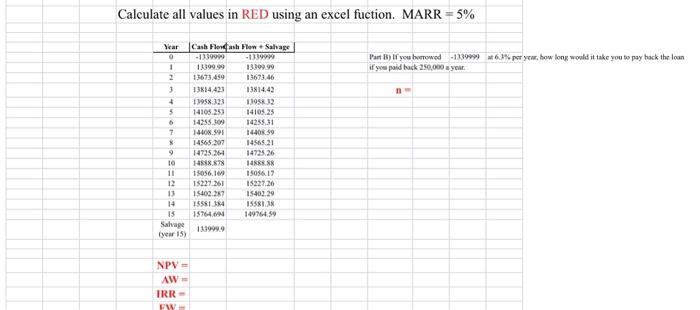
Calculate all values in RED using an excel fuction. MARR=5% \begin{tabular}{|c|c|c|} \hline Year & Cash Flond & How + Salvage \\ \hline 9 & 13390% & -135990 \\ \hline 1 & 1339099 & \\ \hline 2 & 13673.459 & 13673.46 \\ \hline 3 & 13k:4,423 & 13814,42 \\ \hline 4 & t3958.123 & 130512 \\ \hline 5 & 14108253 & 14105.25 \\ \hline 6 & 14255300 & 1425851 \\ \hline 7 & 14408.591 & 14408.59 \\ \hline 8 & 14505.207 & 14565.21 \\ \hline 9 & 14725.264 & 14725.26 \\ \hline 10 & 148i8.878 & 14885.88 \\ \hline 11 & 15056.160 & 15046.17 \\ \hline 12 & 15227.261 & 15227,26 \\ \hline 13 & 15402.287 & 15402.29 \\ \hline 14 & 15581.384 & Isssi.is \\ \hline is & 15764.004 & 149764.59 \\ \hline \begin{tabular}{l} Salvape \\ (vear 15 ) \end{tabular} & 133990.9 & \\ \hline \end{tabular} if you paid tack 250,000 a year. n= NPV = AW = IRR =
Step by Step Solution
There are 3 Steps involved in it

Get step-by-step solutions from verified subject matter experts
 Study Help