







Question: // calculate area of rectangle using class in java import java.io.*; import java.util.Scanner; public class EncapsulationDemo { public static void main(String[] args) { // Create
// calculate area of rectangle using class in java import java.io.*; import java.util.Scanner; public class EncapsulationDemo { public static void main(String[] args) { // Create object of Rectangle class System.out.println("A09 - Written by jd "); Scanner console = new Scanner(System.in); // Input Strings String len=null, wid=null; int l=0,w=0; // Remove Comment to Create the Rectangle // Rectangle rect = new Rectangle(0, 0); // Begin while() loop here System.out.println(" Bye"); } }
2) Create a single Rectangle object called rect
. 3) Implement a while() loop to accept User input for multiple area calculations (reset rect).
4) Implement a break statement to terminate the loop.
5) Each time through the loop, accept user input for 2 integer variables, length (first) and width.
6) Terminate the loop when the user enters x for the length (no need to enter width).
7) Calculate the area of the current rect.
8) Print the area to the console (using rectss getArea() method).
9) Print out an exit greeting (Bye) when exiting the application.
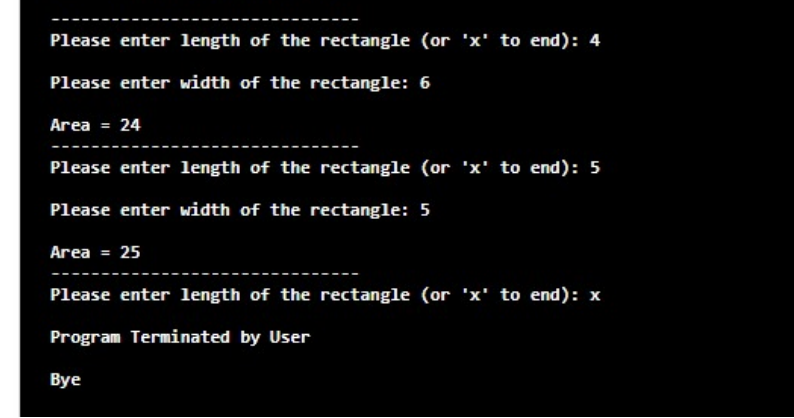
Please enter length of the rectangle (or 'x' to end): 4 Please enter width of the rectangle: 6 Area = 24 Please enter length of the rectangle (or 'x' to end): 5 Please enter width of the rectangle: 5 Area = 25 Please enter length of the rectangle (or 'x' to end): x Program Terminated by User Bye
Step by Step Solution
There are 3 Steps involved in it

Get step-by-step solutions from verified subject matter experts
 Study Help