







Question: Calculate the Service Charge - with GUI We would like to assess a service charge for cashing a check. The service charge depends on the
Calculate the Service Charge - with GUI
We would like to assess a service charge for cashing a check. The service charge depends on the amount of the check.
Business Rules/Criteria:
If the check amount is less than $10, we will charge $1.
If the amount is greater than or equal to $10 but less than $100, we will charge 10% of the amount.
If the amount is greater than or equal to $100, but less than $1,000, we will charge $5 plus 5% of the amount.
If the value is over $1,000, we will charge $40 plus 1% of the amount.
Display a pie chart that displays the % of checks cashed that are:
less than $10
greater than or equal to $10 and less than $100
greater than or equal to $100 and less than $1000
greater than or equal to $1000
Other Requirements:
GUI Notes:
Capture check amount from user input (use a GUI text box)
Use labels where needed to prompt user
Display total in label
Use a button to:
Calculate the current check amount, service charge and the total, then
Display graph with current % information
Note: Use a multibranch if-else statement to compute the service charge.
Note: Keep track of the current % amounts (continue to calculate total %)
Note: Upload the .java files and a screenshot that shows you ran the code. - need the main class, controller class and the .fxml file as well as the screenshot
Screenshot Below: 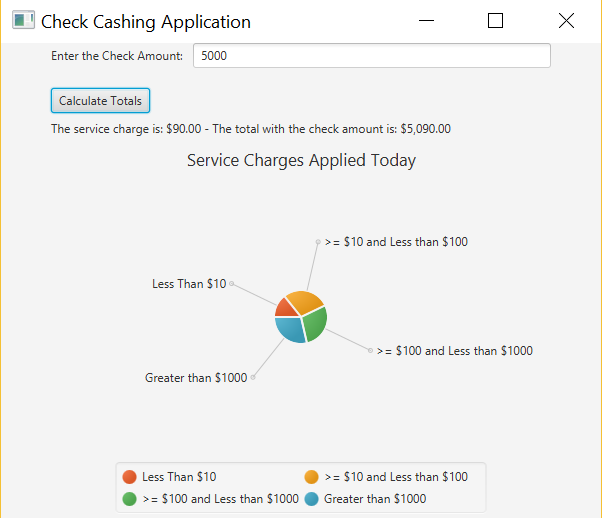
Check Cashing Application Enter the Check Amount 5000 Calculate Totals The service charge is: $90.00 - The total with the check amount is: $5,090.00 Service Charges Applied Today ->= $10 and Less than $100 Less Than $10 $100 and Less than $1000 Greater than $1000 Less Than $10 : $100 and Less than $1000 >= $10 and Less than $100 Greater than $1000 Check Cashing Application Enter the Check Amount 5000 Calculate Totals The service charge is: $90.00 - The total with the check amount is: $5,090.00 Service Charges Applied Today ->= $10 and Less than $100 Less Than $10 $100 and Less than $1000 Greater than $1000 Less Than $10 : $100 and Less than $1000 >= $10 and Less than $100 Greater than $1000
Step by Step Solution
There are 3 Steps involved in it

Get step-by-step solutions from verified subject matter experts
 Study Help