







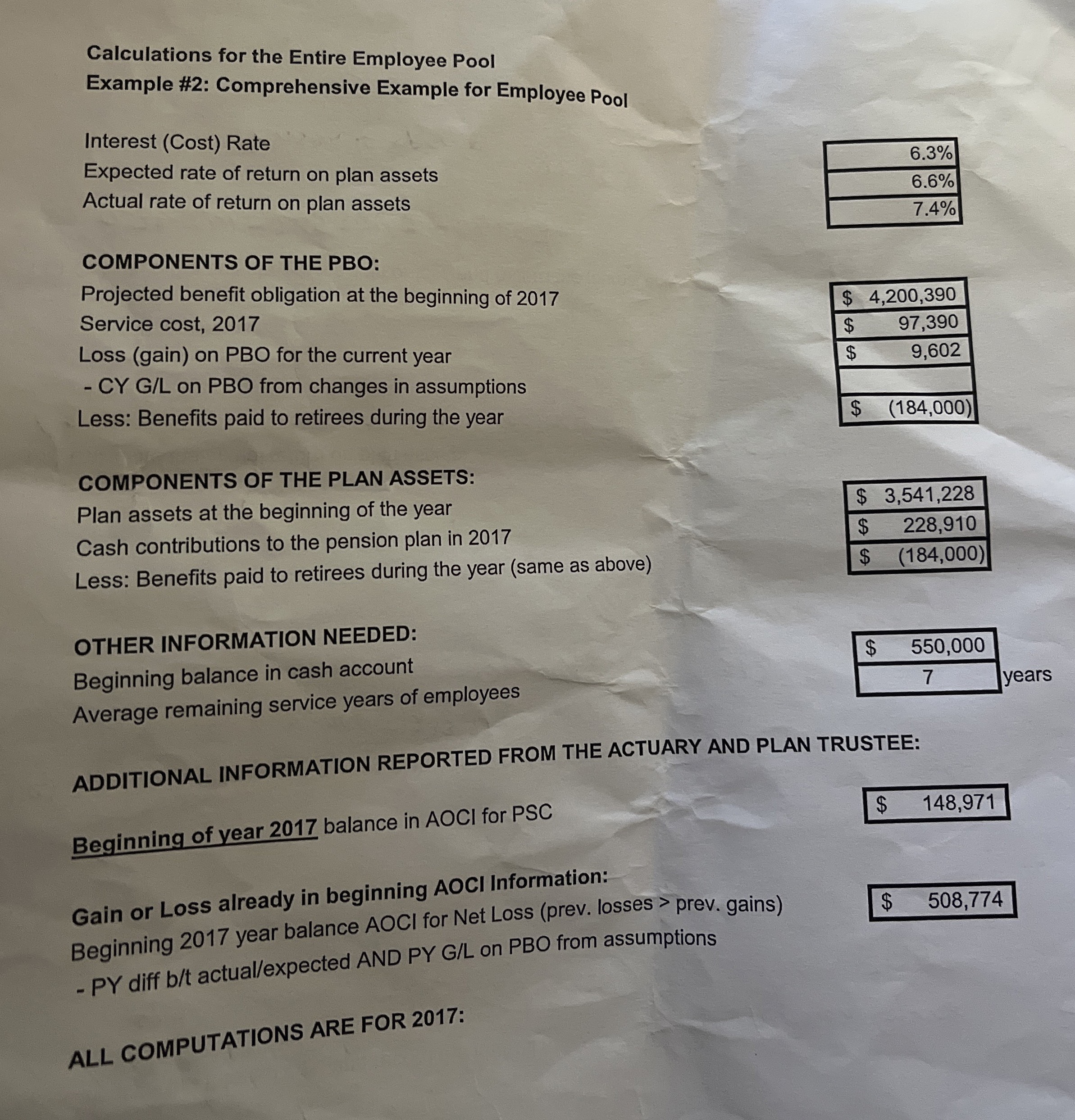
Question: Calculations for the Entire Employee Pool Example # 2 : Comprehensive Example for Employee Pool Interest ( Cost ) Rate Expected rate of return on
Calculations for the Entire Employee Pool
Example #: Comprehensive Example for Employee Pool
Interest Cost Rate
Expected rate of return on plan assets
Actual rate of return on plan assets
COMPONENTS OF THE PBO:
Projected benefit obligation at the beginning of
Service cost,
Loss gain on PBO for the current year
CY GL on PBO from changes in assumptions
Less: Benefits paid to retirees during the year
COMPONENTS OF THE PLAN ASSETS:
Plan assets at the beginning of the year
Cash contributions to the pension plan in
Less: Benefits paid to retirees during the year same as above
OTHER INFORMATION NEEDED:
Beginning balance in cash account
Average remaining service years of employees
ADDITIONAL INFORMATION REPORTED FROM THE ACTUARY AND PLAN TRUSTEE:
Beginning of year balance in AOCI for PSC
Gain or Loss already in beginning AOCI Information:
Beginning year balance AOCI for Net Loss prev losses prev. gains
PY diff bt actualexpected AND PY GL on PBO from assumptions
ALL COMPUTATIONS ARE FOR :
Calculate the interest cost and record the journal entry.
Calculate the expected return on plan assets and record the journal entry.
Calculate the actual return on plan assets:
Calculate the adjustments for gain or loss mad record the journal entry.
Calculate the amortization of PSC
Calculate the amortization of the net gain or loss if required and record the journal entry:
A loss of assumption changes has what impact on regular net income? Increase, decrease, or no impact.
Record the journal entry for payments to retirees:
Record the journal entry for contributions to the plan:
What amount should be debited to pension expense?
Rather than recording each entry separately we could use the pension worksheet to record the amounts as follows:
Step by Step Solution
There are 3 Steps involved in it
1 Expert Approved Answer
Step: 1 Unlock

Question Has Been Solved by an Expert!
Get step-by-step solutions from verified subject matter experts
Step: 2 Unlock
Step: 3 Unlock
 Study Help