







Question: CALL CENTER SIMULATION Write a C++ program to simulate a Call Center. A call center handles incoming telephone calls. Atelephone call is represented by
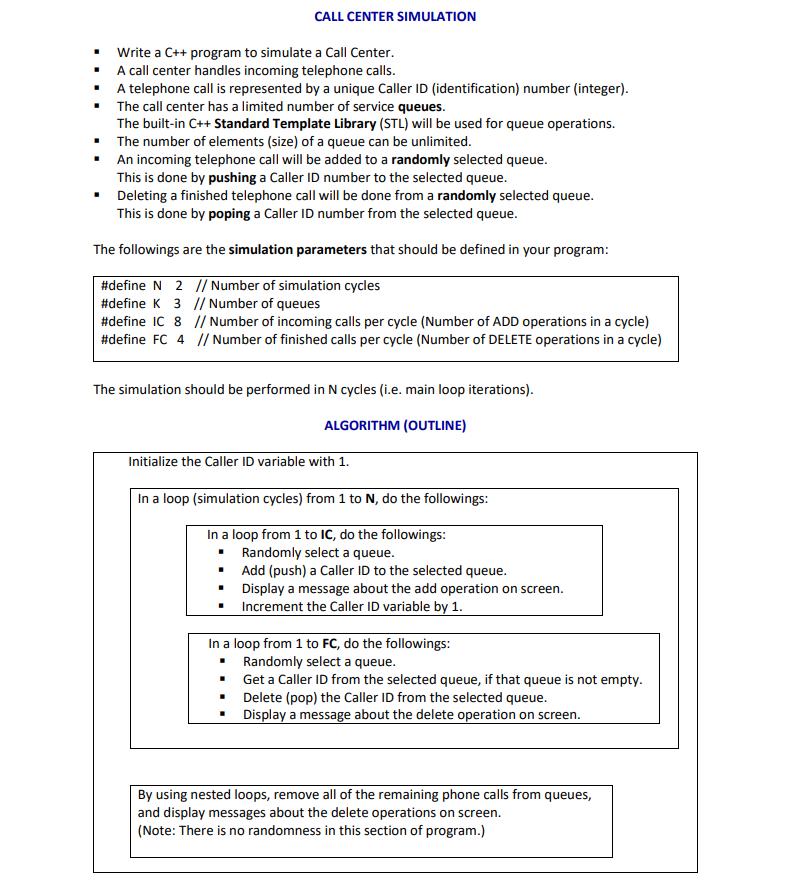
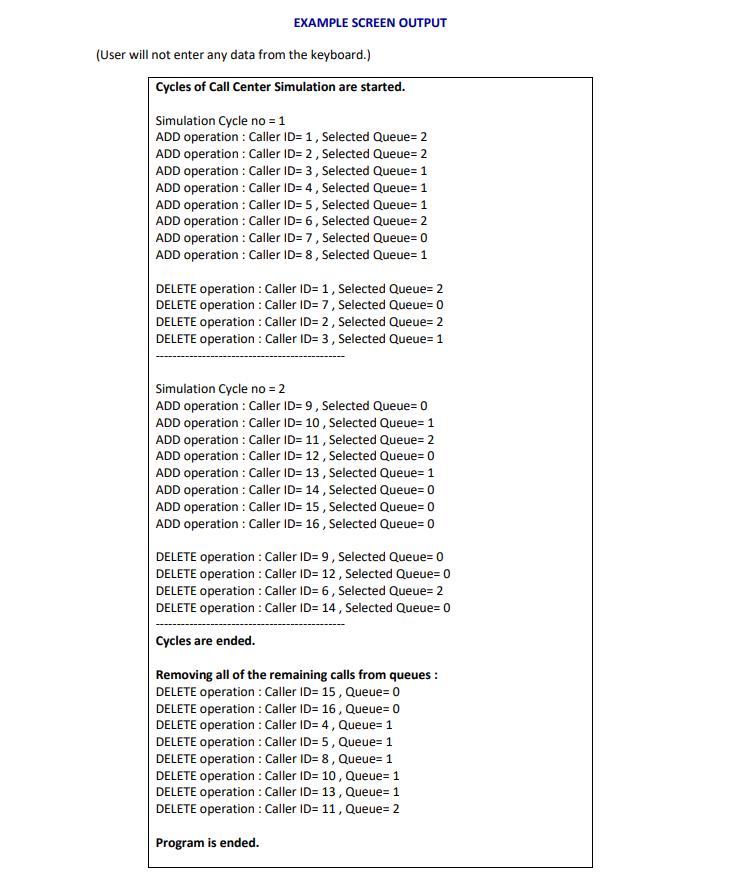
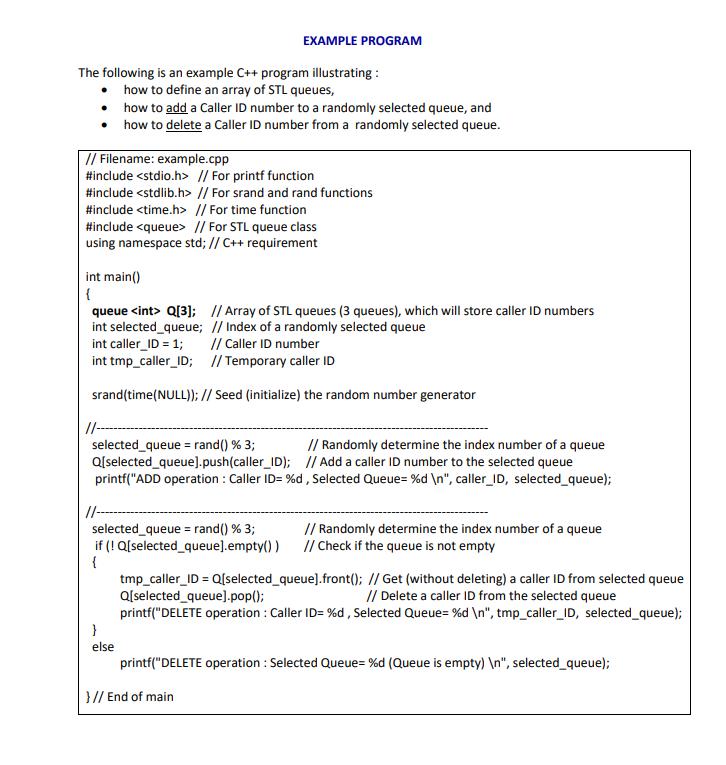
CALL CENTER SIMULATION Write a C++ program to simulate a Call Center. A call center handles incoming telephone calls. Atelephone call is represented by a unique Caller ID (identification) number (integer). The call center has a limited number of service queues. The built-in C++ Standard Template Library (STL) will be used for queue operations. The number of elements (size) of a queue can be unlimited. An incoming telephone call will be added to a randomly selected queue. This is done by pushing a Caller ID number to the selected queue. Deleting a finished telephone call will be done from a randomly selected queue. This is done by poping a Caller ID number from the selected queue. The followings are the simulation parameters that should be defined in your program: #define N 2 // Number of simulation cycles #define K 3 // Number of queues #define IC 8 // Number of incoming calls per cycle (Number of ADD operations in a cycle) #define FC 4 // Number of finished calls per cycle (Number of DELETE operations in a cycle) The simulation should be performed in N cycles (i.e. main loop iterations). ALGORITHM (OUTLINE) Initialize the Caller ID variable with 1. In a loop (simulation cycles) from 1 to N, do the followings: In a loop from 1 to IC, do the followings: Randomly select a queue. Add (push) a Caller ID to the selected queue. Display a message about the add operation on screen. Increment the Caller ID variable by 1. In a loop from 1 to FC, do the followings: Randomly select a queue. Get a Caller ID from the selected queue, if that queue is not empty. Delete (pop) the Caller ID from the selected queue. Display a message about the delete operation on screen. By using nested loops, remove all of the remaining phone calls from queues, and display messages about the delete operations on screen. (Note: There is no randomness in this section of program.) EXAMPLE SCREEN OUTPUT (User will not enter any data from the keyboard.) Cycles of Call Center Simulation are started. Simulation Cycle no = 1 ADD operation : Caller ID= 1, Selected Queue= 2 ADD operation : Caller ID= 2, Selected Queue= 2 ADD operation : Caller ID= 3, Selected Queue= 1 ADD operation : Caller ID= 4, Selected Queue= 1 ADD operation : Caller ID= 5, Selected Queue= 1 ADD operation : Caller ID= 6, Selected Queue= 2 ADD operation : Caller ID= 7, Selected Queue= 0 ADD operation : Caller ID= 8, Selected Queue= 1 DELETE operation : Caller ID= 1, Selected Queue= 2 DELETE operation : Caller ID= 7, Selected Queue= 0 DELETE operation : Caller ID= 2, Selected Queue= 2 DELETE operation : Caller ID= 3, Selected Queue= 1 Simulation Cycle no = 2 ADD operation : Caller ID= 9, Selected Queue= 0 ADD operation : Caller ID= 10, Selected Queue= 1 ADD operation : Caller ID= 11, Selected Queue= 2 ADD operation : Caller ID= 12, Selected Queue= 0 ADD operation : Caller ID= 13, Selected Queue= 1 ADD operation : Caller ID= 14 , Selected Queue= 0 ADD operation : Caller ID= 15 , Selected Queue= 0 ADD operation : Caller ID= 16 , Selected Queue= 0 DELETE operation : Caller ID= 9, Selected Queue= 0 DELETE operation : Caller ID= 12, Selected Queue= 0 DELETE operation : Caller ID= 6, Selected Queue= 2 DELETE operation : Caller ID= 14, Selected Queue= 0 Cycles are ended. Removing all of the remaining calls from queues : DELETE operation : Caller ID= 15, Queue= 0 DELETE operation : Caller ID= 16 , Queue= 0 DELETE operation : Caller ID= 4, Queue= 1 DELETE operation : Caller ID= 5, Queue= 1 DELETE operation : Caller ID= 8, Queue= 1 DELETE operation : Caller ID= 10, Queue= 1 DELETE operation : Caller ID= 13, Queue= 1 DELETE operation : Caller ID= 11, Queue= 2 Program is ended. EXAMPLE PROGRAM The following is an example C++ program illustrating : how to define an array of STL queues, how to add a Caller ID number to a randomly selected queue, and how to delete a Caller ID number from a randomly selected queue. // Filename: example.cpp #include // For printf function #include // For srand and rand functions #include // For time function #include // For STL queue class using namespace std; // C++ requirement int main() { queue Q[3]; I/ Array of STL queues (3 queues), which will store caller ID numbers int selected_queue; // Index of a randomly selected queue int caller_ID = 1; int tmp_caller_ID; // Temporary caller ID // Caller ID number srand(time(NULL)); // Seed (initialize) the random number generator /-- selected_queue = rand() % 3; Q[selected_queue).push(caller_ID); // Add a caller ID number to the selected queue printf("ADD operation : Caller ID= %d, Selected Queue= %d ", caller_ID, selected_queue); // Randomly determine the index number of a queue %3D selected_queue = rand() % 3; if (! Q[selected_queue).empty()) { tmp_caller_ID = Q[selected_queue].front(); // Get (without deleting) a caller ID from selected queue Q[selected_queue].pop(); printf("DELETE operation : Caller ID= %d, Selected Queue= %d ", tmp_caller_ID, selected_queue); // Randomly determine the index number of a queue // Check if the queue is not empty // Delete a caller ID from the selected queue else printf("DELETE operation : Selected Queue= %d (Queue is empty) ", selected_queue); }// End of main
Step by Step Solution
3.60 Rating (154 Votes )
There are 3 Steps involved in it
To implement the Call Center Simulation in C we will follow the given algorithm and example program ... View full answer

Get step-by-step solutions from verified subject matter experts
 Study Help