







Question: Can I get 5 images generated by Java code based on this 5 test cases? I have provided the example image of output expected and
Can I get images generated by Java code based on this test cases? I have provided the example image of output expected and some of the code screenshot. This box has character limit and the project question is asked before in chegg.com for your reference:
Test Case : Valid Scene with a Rectangle and RightTriangle
Description: A basic scene with two shapes, a Rectangle and a RightTriangle.
Input:
Scene Polygons Rectangle Color at Height Width ; RightTriangle Color at Height Width ; End.
Expected Output:
A Scene object with dimensions x
Two shapes: a red Rectangle positioned at with Height and Width and a green RightTriangle positioned at with Height and Width
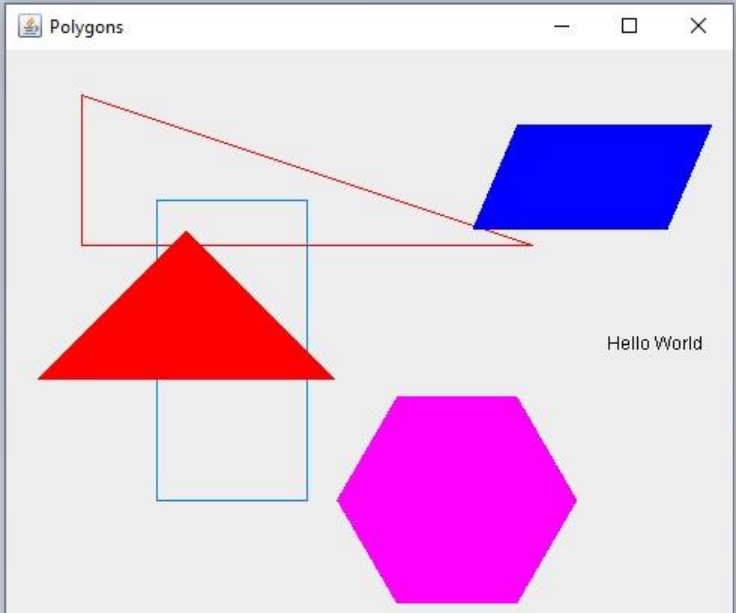
Test Case : Scene with an IsoscelesTriangle, Parallelogram, and RegularPolygon
Description: A scene with an isosceles triangle, a parallelogram with an offset, and a regular polygon.
Input:
Scene Polygons Isosceles Color at Height Width ; Parallelogram Color at Height Width Offset ; RegularPolygon Color at Radius Sides ; End.
Expected Output:
A Scene object with dimensions x
Three shapes: a blue IsoscelesTriangle, a yellow Parallelogram with offset and a purple RegularPolygon with sides and radius
Test Case : Scene with a Text Shape
Description: A scene that includes a text shape to verify the texthandling capability.
Input:
Scene Polygons Text Color at "Hello World"; End.
Expected Output:
A Scene object with dimensions x
One black Text shape positioned at displaying the text "Hello World".
Test Case : Invalid Scene Format
Description: An input with an incorrect scene format to test error handling.
Input:
Scene Polygons Rectangle Color at Height Width ; End.
Expected Output:
The parser should throw an error or log a message indicating the scene format is incorrect, as the scene dimensions are not enclosed in parentheses. The scene should not be created.
Test Case : Complex Scene with Multiple Shapes
Description: A larger scene with multiple shapes to verify handling of diverse shapes and sizes in one scene.
Input:
Scene Polygons Rectangle Color at Height Width ; RightTriangle Color at Height Width ; Isosceles Color at Height Width ; Parallelogram Color at Height Width Offset ; RegularPolygon Color at Radius Sides ; Text Color at "Complex Scene"; End.
Expected Output:
A Scene object with dimensions x
Six shapes:
A gray Rectangle at with Height and WidthAn orange RightTriangle at with Height and WidthA green IsoscelesTriangle at with Height and WidthA yellow Parallelogram at with offset A blue RegularPolygon with sides and radius A black Text shape at with the content "Complex Scene".
Polygons
public class Main
public static void mainString args
File sceneFile null;
Section : Locate the scene.txt file
JFileChooser fileChooser new JFileChooser;
fileChooser.setDialogTitleSelect the scene file";
int returnValue fileChooser.showOpenDialog parent: null;
if returnValue JFileChooser.APPROVEOPTION
sceneFile fileChooser.getSelectedFile;
Print the selected file path for confirmation
System.out.printlnFile selected: sceneFile.getAbsolutePath;
Check if a file was selected; if not, show an error and exit
if sceneFile null
JOptionPane.showMessageDialog parentComponent: null, message: "Error: No scene file selected. Exitin
return;
Check if the file exists
if sceneFile.exists
JOptionPane.showMessageDialog parentComponent: null, message: "Error: The selected file does not exi:
return;
public class Scene usages
private int width; usages
private int height; usages
private JFrame window; usages
private DrawingPanel drawingPanel; usages
public Sceneint width, int height usages
this.width width;
this.height height;
Initialize window
window new JFrame title: "Scene Viewer";
window.setSizewidth height;
window.setDefaultCloseOperationJFrameEXITONCLOSE;
Initialize and add drawing panel to window
drawingPanel new DrawingPanel;
window.adddrawingPanel;
window.setVisibletrue;
public int getWidthusage
return width;
import java.awt.Color;
import java.awt.Graphics;
import java.awt.Polygon;
public class RightTriangle extends Shape usage
private int height; usages
private int width; usages
public RightTriangleint color, int position, int height, int widthusage
supercolor position;
this.height height;
this.width width;
@Override no usages
public void
public class
Step by Step Solution
There are 3 Steps involved in it
1 Expert Approved Answer
Step: 1 Unlock

Question Has Been Solved by an Expert!
Get step-by-step solutions from verified subject matter experts
Step: 2 Unlock
Step: 3 Unlock
 Study Help