







Question: can i get help with finding the highest scores count & the failed scores & Searching for student s last name and show the student
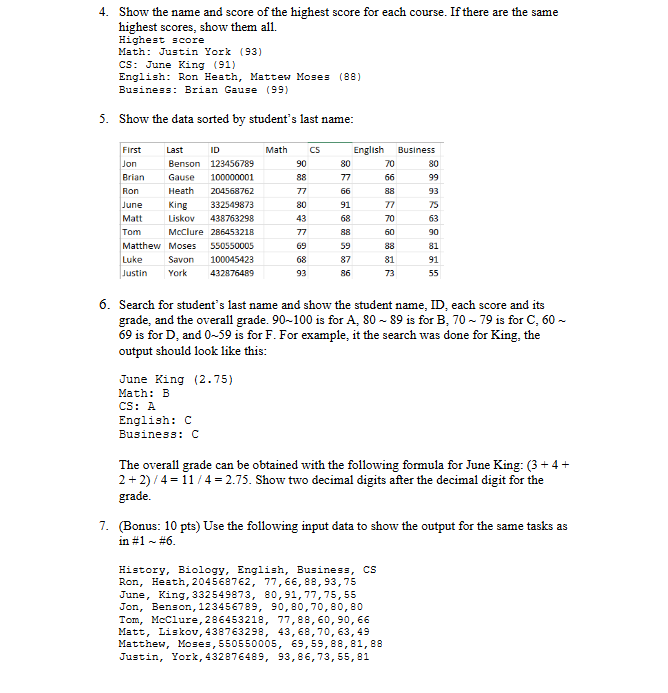
can i get help with finding the highest scores count & the failed scores & Searching for students last name and show the student name, ID each score and its grade, and the overall grade & sorting the data out by last name?
this what i have so far:
Public Class Form
Dim subjects As String
Structure Student
Dim firstName As String
Dim lastName As String
Dim id As String
Dim scores As String
End Structure
Dim studs As Student
Private Sub FormLoadsender As Object, e As EventArgs Handles MyBase.Load
OpenFileDialogShowDialog
Dim filename OpenFileDialogFileName
Dim srVar As IOStreamReader IOFile.OpenTextfilename
Dim line srVar.ReadLine
Dim temp line.Splitc
Dim numOfSubjects temp.Length
ReDim subjectsnumOfSubjects
Dim i As Integer
For i To numOfSubjects
subjectsi tempiTrim
Next
i
Do Until srVar.EndOfStream
line srVar.ReadLine
temp line.Splitc
studsifirstName tempTrim
studsilastName tempTrim
studsiid tempTrim
ReDim studsiscoresnumOfSubjects
For j To numOfSubjects
studsiscoresjtemp j
Next
i
Loop
ReDim Preserve studsi
End Sub
Private Sub btnScoreClicksender As Object, e As EventArgs Handles btnScore.Click
lstResults.Items.Clear
Dim header As String String.Format "First", "Last", ID
For Each subject As String In subjects
header & String.Format subject
Next
lstResults.Items.Addheader
For Each student In studs
If student.firstName IsNot Nothing Then
Dim studentRow As String String.Format student.firstName, student.lastName, student.id
For Each score As Integer In student.scores
studentRow & String.Format score
Next
lstResults.Items.AddstudentRow
End If
Next
End Sub
Private Sub btnAverageClicksender As Object, e As EventArgs Handles btnAverage.Click
Dim totalScoressubjectsLength As Integer
Dim countScoressubjectsLength As Integer
For i As Integer To subjects.Length
For j As Integer To subjects.Length
totalScoresj studsiscoresj
countScoresj
Next
Next
lstResults.Items.Clear
lstResults.Items.AddCourse Averages"
For i As Integer To subjects.Length
Dim averages As Double totalScoresi countScoresi
lstResults.Items.AddStringFormat: :N subjectsi averages
Next
End Sub
Private Sub btnSortClicksender As Object, e As EventArgs Handles btnSort.Click
lstResults.Items.Clear
Dim header As String String.Format "First", "Last", ID
For Each subject As String In subjects
header & String.Format subject
Next
Dim student As String
IOFile.ReadAllLinesexamstxt
Dim lastnameQuery From lastname In student
Order By lastname.Length, lastname Ascending
Select lastname
For Each lastname As String In lastnameQuery
lstResults.Items.Addlastname
Next
End Sub
Private Sub btnFailedCoursesClicksender As Object, e As EventArgs Handles btnFailedCourses.Click
End Sub
Private Sub btnHighestScoresClicksender As Object, e As EventArgs Handles btnHighestScores.Click
End Sub
End Class You are to write a program to process student grades. Each student takes four courses: Math, CS English, Business. The data are stored in a file examtxt where the first line contains the subject of four courses, followed by each line consisting of the name of student First Name, Last Name student ID which is digit string, and the scores of four courses that each student is taking.
The input file contains the following data:
Math, Cs English, Business
Jon, Benson,
Brian, Gause,
Ron, Heath,
June, King,
Luke, Savon,
Tom, McClure,
Matt, Liskov,
Matthew, Moses,
Justin, York,
Show the whole data in a tabular format like this in a list box.
Show the course average for each course. There should be one decimal digit.
Course average
Math:
English:
Business:
Show the number of students failed in each course the scores less than
Number of failed students in each course
Math:
CS:
English:
Business:
Step by Step Solution
There are 3 Steps involved in it
1 Expert Approved Answer
Step: 1 Unlock

Question Has Been Solved by an Expert!
Get step-by-step solutions from verified subject matter experts
Step: 2 Unlock
Step: 3 Unlock
 Study Help