







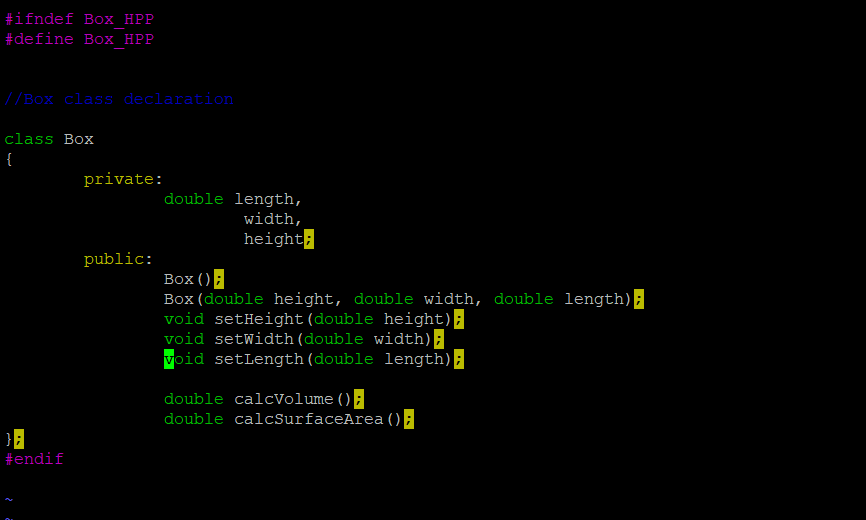
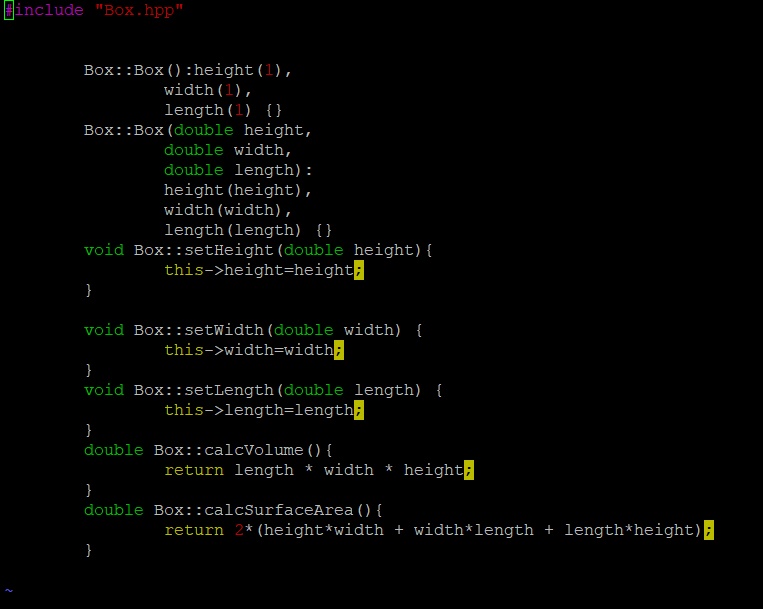
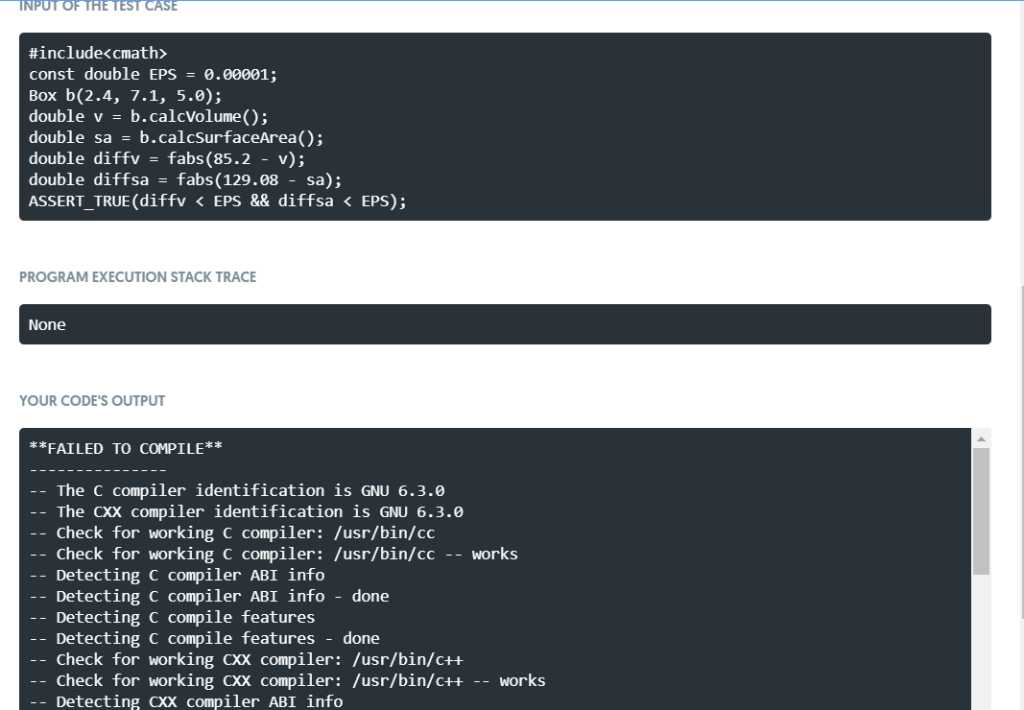
Question: Can I get some help with my code; I have a cpp and a hpp code, but I am getting this error in mimir. Here
 Can I get some help with my code;
I have a cpp and a hpp code, but I am getting this error in mimir.
Here is the question:
Project 5.a
Write a class called Box that has three double fields called height, width and length. The class should have set methods for each field. It should have a three-parameter constructor that takes three doubles and uses them to initialize the fields of the Box. It should have a default constructor that initializes each field to 1. It should have a method that calculates and returns the volume of the Box and a method that calculates and returns the surface area of the Box.
The class declaration (interface) and the function definitions (implementation) must be in separate files - the interface or "header" file has a .hpp extension and the implementation has a .cpp extension. As usual, all data members should be private. For example, the Box class might be used as follows:
Box box1(2.4, 7.1, 5.0); Box box2; double volume1 = box1.calcVolume(); double surfaceArea1 = box1.calcSurfaceArea(); double volume2 = box2.calcVolume(); double surfaceArea2 = box2.calcSurfaceArea();
Your functions should have the following names:
setHeight
setWidth
setLength
calcVolume
calcSurfaceArea
The files must be named: Box.hpp and Box.cpp
About using multiple files:
Make sure you've read and understood section 7.11.
Box.hpp should have "include guards" as discussed on page in section 7.11 (use "BOX_HPP").
Box.cpp needs to #include Box.hpp. When you include your own .hpp files (header files), put double quotes around them instead of angled brackets. (You should only #include .hpp files, not .cpp files.)
When testing your program with your own main method, put it in a separate file (this is the "client" code) and give it a name with a .cpp extension.
Your main method also needs to #include Box.hpp.
If you named the file with your main method "boxMain.cpp", then you can compile your program with "g++ Box.cpp boxMain.cpp -o box".
#lfndef Box HPP #define Box HPP //Box class declaration class Box private: double length, width, heightl public: Box Box (double height, double width, double length) void setHeight (double height)E void setWidth (double width) void setLength (double length) double calcVolume () double calcsurfaceArea endif include "Box.hpp" Box::Box () :height (1), width (1), length (1) ( Box: :Box (double height, double width, double length): height (height), width (width) , length (length) void Box:: setHeight (double height) this->height-height: void Box::setWidth (double width) this->width-width void Box:: setLength (double length) this->length-1ength double Box: :calcVolume () return length width height double Box: :calcsurfaceArea () return 2* (height*width + width*length length height) INPUTOF THE TEST CASE #includemath const double EPS .00001; Box b(2.4, 7.1, 5.0); double v b.calcVolume (); double sa = b.calcsurfaceArea(); double diffv fabs (85.2-v); double diffsa fabs (129.08 sa); ASSERT_TRUE (diffv
Step by Step Solution
There are 3 Steps involved in it

Get step-by-step solutions from verified subject matter experts
 Study Help