







Question: Can I get this in python with the outcome same as the sample output at the end. Topics: class, object, instantiation, methods, inheritance Problem Statement:
Can I get this in python with the outcome same as the sample output at the end.
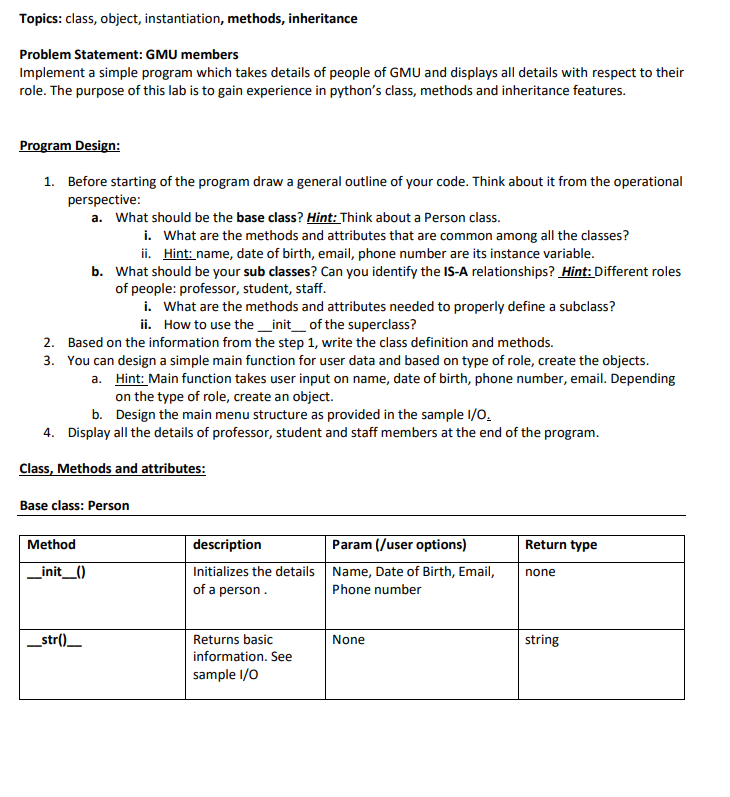
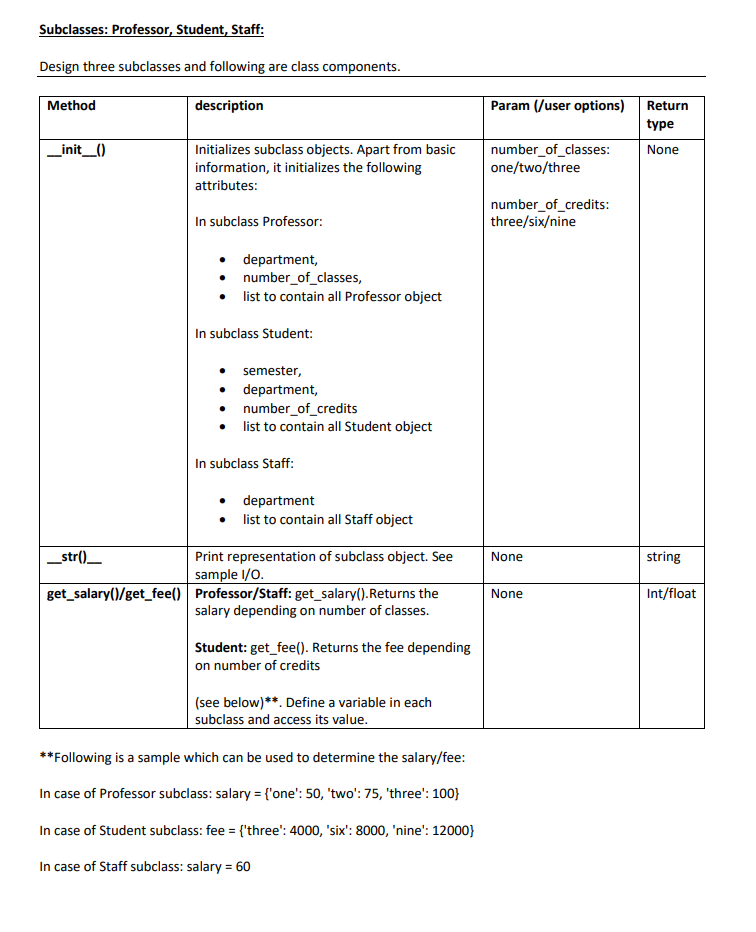
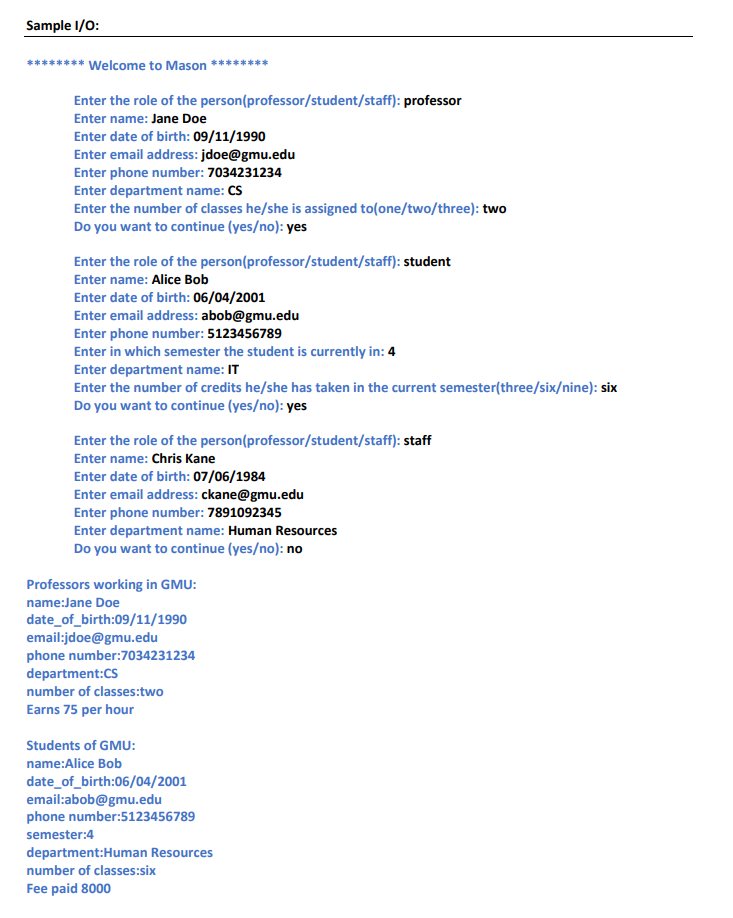
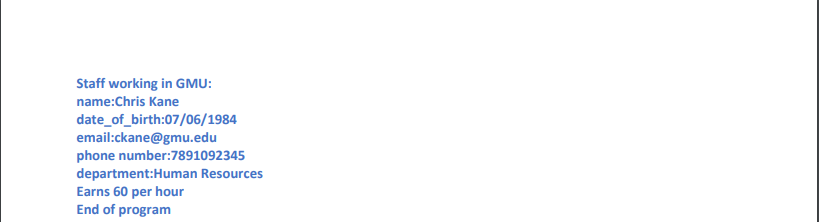
Topics: class, object, instantiation, methods, inheritance Problem Statement: GMU members Implement a simple program which takes details of people of GMU and displays all details with respect to their role. The purpose of this lab is to gain experience in python's class, methods and inheritance features. Program Design: 1. Before starting of the program draw a general outline of your code. Think about it from the operational perspective: a. What should be the base class? Hint: Think about a Person class. i. What are the methods and attributes that are common among all the classes? ii. Hint: name, date of birth, email, phone number are its instance variable. b. What should be your sub classes? Can you identify the IS-A relationships? Hint: Different roles of people: professor, student, staff. i. What are the methods and attributes needed to properly define a subclass? ii. How to use the _init_of the superclass? 2. Based on the information from the step 1, write the class definition and methods. 3. You can design a simple main function for user data and based on type of role, create the objects. a. Hint: Main function takes user input on name, date of birth, phone number, email. Depending on the type of role, create an object. b. Design the main menu structure as provided in the sample 1/0. 4. Display all the details of professor, student and staff members at the end of the program. Class, Methods and attributes: Base class: Person Return type Method _init__0) description Param (/user options) Initializes the details Name, Date of Birth, Email, of a person. Phone number none _str()__ None string Returns basic information. See sample 1/0 Subclasses: Professor, Student, Staff: Design three subclasses and following are class components. Method description Param (/user options) Return type None _init__() Initializes subclass objects. Apart from basic information, it initializes the following attributes: number_of_classes: one/two/three In subclass Professor: number_of_credits: three/sixine department, number_of_classes, list to contain all Professor object In subclass Student: semester, department, number_of_credits list to contain all Student object In subclass Staff: department list to contain all Staff object None string _str() __ Print representation of subclass object. See sample 1/0. get_salary()/get_fee() Professor/Staff: get_salary().Returns the salary depending on number of classes. None Int/float Student: get_fee(). Returns the fee depending on number of credits (see below)** Define a variable in each subclass and access its value. **Following is a sample which can be used to determine the salary/fee: In case of Professor subclass: salary = {'one': 50, 'two': 75, 'three': 100} In case of Student subclass: fee = {'three: 4000, 'six': 8000, 'nine': 12000} In case of Staff subclass: salary = 60 Sample 1/O: ****** Welcome to Mason Enter the role of the person(professor/student/staff): professor Enter name: Jane Doe Enter date of birth: 09/11/1990 Enter email address: jdoe@gmu.edu Enter phone number: 7034231234 Enter department name: CS Enter the number of classes he/she is assigned to(one/two/three): two Do you want to continue (yeso): yes Enter the role of the person(professor/student/staff): student Enter name: Alice Bob Enter date of birth: 06/04/2001 Enter email address: abob@gmu.edu Enter phone number: 5123456789 Enter in which semester the student is currently in: 4 Enter department name: IT Enter the number of credits he/she has taken in the current semester(three/sixine): six Do you want to continue (yeso): yes Enter the role of the person(professor/student/staff): staff Enter name: Chris Kane Enter date of birth: 07/06/1984 Enter email address: ckane@gmu.edu Enter phone number: 7891092345 Enter department name: Human Resources Do you want to continue (yeso): no Professors working in GMU: name:Jane Doe date_of_birth:09/11/1990 email:jdoe@gmu.edu phone number:7034231234 department:cs number of classes:two Earns 75 per hour Students of GMU: name:Alice Bob date_of_birth:06/04/2001 email:abob@gmu.edu phone number:5123456789 semester:4 department:Human Resources number of classes:six Fee paid 8000 Staff working in GMU: name:Chris Kane date_of_birth:07/06/1984 email:ckane@gmu.edu phone number:7891092345 department:Human Resources Earns 60 per hour End of program
Step by Step Solution
There are 3 Steps involved in it

Get step-by-step solutions from verified subject matter experts
 Study Help