







Question: Can I please get this code in the FLOWGORITHM program screenshots. I do not need a flowchart. If you do not have FLOWGORITHM, please don't
Can I please get this code in the FLOWGORITHM program screenshots. I do not need a flowchart. If you do not have FLOWGORITHM, please don't answer....Thanks!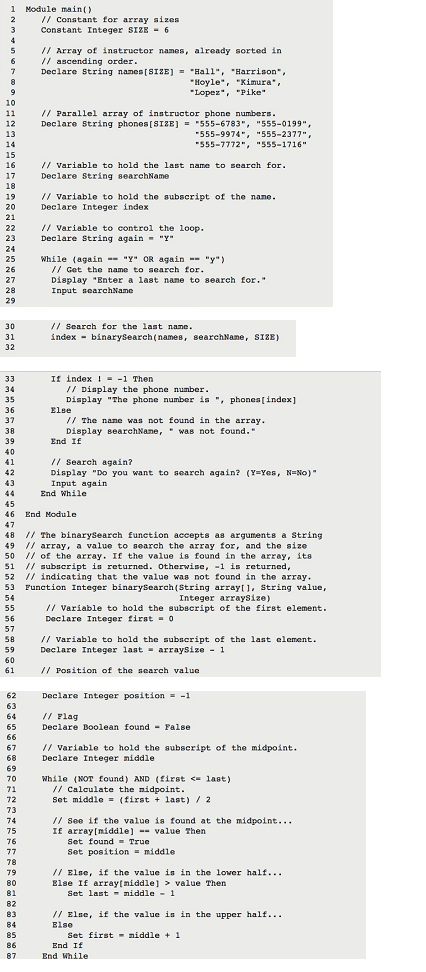
Create a Flowgorithm program as follows.
Declare the constant SIZE as an Integer variable, and assign the value 6.
Declare the two String arrays to a size of SIZE, and use individual assignment statements to set their values (names[0] = Hall, etc.). This takes some time to type, but youll be pleased when you get it working!
Remember that you have to declare and assign variables in separate steps.
You will write a function called binarySearch() with three arguments just as specified in line 31. It will return an Integer value named position, which is declared in line 62 and initially set to -1.
Flowgorithm accepts both the C and Visual Basic operators, so you can specify not found as NOT found, or you can specify it as !found
1 Module main Constant for array sizes Constant Integer SI2E 6 Array of instruetor nanes, already sorted in ascending order Declare String nares [SIZE] "Hall", "Harrison. = Hoyle*, "Kimura Lopez, "Pike Parallel array of instructor phone numbers Declare String phones [SIZE] = "555-6783" 555-0199", 555-2377" 555-9974 555-7772", "555-1716" variable to hold the last name to search for Declare String searchName ariable to hold the subscript of the nane 20 Declare Integer index Variable to eontrol the loop Declare String again-"Y 25 While (againOR again Get the name to search for Display "Enter a last nane to search for Inpat searchName 30 31 32 Search for the last name index- binarySearch(name, searchNane, SIZE) If index 1 Then 34 35 36 Display the phone number Display "The phone number is phones[index] The nane was not found in the array Display eearchNane, " was not found 38 39 40 End If / Search againt? Display "Do you want Input again to search again? (Y=Yes, No)" 43 End While 45 46 End Nodule 48 /I The binarySearch function accepts as argumente a String 49 / array, a value to search the array for, and the size 50 of the array. If the value is found in the array, its 51 subscript in returned. otherwisc, -1 is returned 52 indicating that the value was not found in the array 53 Function Integer binarySearch(String arrayl1. String value, 54 Integer arraysize) / Variable to hold the subscript of the first element Declare Integer first 0 57 58 59 60 variable to hold the subseript of the last clement Declare Integer last-arraysize 1 Position of the scarch value Declare Integer position =-1 // 1ag 63 65 Declare Boolean found False 67 68 ariable to hold the subscript of the midpoint Declare Integer niddle while (NOT found) AND (first last) calculate the nidpoint set middle = (first + last ) / 2 // See if the value is found at the midpoint IE arrayImiddle]value Then set found = True set position = middle Elac, if the value in in the lower half Else If arraytniddle] value Then 80 Set last middle1 82 83 84 85 86 Elsc, if the value is in the upper half Set first iddle 1 End If End While
Step by Step Solution
There are 3 Steps involved in it

Get step-by-step solutions from verified subject matter experts
 Study Help