



Question: Can someone explain or reword step 2-4. I don't know understand why I'm getting 0s. Columbian Mild Coffee Brazilian Natural Coffee 82.07 70.36 OBSERVED 91.55
Can someone explain or reword step 2-4. I don't know understand why I'm getting 0s.
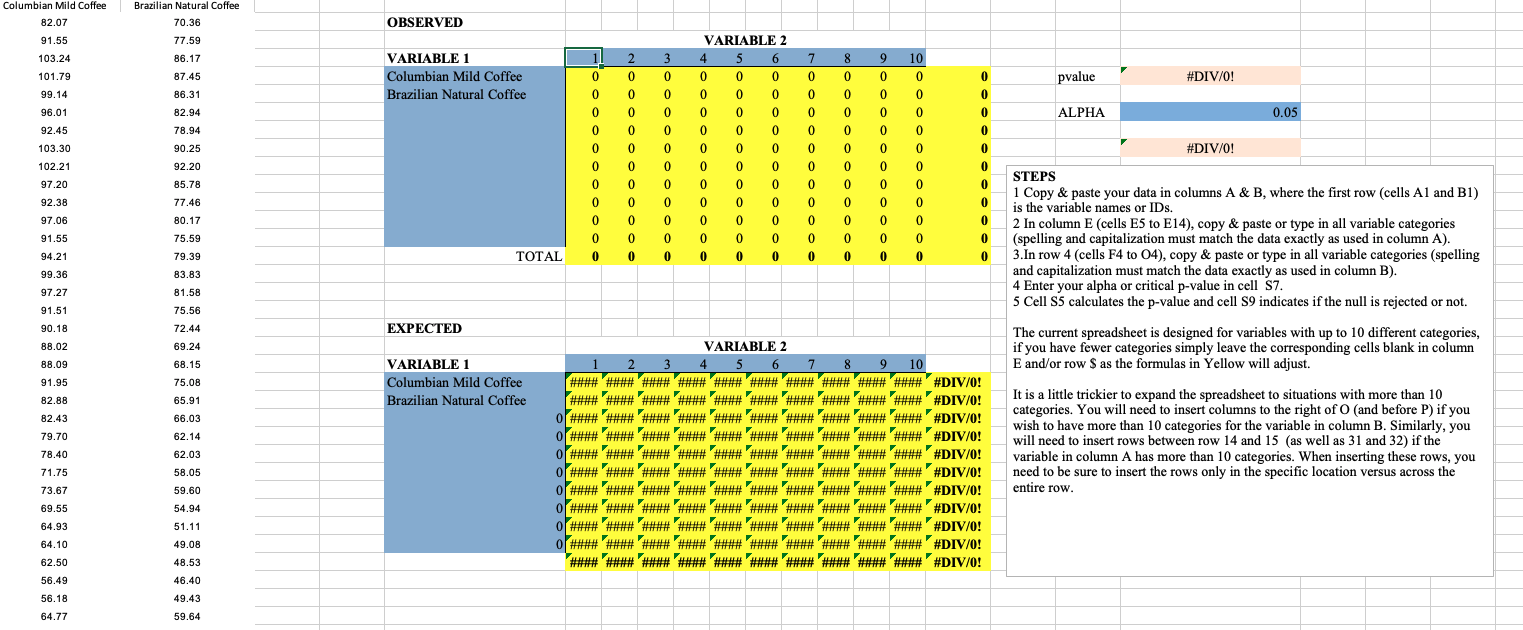
Columbian Mild Coffee Brazilian Natural Coffee 82.07 70.36 OBSERVED 91.55 77.59 VARIABLE 2 103.24 86.17 VARIABLE 1 8 9 10 101.79 87.45 Columbian Mild Coffee pvalue 99.14 86.31 Brazilian Natural Coffee O #DIV/O! 96.01 82.94 ALPHA 0.05 92.45 78.94 103.30 90.25 #DIV/O! 102.21 92.20 97.20 85.78 STEPS 92.38 77.46 75.59 oooooo ooo1- 1 Copy & paste your data in columns A & B, where the first row (cells Al and Bl) 97.06 80.17 is the variable names or IDs. 2 In column E (cells E5 to E14), copy & paste or type in all variable categories 91.55 (spelling and capitalization must match the data exactly as used in column A). 94.21 79.39 TOTAL 3.In row 4 (cells F4 to 04), copy & paste or type in all variable categories (spelling 99.36 83.83 and capitalization must match the data exactly as used in column B). 97.27 81.58 4 Enter your alpha or critical p-value in cell $7. 91.51 75.56 5 Cell S5 calculates the p-value and cell S9 indicates if the null is rejected or not. 90.18 72.44 EXPECTED 88.02 69.24 VARIABLE 2 The current spreadsheet is designed for variables with up to 10 different categories, if you have fewer categories simply leave the corresponding cells blank in column 88.09 68.15 VARIABLE 1 2 3 4 5 6 7 8 9 10 E and/or row $ as the formulas in Yellow will adjust. 91.95 75.08 Columbian Mild Coffee 82.88 65.91 Brazilian Natural Coffee It is a little trickier to expand the spreadsheet to situations with more than 10 82.43 66.03 categories. You will need to insert columns to the right of O (and before P) if you 79.70 62.14 wish to have more than 10 categories for the variable in column B. Similarly, you 78.40 32.03 O # n n n NN NN WWW WWW WWW# #DIVIO! will need to insert rows between row 14 and 15 (as well as 31 and 32) if the variable in column A has more than 10 categories. When inserting these rows, you 71.75 58.05 need to be sure to insert the rows only in the specific location versus across the 73.67 59.60 entire row. 69.55 54.94 On HUH HUHHUH HAN# #H# #DIV/O! 64.93 51.11 64.10 19.08 62.50 48.53 56.49 46.40 56.18 49.43 64.77 59.64
Step by Step Solution
There are 3 Steps involved in it

Get step-by-step solutions from verified subject matter experts