







Question: Can someone explain to me how data (M) bits = 16 and how they found the location of k check bits from the transmitted file
Can someone explain to me how data (M) bits = 16 and how they found the location of k check bits from the transmitted file that contains the following: 111011001011011001100
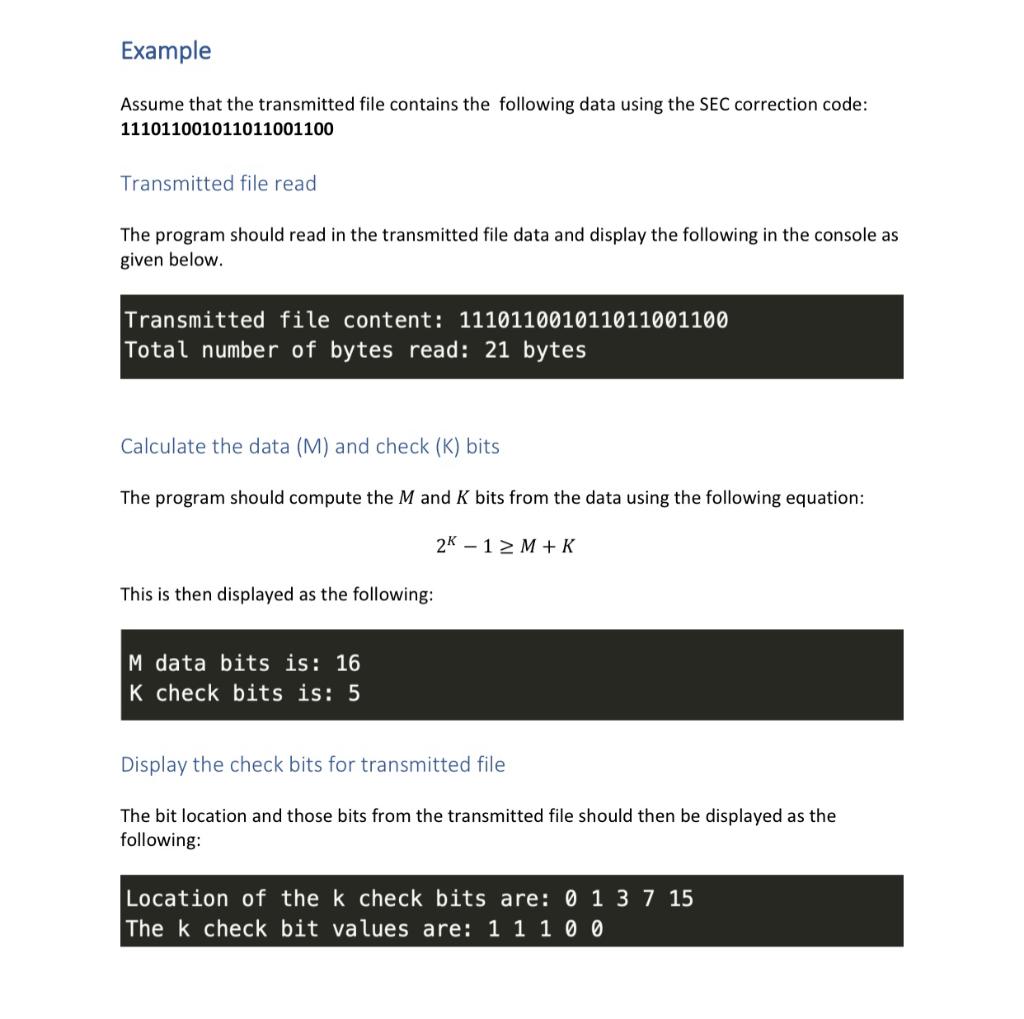
Example Assume that the transmitted file contains the following data using the SEC correction code: 111011001011011001100 Transmitted file read The program should read in the transmitted file data and display the following in the console as given below. Transmitted file content: 111011001011011001100 Total number of bytes read: 21 bytes Calculate the data (M) and check (K) bits The program should compute the M and K bits from the data using the following equation: 2K1M+K This is then displayed as the following: M data bits is: 16 K check bits is: 5 Display the check bits for transmitted file The bit location and those bits from the transmitted file should then be displayed as the following: Location of the k check bits are: 013715 The k check bit values are: 11100 Example Assume that the transmitted file contains the following data using the SEC correction code: 111011001011011001100 Transmitted file read The program should read in the transmitted file data and display the following in the console as given below. Transmitted file content: 111011001011011001100 Total number of bytes read: 21 bytes Calculate the data (M) and check (K) bits The program should compute the M and K bits from the data using the following equation: 2K1M+K This is then displayed as the following: M data bits is: 16 K check bits is: 5 Display the check bits for transmitted file The bit location and those bits from the transmitted file should then be displayed as the following: Location of the k check bits are: 013715 The k check bit values are: 11100
Step by Step Solution
There are 3 Steps involved in it

Get step-by-step solutions from verified subject matter experts
 Study Help