







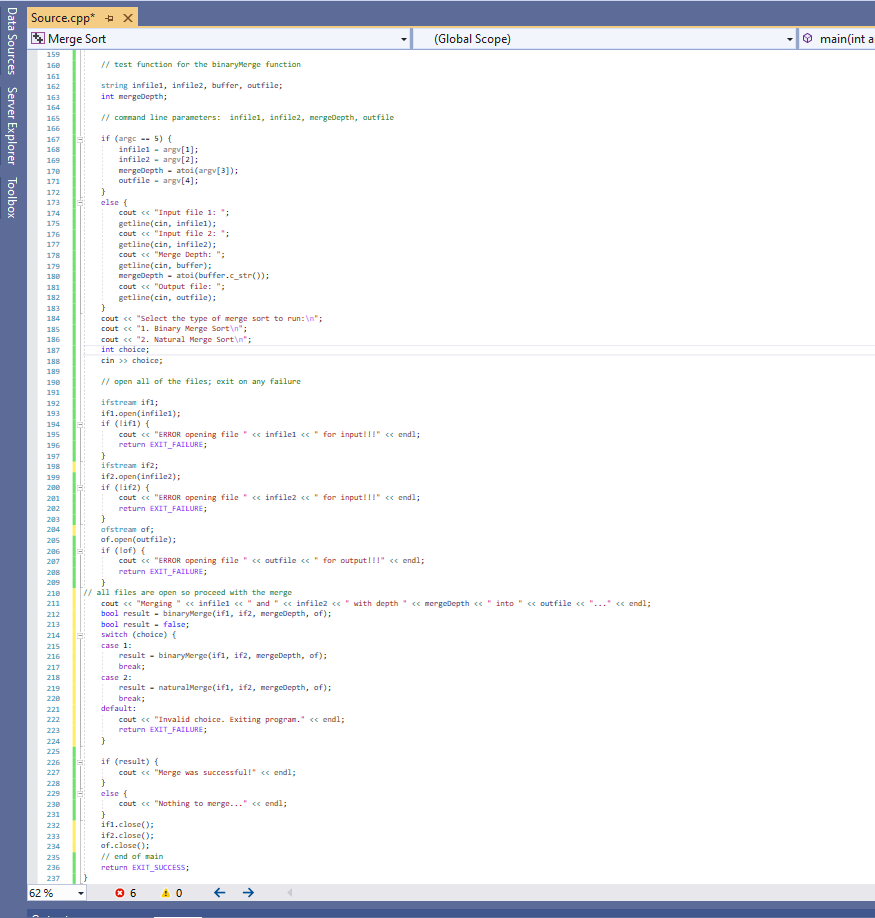
Question: can someone fix this code I get errors inside the natural merge function I get error 0 E 4 1 3 here is the code
can someone fix this code I get errors inside the natural merge function I get error E here is the code below test function for the binaryherge function
string infile infilez, buffer, outfile;
int nergeDepth;
comand line parameters: infile infile mergeDepth, autfile
if argc
#include
#include
#include
#include
using namespace std;
bool binaryMergeifstream& if ifstream& if int mergeDepth, ofstream& of
preconditions: infile infile and outfile must be valid file streams, and must be open
if they are not this function will read andor write garbage
int count;
int count;
bool file true;
bool file true;
int buffer buffer;
if if buffer
we tried to read from the stream in the argument to the if statement
if successful, the result is true
if not the result is false and we go to the else clause and flag this file as done
else
we are at the end of file
file false;
if if buffer
we tried to read from the stream in the argument to the if statement
if successful, the result is true
if not the result is false and we go to the else clause and flag this file as done
else
we are at the end of file
file false;
if file && file
both files are at the End Of File marker, there is nothing to merge
return false to let the caller know that the merge has been completed
note that it is the caller's job to close all of the streams
return false;
this block is entered only if both files are not yet at the EOF marker
if file && file
both files are good, and we've already loaded up both of the buffers
while true
if buffer buffer
count; bump the depth counter for this file
of buffer; write that element to the output file
of ; and a space to separate the numbers
now we have to see if there is something else to read
if count mergeDepth && if buffer
no code here
else
file false;
break; either f is at EOF or we have read the last item for that merge depth
else
count; bump the depth counter for this file
of buffer; write that element to the output file
of ; and a space to separate the numbers
if count mergeDepth && if buffer
no code here
else
file false;
break; either f is at EOF or we have read the last item for that merge depth
at this point either one of the files is at EOF, or one of the depth counts has passed mergeDepth
if file file is dry, read the rest of file up to either merge depth or end of file, whichever comes first
of buffer; take care of the item read previously
count; bump the counter
while count mergeDepth && if buffer
read and write until either EOF or depth reached
of buffer;
count;
else
of buffer;
count;
while count mergeDepth && if buffer
of buffer;
count;
ifclose;
ifclose;
ofclose;
merge complete!
return true;
bool naturalMergeifstream& if ifstream& if int mergeDepth, ofstream& of
int buffer buffer;
bool file if buffer; Attempt to read first element from if
bool file if buffer; Attempt to read first element from if
int last INTMIN, last INTMIN; Initialize to minimum int value
while file && file While there are elements in both files
if buffer buffer && buffer last last buffer
If buffer is less than buffer and is part of a run, or buffer has ended a run
of buffer;
last buffer; Update last to the last written value from if
file if buffer; Read next element from if
else
of buffer;
last buffer; Update last to the last written value from if
file if buffer; Read next element from if
If one file is exhausted, output the rest of the other file
while file If elements remain in if
if buffer last If the current element continues the run
of buffer;
last buffer;
file if buffer;
else
break; Run ended, exit the loop
while file If elements remain in if
if buffer last If the current element continues the run
of buffer;
last buffer;
file if buffer;
else
break; Run ended, exit the loop
return file file; Return true if at least one file had elements left
int mainint argc, char argv
test function for the binaryMerg
Step by Step Solution
There are 3 Steps involved in it
1 Expert Approved Answer
Step: 1 Unlock

Question Has Been Solved by an Expert!
Get step-by-step solutions from verified subject matter experts
Step: 2 Unlock
Step: 3 Unlock
 Study Help