







Question: Can someone help me answer this problem please showing a step-by-step walk-through on how to solve this code with Comments throughout the code, please? can
Can someone help me answer this problem please showing a step-by-step walk-through on how to solve this code with Comments throughout the code, please? can this be done in Python-style code within a juypter notebook, can I ask that when you write your code to please double-check that it runs without any errors as well as I've been having trouble running code on here before and it is not working. With this being said can you type out your code so it's easier to follow/read thank you again in advance sorry for the long message.
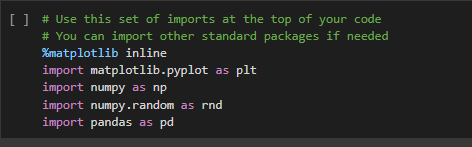
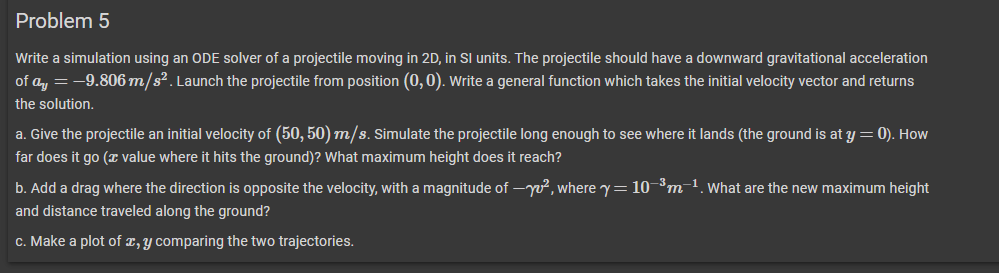
[ ] \# Use this set of imports at the top of your code \# You can import other standard packages if needed \%matplotlib inline import matplotlib.pyplot as plt import numpy as np import numpy.random as rnd import pandas as pd Write a simulation using an ODE solver of a projectile moving in 2D, in SI units. The projectile should have a downward gravitational acceleration of ay=9.806m/s2. Launch the projectile from position (0,0). Write a general function which takes the initial velocity vector and returns the solution. a. Give the projectile an initial velocity of (50,50)m/s. Simulate the projectile long enough to see where it lands (the ground is at y=0 ). How far does it go ( x value where it hits the ground)? What maximum height does it reach? b. Add a drag where the direction is opposite the velocity, with a magnitude of v2, where =103m1. What are the new maximum height and distance traveled along the ground? c. Make a plot of x,y comparing the two trajectories
Step by Step Solution
There are 3 Steps involved in it

Get step-by-step solutions from verified subject matter experts
 Study Help