







Question: Can someone help me code this in visual basics 2013. thanky you Create a new project, called My Chaos, with an interface that contains a
Can someone help me code this in visual basics 2013. thanky you
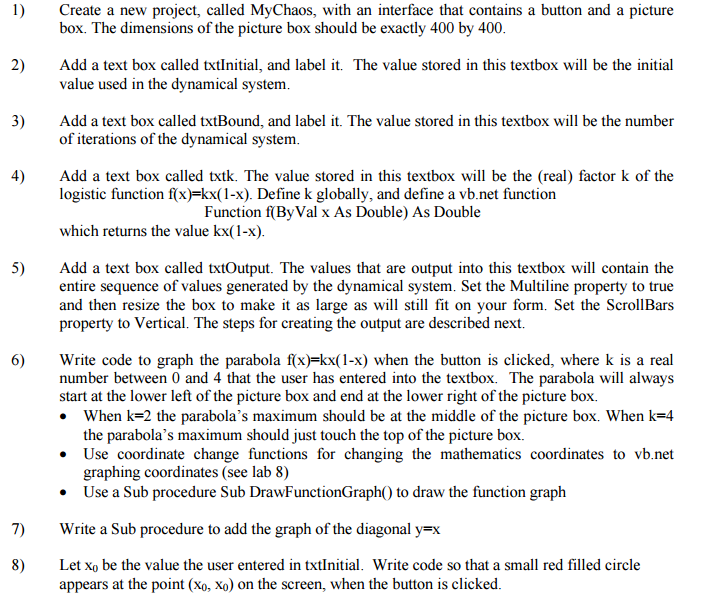
Create a new project, called My Chaos, with an interface that contains a button and a picture box. The dimensions of the picture box should be exactly 400 by 400. Add a text box called TX Initial, and label it. The value stored in this textbox will be the initial value used in the dynamical system. Add a text box called txtBound, and label it. The value stored in this textbox will be the number of iterations of the dynamical system. Add a text box called text. The value stored in this textbox will be the (real) factor k of the logistic function f(x) = kx(l - x). Define k globally, and define a vb.net function Function f(ByVal x As Double) As Double which returns the value kx(l-x). Add a text box called txtOutput. The values that are output into this textbox will contain the entire sequence of values generated by the dynamical system. Set the Multiline property to true and then resize the box to make it as large as will still fit on your form. Set the ScrollBars property to Vertical. The steps for creating the output are described next. Write code to graph the parabola f(x) = kx(l - x) when the button is clicked, where k is a real number between 0 and 4 that the user has entered into the textbox. The parabola will always start at the lower left of the picture box and end at the lower right of the picture box. When k=2 the parabola's maximum should be in the middle of the picture box. When k=4 the parabola's maximum should just touch the top of the picture box. Use coordinate change functions for changing the mathematics coordinates to vb.net graphing coordinates (see lab 8) Use a Sub procedure Sub DrawFunctionGraph() to draw the function graph Write a Sub procedure to add the graph of the diagonal y=x Let x_0 be the value the user entered in TX Initial. Write code so that a small red filled circle appears at the point (x_0, x_0) on the screen, when the button is clicked
Step by Step Solution
There are 3 Steps involved in it

Get step-by-step solutions from verified subject matter experts
 Study Help