







Question: Can someone help me crate a GUI for my Java code? package expertsystem; import java.io.BufferedReader; import java.io.BufferedWriter; import java.io.File; import java.io.FileReader; import java.io.FileWriter; import java.io.InputStream;
Can someone help me crate a GUI for my Java code?
package expertsystem;
import java.io.BufferedReader;
import java.io.BufferedWriter;
import java.io.File;
import java.io.FileReader;
import java.io.FileWriter;
import java.io.InputStream;
import java.io.InputStreamReader;
import java.io.OutputStream;
import java.io.PrintWriter;
import java.util.ArrayList;
import java.util.HashMap;
import java.util.Random;
import java.util.Scanner;
public class ExpertSystemData {
private HashMap
private String fileName; // name of the input and output file
private Random rand; // random object to randomly select a
public ExpertSystemData (String fn) {
data = new HashMap
fileName = fn;
rand = new Random();
readFile( );
}
public String getValue(String key) {
// method returns a single random value associated with this key
// returns null if key is not found
String allValues = data.get(key);
if (allValues == null) {
return null;
}
// split result into individual elements (split on comma)
String[] tokens = allValues.split(",");
return tokens[rand.nextInt(tokens.length)];
}
public String getValues(String key) {
// method returns all values associated with this key
// returns null if key is not found
String allValues = data.get(key);
if (allValues == null) {
return null;
}
return allValues;
}
public boolean hasKey (String key) {
// method determines if the key exists in the hashmap
return data.containsKey(key);
}
public ArrayList
// method returns all of the keys with input value
// if value is not found the returned ArrayList will be empty
ArrayList
for (String key : data.keySet()) {
if (data.get(key).contains(value))
toReturn.add(key);
}
return toReturn;
}
public ArrayList
// method returns all of the keys in the hashmap
ArrayList
for (String key : data.keySet()) {
toReturn.add(key);
}
return toReturn;
}
public void addToKey (String key, String value) {
// this method adds input value to input key
// if the key exists, the value is appended to the existing values
// if the key does not exist, the new key / value pair is added to the hashmap
String currentValues = data.get(key);
if (currentValues == null) {
currentValues = value;
}
else {
currentValues += ","+value;
}
data.put(key, currentValues);
}
public String toString () {
return data.toString();
}
private void doWrite(String fn) {
// this method writes all of the data in the hashmap to the file set during
// creation of this object
try
{
FileWriter fw = new FileWriter(fn);
BufferedWriter myOutfile = new BufferedWriter(fw);
// format for write will be key:value
for (String key : data.keySet()) {
myOutfile.write(key+":"+data.get(key)+" ");
}
myOutfile.flush();
myOutfile.close();
}
catch (Exception e) {
e.printStackTrace();
System.err.println("Didn't save to " + fn);
}
}
public void writeFile () {
// overloaded method: this calls doWrite with file used to read data
// use this for saving data between runs
doWrite(fileName);
} // end of writeFile method
public void writeFile(String altFileName) {
// overloaded method: this calls doWrite with different file name
// use this for testing write
doWrite(altFileName);
}// end of writeFile method
private void readFile( ){
// this method reads all of the data in the file and stores it into the
// hashmap as a key value pair
try
{
// FileReader fr = new FileReader(fileName);
// BufferedReader myInfile = new BufferedReader(fr);
InputStream inp = getClass().getResourceAsStream(fileName);
BufferedReader myInfile = new BufferedReader(new InputStreamReader(inp));
String line;
while ((line = myInfile.readLine()) != null) {
// format from read will be key:value
System.out.println(line);
String[] tokens = line.split(":");
data.put(tokens[0], tokens[1]);
}
}
catch (Exception e) {System.err.println("Didn't read from " + fileName);}
} // end of readFile
}
package expertsystem;
public class Tester {
public static void main(String[] args) {
ExpertSystemData expert = new ExpertSystemData("/expertsystem/data.txt");
System.out.println(expert+" ");
// test hasKey
if(expert.hasKey("ground meat")) {
System.out.println("ground meat is one of the ingredients ");
}
else {
System.out.println("ground meat is NOT one of the ingredients ");
}
if(expert.hasKey("jelly fish")) {
System.out.println("jelly fish is one of the ingredients ");
}
else {
System.out.println("jelly fish is NOT one of the ingredients ");
}
// test getAllKeys
System.out.println("print all keys " + expert.getAllKeys()+" ");
// test getValue
System.out.println("print a recipe with lemon " + expert.getValue("lemon")+" ");
// test getValues
System.out.println("print all recipes with salmon " + expert.getValues("salmon")+" ");
// test getKeysForValue
System.out.println("print ingredients in lemon dishes " + expert.getKeysForValue("lemon")+" ");
// test adding to expert
// add to existing ingredient
expert.addToKey("salmon", "pate");
System.out.println("print all recipes with salmon " + expert.getValues("salmon")+" ");
// add to new ingredient
expert.addToKey("peanut butter", "pb&j");
System.out.println("print all recipes with peanut butter " + expert.getValues("peanut butter")+" ");
// add to previously new ingredient
expert.addToKey("peanut butter", "peanut butter cookies");
System.out.println("print all recipes with peanut butter " + expert.getValues("peanut butter")+" ");
// write data to tester file
expert.writeFile("./expertsystem/dataTest.txt");
}
}
data.txt
salmon:burgers,baked with lemons,smoked salmon
ground meat:hamburgers,spaghetti,meat loaf
broccoli:steamed with lemons,fried,baked with cardamom
lemon:steamed broccoli with lemons,baked fish,lemon sorbet
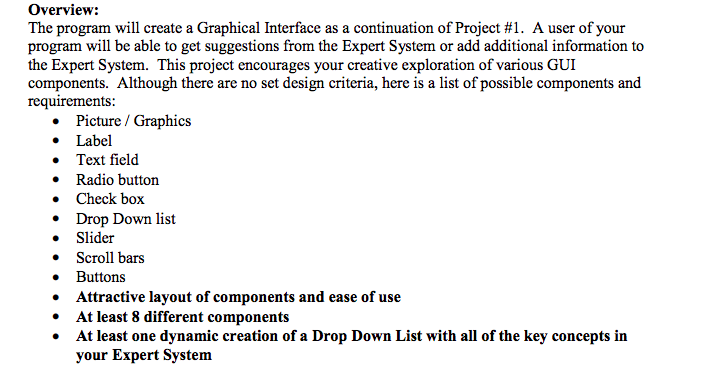
Overview: The program will create a Graphical Interface as a continuation of Project #1. A user of your program will be able to get suggestions from the Expert System or add additional information to the Expert System. This project encourages your creative exploration of various GUI components. Although there are no set design criteria, here is a list of possible components and requirements Picture / Graphics Label . Text field Radio buttorn Check box . Drop Down list Slider Scroll bars Buttons Attractive layout of components and ease of use At least 8 different components . At least one dynamic creation of a Drop Down List with all of the key concepts in your Expert System Overview: The program will create a Graphical Interface as a continuation of Project #1. A user of your program will be able to get suggestions from the Expert System or add additional information to the Expert System. This project encourages your creative exploration of various GUI components. Although there are no set design criteria, here is a list of possible components and requirements Picture / Graphics Label . Text field Radio buttorn Check box . Drop Down list Slider Scroll bars Buttons Attractive layout of components and ease of use At least 8 different components . At least one dynamic creation of a Drop Down List with all of the key concepts in your Expert System
Step by Step Solution
There are 3 Steps involved in it

Get step-by-step solutions from verified subject matter experts
 Study Help