







Question: CAN SOMEONE HELP ME WITH THE FOLLOWING PROGRAM PLEASE Write a Java program which will store, manipulate, and print student registration information. As part of
CAN SOMEONE HELP ME WITH THE FOLLOWING PROGRAM PLEASE
Write a Java program which will store, manipulate, and print student registration information.
As part of the solution, identify the following classes:
Student
Admissions.
The class Student must have the following fields Name, Address, Id number, Courses, and Date, where:
Name is a user defined class comprising of at minimum first name and last name.
Address is a user defined class comprising of fields - street, city, state, and zip code.
Date is a predefined class in the java.util package
The field Courses is a set of no more than five (5) string values representing the courses being registered for. Course names supplied are assumed to be valid and contains no blank space, for instance COP3337 is valid but not COP 3337.
Id number a string variable that uniquely identifies a student.
The class Student must be capable of adding courses and dropping courses
The class Admissions stores and manipulates the student information (student record). Because the list of students grows dynamically, it is best to use a dynamic data structure such as the ArrayList to store the information. This class should do the following, among other possible activities:
Add student to the list
Remove student from the list, which would first involve locating the record in order to remove it. In order to determine which record to remove you must supply the Id number as the search argument.
You are to provide a test class that coordinates the activities of the classes outlined above, by:
Creating student objects and adding them to the database of the Admissions object
Manipulating student record by:
Adding a course(s)
Dropping a course(s)
Removing a student from the database
Displaying list of currently registered students
Displaying list of all students that were dropped from the course
Display the output in a scrollable pane, and must be formatted as follows:
CURRENTLY ENROLLED
Id number: 123456
Name: Williams, John
Address: 2525 Hartsfield Road
Tallahassee, FL 33319
Date: September 5, 2009
Courses: COP3804, MATH2050, ENG3300
:
:
:
STUDENT WHO WERE DROPPED
Id number: 567890
Name: Roberts, Kay-Anne
Date: September 5, 2009
:
:
Note: Use the class GetData provided to enter the data from the keyboard.
| import javax.swing.JOptionPane; class GetData { static double getDouble(String s) { return Double.parseDouble(getWord(s)); } static int getInt(String s) { return Integer.parseInt(getWord(s)); } static String getWord(String s) { return JOptionPane.showInputDialog(s); } } |
The method display shown below shows how to display information in a scrollable pane. Listing 1.8 of text shows how the class GetData and the method display are implemented within a program.
Tose are the instructions. I basically have it finished, it just neads a few tweaks, i think everythings correct xcept for the output. the instructions show how the output should be printed, however i can only get my program to say "succesfully enrolled / dropped" can someone help me edit my program so that it prints out the output the way the instructions show please.
this is wnat i have so far
package Session2;
//class for name public class Name { //fields
private String FirstName; private String LastName; //default constructor
public Name() { this.FirstName = ""; this.LastName = ""; } //parameterised constructor
public Name(String FirstName, String LastName) { this.FirstName = FirstName; this.LastName = LastName; } //accessor and mutators for all fields
public String getFirstName() { return FirstName; }
public void setFirstName(String FirstName) { this.FirstName = FirstName; }
public String getLastName() { return LastName; }
public void setLastName(String LastName) { this.LastName = LastName; } //tostring to print Name
@Override public String toString() { return "Name: " + LastName + ", " + FirstName; } }
package Session2;
//class for Address public class Address { //fields street, city, state, and zip code
private String street; private String city; private String state; private String zip_code;
//default constructor public Address() { this.street = ""; this.city = ""; this.state = ""; this.zip_code = ""; }
//parameterised constructor public Address(String street, String city, String state, String zip_code) { this.street = street; this.city = city; this.state = state; this.zip_code = zip_code; } //accessor and mutators for all fields
public String getStreet() { return street; }
public void setStreet(String street) { this.street = street; }
public String getCity() { return city; }
public void setCity(String city) { this.city = city; }
public String getState() { return state; }
public void setState(String state) { this.state = state; }
public String getZip_code() { return zip_code; }
public void setZip_code(String zip_code) { this.zip_code = zip_code; }
//tostring to print Address @Override public String toString() { return "Address: " + street + " " + city + " " + state + ", " + zip_code; } }
package Session2;
import java.util.Date;
//class student
public class Student { //fields
private int id; private Name Name; private Address Address; private String[] Courses; private int len; private Date Date; //default constructor
public Student() { this.id = 0; this.Name = null; this.Address = null; this.Courses = new String[5]; this.len=0; this.Date = null; } //parameterised constructor
public Student(int id, Name Name, Address Address, String[] Courses, Date Date) { this.id = id; this.Name = Name; this.Address = Address; this.Courses = Courses; this.len=Courses.length; this.Date = Date; }
//accessor and mutators for all fields
public int getId() { return id; }
public void setId(int id) { this.id = id; }
public Name getName() { return Name; }
public void setName(Name Name) { this.Name = Name; }
public Address getAddress() { return Address; }
public void setAddress(Address Address) { this.Address = Address; }
public String[] getCourses() { return Courses; }
public void setCourses(String[] Courses) { this.Courses = Courses; this.len=Courses.length; } //method to add course
public void addCourses(String newcourse) { if (len
public void dropCourses(String oldCourses) { int index=0; String[] Course = new String[5]; for (int i = 0; i
public Date getDate() { return Date; }
public void setDate(Date Date) { this.Date = Date; }
@Override public String toString() { return "id:" + id + ", Name=" + Name.toString() + ", Address=" + Address.toString() + ", Courses=" + Courses + ", Date=" + Date + " "; } }
package Session2;
import java.util.ArrayList; import java.util.Date; import javax.swing.JOptionPane;
class GetData {
static double getDouble(String s) { return Double.parseDouble(getWord(s)); }
static int getInt(String s) { return Integer.parseInt(getWord(s)); }
static String getWord(String s) { return JOptionPane.showInputDialog(s); } }
public class Admission {
public ArrayList
public void addStudent() { Student s = new Student(); s.setId(GetData.getInt("Enter the id: ")); s.setName(new Name(GetData.getWord("Enter FirstName: "), GetData.getWord("Enter LastName: "))); s.setAddress(new Address(GetData.getWord("Enter Street: "), GetData.getWord("Enter City: "), GetData.getWord("Enter state: "), GetData.getWord("Enter Zip Code: "))); s.addCourses(GetData.getWord("Enter a course")); s.setDate(new Date(GetData.getWord("Enter Date: "))); StudentRecord.add(s); System.out.println("Students Enrolled successfully"); }
public void dropStudent(int id) { for (int i = 0; i
public void Studentlist() { for (int i = 0; i
package Session2;
public class test {
public static void main(String[] args) { Admission a = new Admission(); a.addStudent(); a.addStudent(); a.Studentlist(); a.dropStudent(GetData.getInt("Enter id of student to drop: ")); a.Studentlist(); } }
output:
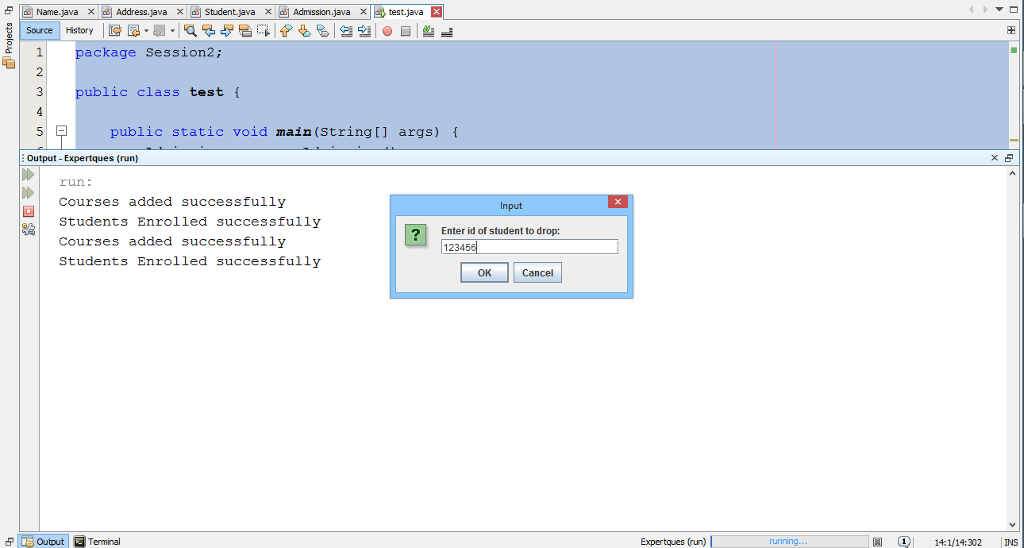
test java EX Source History package Session2 ublic class test public static void main (string args output Expertiques (run run. Courses added successfully Students Enrolled successfully Enter id of student to drop Courses added successfully 2345 Students Enrolled successfully OK Cancel 5 E output Terminal Expertques (run) running 1 14:1/14:302 INS
Step by Step Solution
There are 3 Steps involved in it

Get step-by-step solutions from verified subject matter experts
 Study Help