







Question: Can someone help with Javascript assignment, I am having trouble getting the exact outcome for the resulting web page. The instructions are: 1.Add another Unordered
Can someone help with Javascript assignment, I am having trouble getting the exact outcome for the resulting web page. The instructions are: 1.Add another Unordered List (using
) after the Unordered List already in this html file. The new unordered List lists at least three electronic product names. Set the class of this list to hot.
2.Add list element salt in between pine nuts and honey ( this should be done in javascript file).
3.After Header 2(
) insert Header 3 (using
) with text Electronics.
4. The scripts need to calculate the total number of groceries listed in the first Unordered List and display it in Header2 your script also need to calculate the total electronics in the second Unordered List and display the number in Header 3. The resulting page should look like the image on the next page, you need to implement the look of the webpage using CSS and JAVASCRIPT:
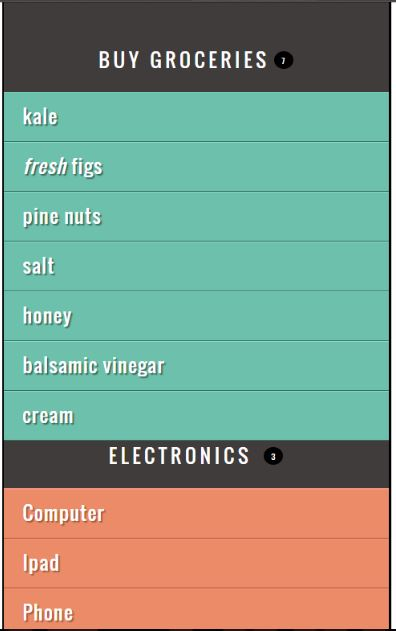
I have already added the second Unorderd list to the HTML Page
List
Buy groceries
- fresh figs
- pine nuts
- honey
- balsamic vinegar
Elecronics
- Computers
- Ipad
- Phone
Javascript needs to be modified
var list = document.getElementsByTagName('ul')[0]; // Get the
- element
- elements
var i; // Counter variable for (i = 0; i elements var newHeading = headingText + '' + totalItems + ''; // Content heading.innerHTML = newHeading; // Update h2 using innerHTML (not textContent) because it contains markup
CSS Page
body { background-color: #000; font-family: 'Oswald', 'Futura', sans-serif; margin: 0; padding: 0;}
#page { background-color: #403c3b; margin: 0 auto 0 auto;} /* Responsive page rules at bottom of style sheet */
h1 { background-image: url(../images/kinglogo.png); background-repeat: no-repeat; background-position: center center; text-align: center; text-indent: -1000%; height: 75px; line-height: 75px; width: 117px; margin: 0 auto 0 auto; padding: 30px 10px 20px 10px;}
h2 { color: #fff; font-size: 24px; font-weight: normal; text-align: center; text-transform: uppercase; letter-spacing: .2em; margin: 0 0 23px 0;}
h3 { color: #fff; font-size: 24px; font-weight: normal; text-align: center; text-transform: uppercase; letter-spacing: .2em; margin: 0 0 23px 0;}
h2 span { border-radius: 50%; background-color: #000; font-size: 10px; text-align: center; display: inline-block; position: relative; top: -5px; height: 18px; width: 20px; margin-left: 5px; padding: 4px 0 0 4px;}
h3 span { border-radius: 50%; background-color: #000; font-size: 10px; text-align: center; display: inline-block; position: relative; top: -5px; height: 18px; width: 20px; margin-left: 5px; padding: 4px 0 0 4px;}
ul { background-color: #584f4d; border:none; padding: 0; margin: 0;}
li { background-color: #ec8b68; color: #fff; border-top: 1px solid #fe9772; border-bottom: 1px solid #9f593f; font-size: 24px; letter-spacing: .05em; list-style-type: none; text-shadow: 2px 2px 1px #9f593f; height: 50px; padding-left: 1em; padding-top: 10px;}
.hot { background-color: #d7666b; color: #fff; text-shadow: 2px 2px 1px #914141; border-top: 1px solid #e99295; border-bottom: 1px solid #914141;}
.cool { background-color: #6cc0ac; color: #fff; text-shadow: 2px 2px 1px #3b6a5e; border-top: 1px solid #7ee0c9; border-bottom: 1px solid #3b6a5e;}
.complete { background-color: #999; color: #fff; background-image: url("../images/icon-trash.png"); background-position: center, right; background-repeat: no-repeat; border-top: 1px solid #666; text-shadow: 2px 2px 1px #333;}
li a { color: #fff; text-decoration: none; background-image: url("../images/icon-link.png"); background-position: center, right; background-repeat: no-repeat; padding-right: 36px;}
p { color: #403c3b; background-color: #fff; border-radius: 5px; text-align: center; padding: 10px; margin: 20px auto 20px auto; min-width: 20%; max-width: 80%; }
#scriptResults { padding-bottom: 10px;}
/* Small screen - acts like the app would */ @media only screen and (max-width: 500px) { body { background-color: #584f4d; } #page { max-width: 480px; } } @media only screen and (min-width: 501px) and (max-width: 767px) { #page { max-width: 480px; margin: 20px auto 20px auto; } } @media only screen and (min-width: 768px) and (max-width: 959px) { #page { max-width: 480px; margin: 20px auto 20px auto; } } /* Larger screens act like a demo for the app */ @media only screen and (min-width: 960px) { #page { max-width: 480px; margin: 20px auto 20px auto; } } @media (-webkit-min-device-pixel-ratio: 2), (min-resolution: 192dpi) { h1{ background-image: url(../images/2xkinglogo.png); background-size: 72px 72px; } }
BUY GROCERIES kale fresh figs pine nuts salt honey balsamic vinegar cream ELECTRONICS Computer lpad Phone
var newItemLast = document.createElement('li'); // Create element var newTextLast = document.createTextNode('cream'); // Create text node newItemLast.appendChild(newTextLast); // Add text node to element list.appendChild(newItemLast); // Add element end of list
var newItemFirst = document.createElement('li'); // Create element var newTextFirst = document.createTextNode('kale'); // Create text node newItemFirst.appendChild(newTextFirst); // Add text node to element list.insertBefore(newItemFirst, list.firstChild); // Add element to list
var listItems = document.querySelectorAll('li'); // All
Step by Step Solution
There are 3 Steps involved in it

Get step-by-step solutions from verified subject matter experts
 Study Help