







Question: Can this be answered using Excel? 6. Use the data below 0.6 1.4 0.46 0.68 Cutting & dyeing time for seat A Cutting & dyeing
Can this be answered using Excel?
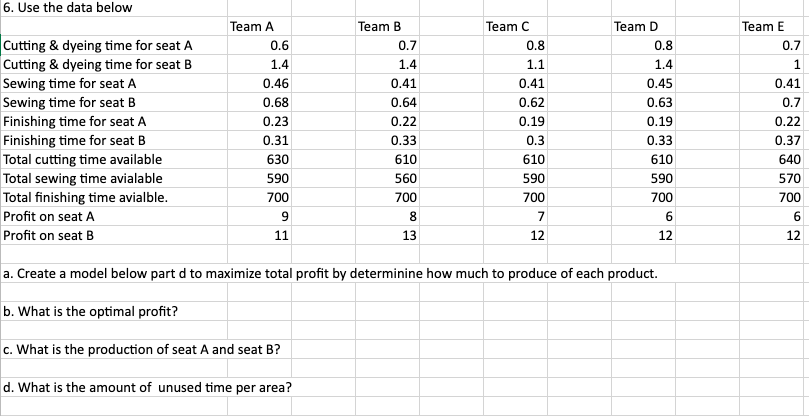
6. Use the data below 0.6 1.4 0.46 0.68 Cutting & dyeing time for seat A Cutting & dyeing time for seat B Sewing time for seat A Sewing time for seat B Finishing time for seat A Finishing time for seat B Total cutting time available Total sewing time avialable 0.23 0.31 630 590 Total finishing time avialble. 700 Profit on seat A 9 8 Profit on seat B 11 13 12 12 a. Create a model below part d to maximize total profit by determinine how much to produce of each product. b. What is the optimal profit? c. What is the production of seat A and seat B? d. What is the amount of unused time per area? Team A Team B 0.7 1.4 0.41 0.64 0.22 0.33 610 560 700 Team C 0.8 1.1 0.41 0.62 0.19 0.3 610 590 700 7 Team D 0.8 1.4 0.45 0.63 0.19 0.33 610 590 700 6 Team E 0.7 1 0.41 0.7 0.22 0.37 640 570 700 6 12 +++ 6. Use the data below 0.6 1.4 0.46 0.68 Cutting & dyeing time for seat A Cutting & dyeing time for seat B Sewing time for seat A Sewing time for seat B Finishing time for seat A Finishing time for seat B Total cutting time available Total sewing time avialable 0.23 0.31 630 590 Total finishing time avialble. 700 Profit on seat A 9 8 Profit on seat B 11 13 12 12 a. Create a model below part d to maximize total profit by determinine how much to produce of each product. b. What is the optimal profit? c. What is the production of seat A and seat B? d. What is the amount of unused time per area? Team A Team B 0.7 1.4 0.41 0.64 0.22 0.33 610 560 700 Team C 0.8 1.1 0.41 0.62 0.19 0.3 610 590 700 7 Team D 0.8 1.4 0.45 0.63 0.19 0.33 610 590 700 6 Team E 0.7 1 0.41 0.7 0.22 0.37 640 570 700 6 12 +++
Step by Step Solution
There are 3 Steps involved in it

Get step-by-step solutions from verified subject matter experts
 Study Help