



Question: can type 1 and press Enter to fill each cell. Also, add the Start and Finish dates to the yellow cells on the
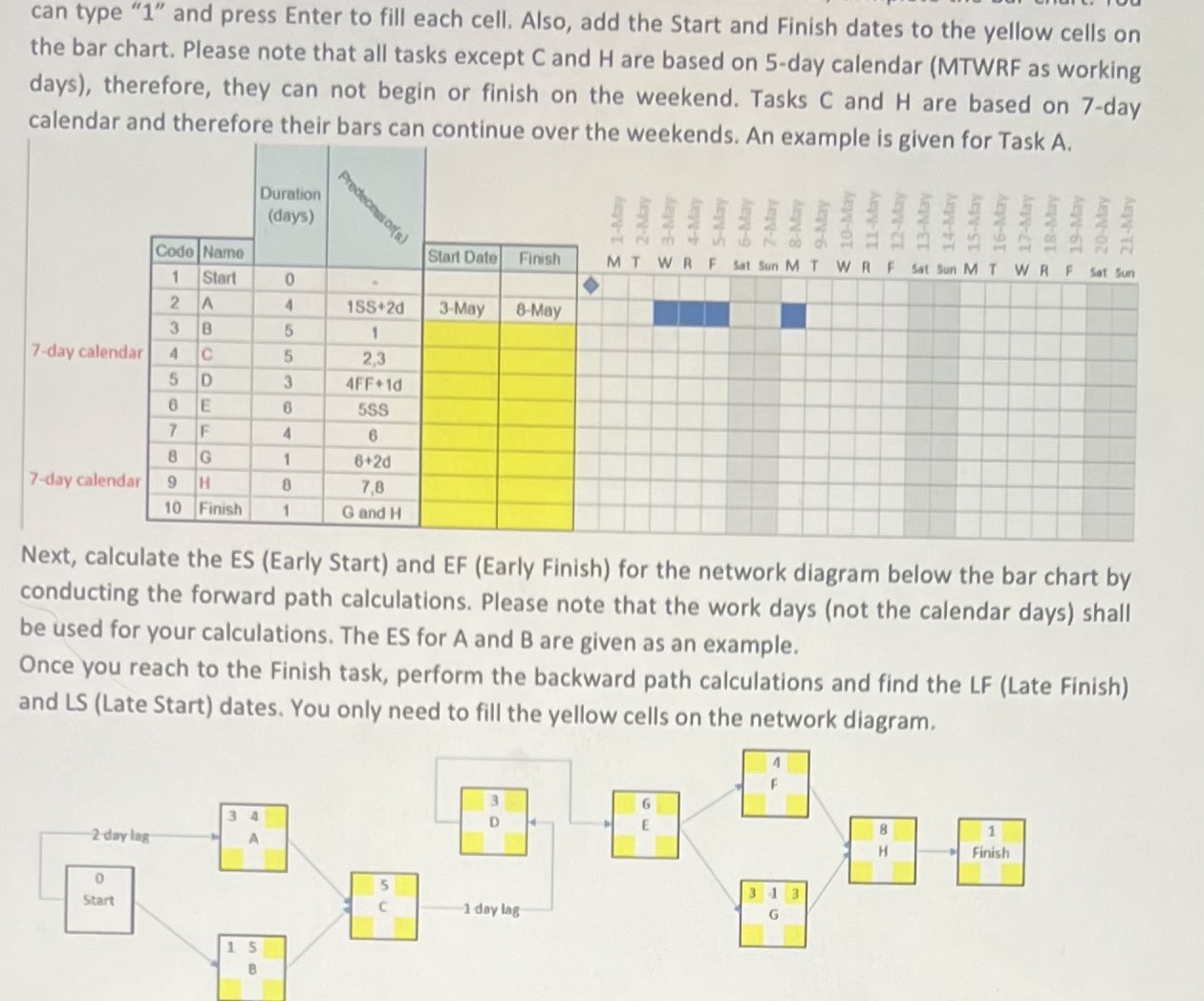
can type and press Enter to fill each cell. Also, add the Start and Finish dates to the yellow cells on the bar chart. Please note that all tasks except and are based on day calendar MTWRF as working days therefore, they can not begin or finish on the weekend. Tasks and are based on day calendar and therefore their bars can continue over the weekends. An example is given for Task A
Next, calculate the ES Early Start and EF Early Finish for the network diagram below the bar chart by conducting the forward path calculations. Please note that the work days not the calendar days shall be used for your calculations. The ES for A and are given as an example.
Once you reach to the Finish task, perform the backward path calculations and find the LF Late Finish and LS Late Start dates. You only need to fill the yellow cells on the network diagram.
Step by Step Solution
There are 3 Steps involved in it
1 Expert Approved Answer
Step: 1 Unlock

Question Has Been Solved by an Expert!
Get step-by-step solutions from verified subject matter experts
Step: 2 Unlock
Step: 3 Unlock