



Question: can u put there on excel .this pronlem has been already result but not the way they suppose to Part 1 The Purchasing Department forwards
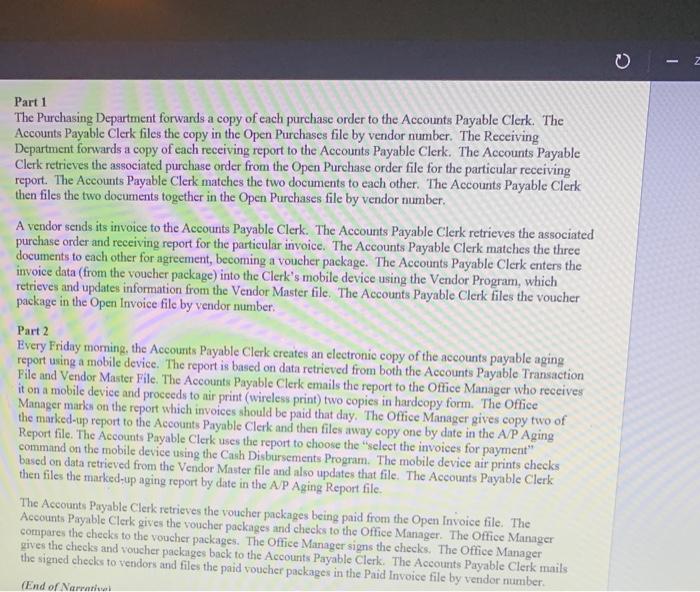
Part 1 The Purchasing Department forwards a copy of each purchase order to the Accounts Payable Clerk. The Accounts Payable Clerk files the copy in the Open Purchases file by vendor number. The Receiving Department forwards a copy of each receiving report to the Accounts Payable Clerk. The Accounts Payable Clerk retrieves the associated purchase order from the Open Purchase order file for the particular receiving report. The Accounts Payable Clerk matches the two documents to each other. The Accounts Payable Clerk then files the two documents together in the Open Purchases file by vendor number A vendor sends its invoice to the Accounts Payable Clerk. The Accounts Payable Clerk retrieves the associated purchase order and receiving report for the particular invoice. The Accounts Payable Clerk matches the three documents to each other for agreement, becoming a voucher package. The Accounts Payable Clerk enters the invoice data from the voucher package) into the Clerk's mobile device using the Vendor Program, which retrieves and updates information from the Vendor Master file. The Accounts Payable Clerk files the voucher package in the Open Invoice file by vendor number, Part 2 Every Friday morning, the Accounts Payable Clerk creates an electronic copy of the accounts payable aging report using a mobile device. The report is based on data retrieved from both the Accounts Payable Transaction Pile and Vendor Master File. The Accounts Payable Clerk emails the report to the Office Manager who receives it on a mobile device and proceeds to air print (wireless print) two copies in hardcopy form. The Office Manager marks on the report which invoices should be paid that day. The Office Manager gives copy two of the marked-up report to the Accounts Payable Clerk and then files away copy one by date in the A/P Aging Report file. The Accounts Payable Clerk uses the report to choose the "select the invoices for payment" command on the mobile device using the Cash Disbursements Program. The mobile device air prints checks based on data retrieved from the Vendor Master file and also updates that file. The Accounts Payable Clerk then files the marked-up aging report by date in the AJP Aging Report file The Accounts Payable Clerk retrieves the voucher packages being paid from the Open Invoice file. The Accounts Payable Clerk gives the voucher packages and checks to the Office Manager. The Office Manager compares the checks to the voucher packages. The Office Manager signs the checks. The Office Manager szives the checks and voucher packages back to the Accounts Payable Clerk The Accounts Payable Clerk mails the signed checks to vendors and files the paid voucher packages in the Paid Invoice file by vendor number (End of Narni Part 2 Every day, the AP Carry the table in portable device. The prise de Payable Traction File Vendor Master File The Acable Choke Mawhore e o procedere polym. The Office Mamma portada de The empat we de in up fix the leal where the former d. The thesis Vendee Make The teeb in the The complete Allwedd The Od tiedot Theo edhead They Talreat - 3 30
Step by Step Solution
There are 3 Steps involved in it

Get step-by-step solutions from verified subject matter experts