







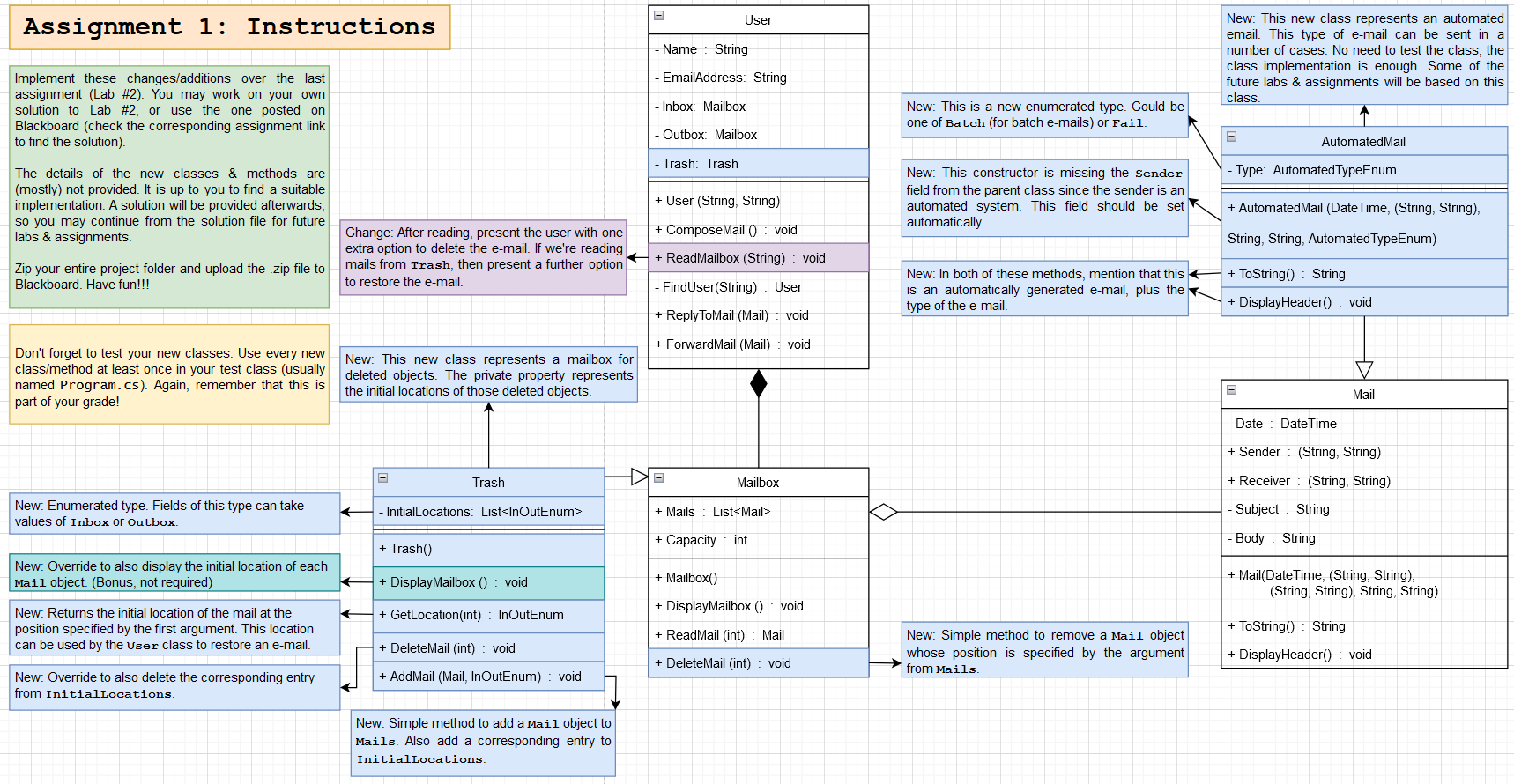
Question: can you change the code that I will give you according to instructions? using System; using System.Collections.Generic; using System.Text; namespace LAB 2 { class Mail
can you change the code that I will give you according to instructions?
using System;
using System.Collections.Generic;
using System.Text;
namespace LAB
class Mail
private DateTime Date;
private String Subject;
private String Body;
public String String Sender get; private set;
public String String Receiver get; private set;
public DateTime GetDate return Date;
public String GetSubject return Subject;
public String GetBody return Body;
public MailDateTime date, String String senderString String receiver, String subject, String body
Date date; Sender sender; Receiver receiver; Subject subject; Body body;
public override String ToString
String finalString Date.ToShortDateString Date.ToShortTimeString
;
finalString "From: Sender.Item Sender.Item
;
finalString To: Receiver.Item Receiver.Item
;
finalString "Subject: Subject
Body;
return finalString;
public virtual void DisplayHeader Console.WriteLineSubject: Subject;
using System;
using System.Collections.Generic;
using System.Text;
namespace LAB
class Mailbox
public List Mails get; set;
public int Capacity get; set;
public Mailbox
Mails new List;
Capacity ; To test capacity
public virtual void DisplayMailbox
if MailsCount
Console.WriteLineNo mails here!"; else
forint i ; i Mails.Count; i
Console.Writei;
MailsiDisplayHeader;
public Mail ReadMailint selection
Console.WriteLineMailsselectionToString;
return Mailsselection;
public virtual void DeleteMailint selection
MailsRemoveAtselection;
using System;
using System.Collections.Generic;
using System.Text;
namespace LAB
class User
private String Name get; set;
private String EmailAddress get; set;
private Mailbox Inbox get; set;
private Mailbox Outbox get; set;
private Trash Trash get; set;
public UserString name, String emailAddress
Name name; EmailAddress emailAddress;
Inbox new Mailbox; Outbox new Mailbox; Trash new Trash;
public void ReadMailboxString mailbox
Mailbox selectedMailbox SelectMailboxmailbox;
if selectedMailbox is null
Console.WriteLineIncorrect input.";
return;
Console.WriteLinemailbox "I" "Inbox : mailbox O "Outbox : "Trash "for Name EmailAddress :;
selectedMailbox.DisplayMailbox;
if selectedMailboxMails.Count
Console.Write
Enter the number for the mail you want to read: ;
int mailSelection Convert.ToIntConsoleReadLine;
Console.Clear;
Mail selectedMail selectedMailbox.ReadMailmailSelection ;
Console.WriteLine
Forward
Reply
Delete" mailbox T
Restore" : ;
Console.Write
Choose an action to exit: ;
int selection Convert.ToIntConsoleReadLine;
if selection
return;
else if selection
ForwardMailselectedMail;
else if selection
ReplyToMailselectedMail;
else if selection
if mailbox T
Trash.AddMailselectedMailmailbox "I" InOutEnum.Inbox : InOutEnum.Outbox;
selectedMailbox.DeleteMailmailSelection ;
Console.WriteLineMail successfull
also I need Trash.cs AutomatedMail.cs and Program.cs
Step by Step Solution
There are 3 Steps involved in it
1 Expert Approved Answer
Step: 1 Unlock

Question Has Been Solved by an Expert!
Get step-by-step solutions from verified subject matter experts
Step: 2 Unlock
Step: 3 Unlock
 Study Help