Can you exaplain the following codes doing line by line, like add comments to codes to show what the lines are doing, also you can reference the picture of description below the code since the codes are wrote based on this description: Can you exaplain the following codes doing line by line, like add comments to codes to show what the lines are doing, also you can reference the picture of description below the code since the codes are wrote based on this description: Can you exaplain the following codes doing line by line, like add comments to codes to show what the lines are doing, also you can reference the picture of description below the code since the codes are wrote based on this description:
import sys def form_cube(n): i = 1 ret = [] while i*n25): c-=26 temp.append(chr(ord('A')+c)) else: temp.append(chr(ord('a')+c)) k+=1 ret.append(temp) j+=1 return ret def search(s,lst): i = 0 while i25): print("key1 invalid value") exit(3) if(key225): print("key2 invalid value") exit(4) plain = "" try: f = open(fname) plain = f.read().lower() except: print("Could not open file") exit(5) cube = form_cube(key1) cipher = encrypt(plain,cube,key2) print(cipher)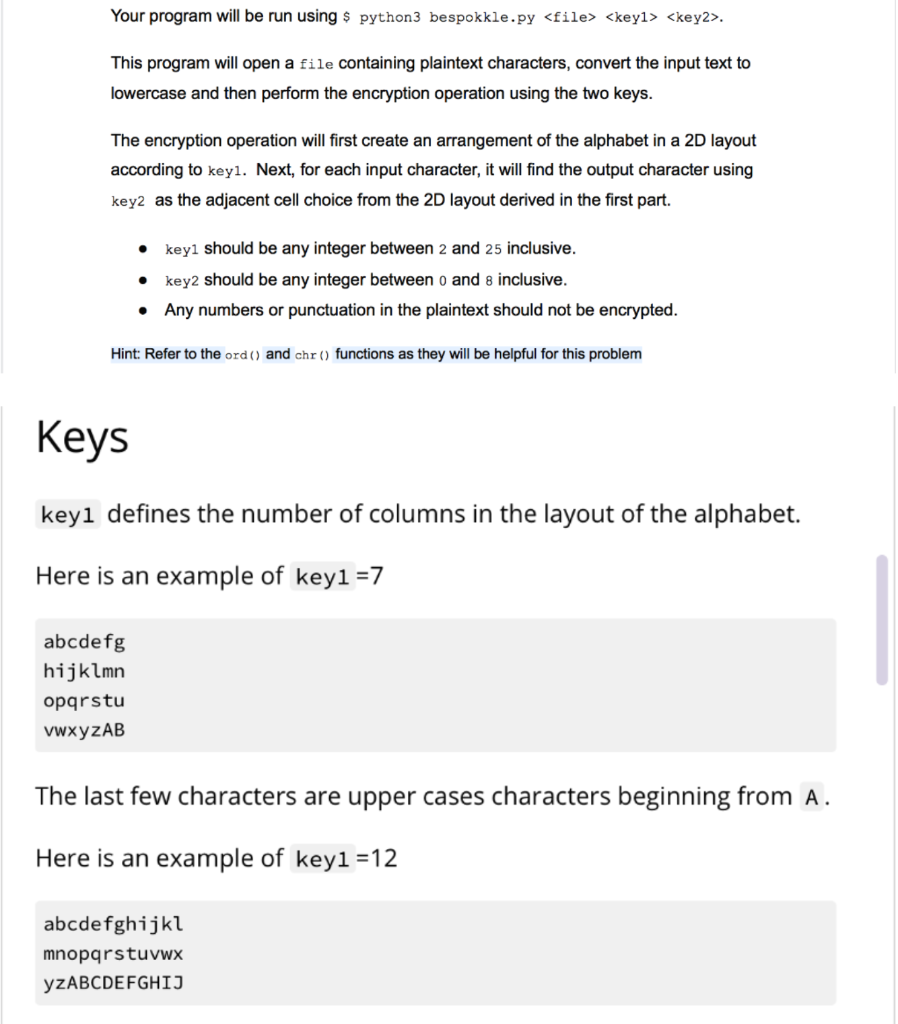
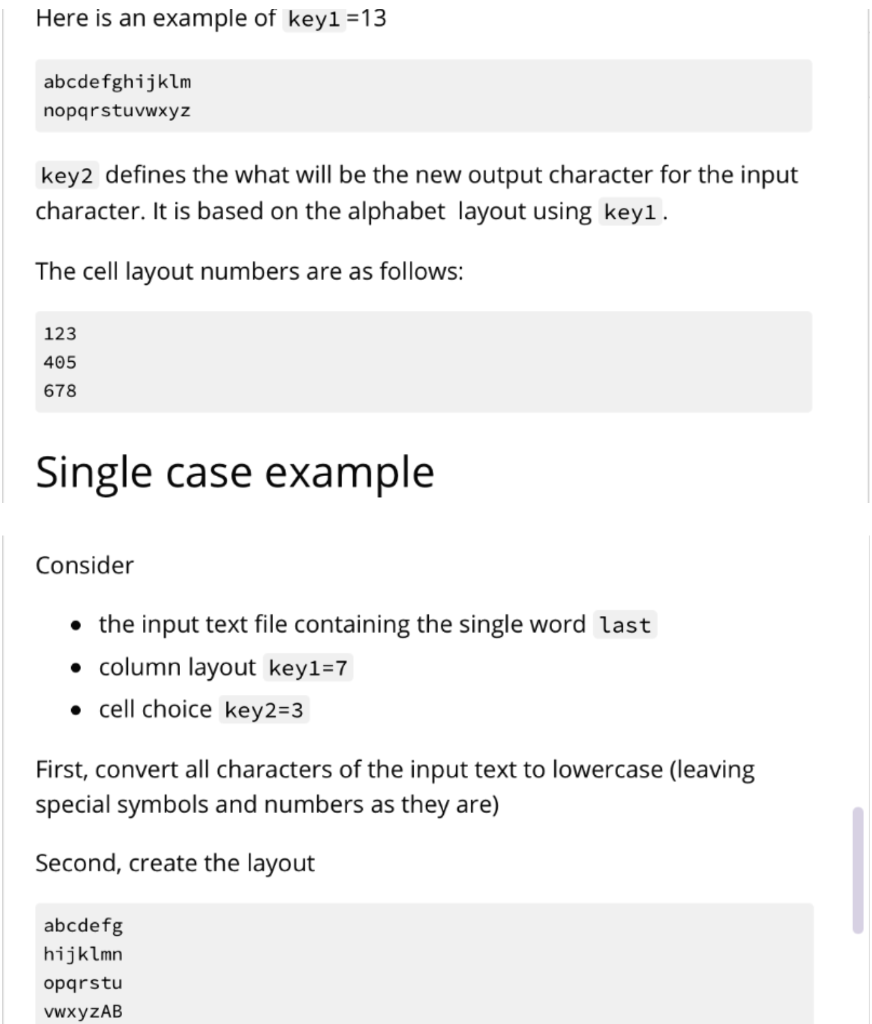
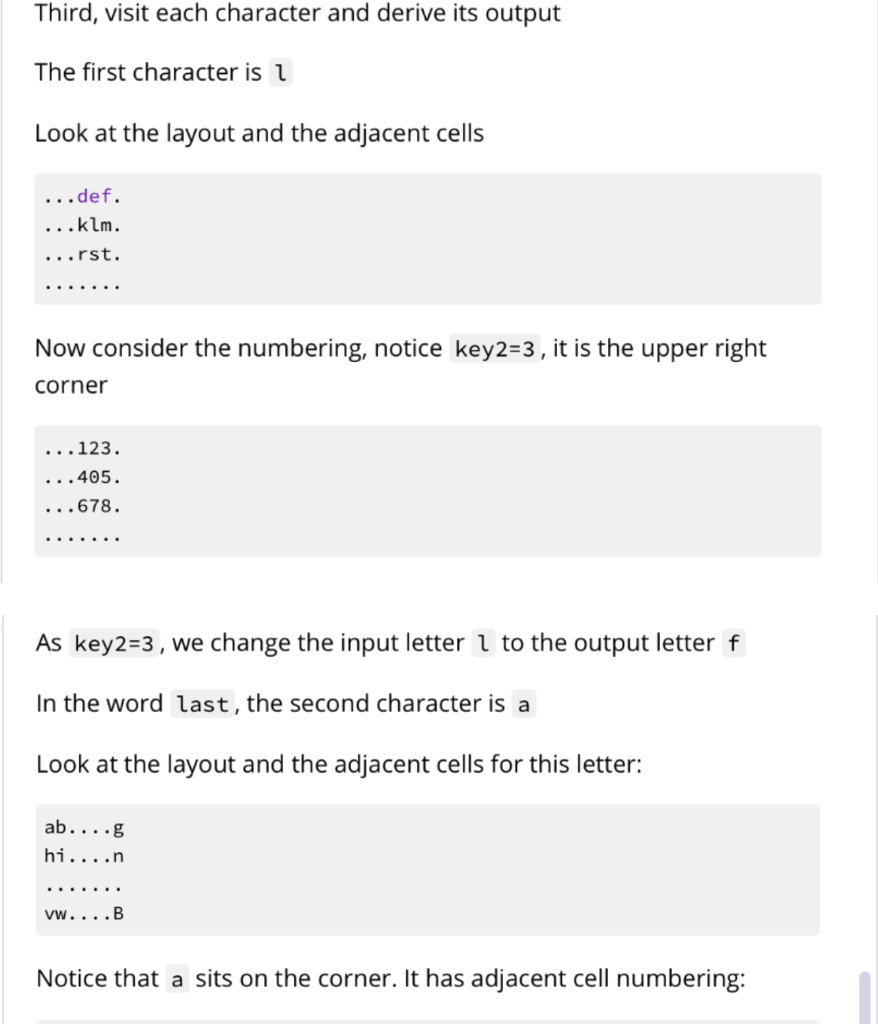
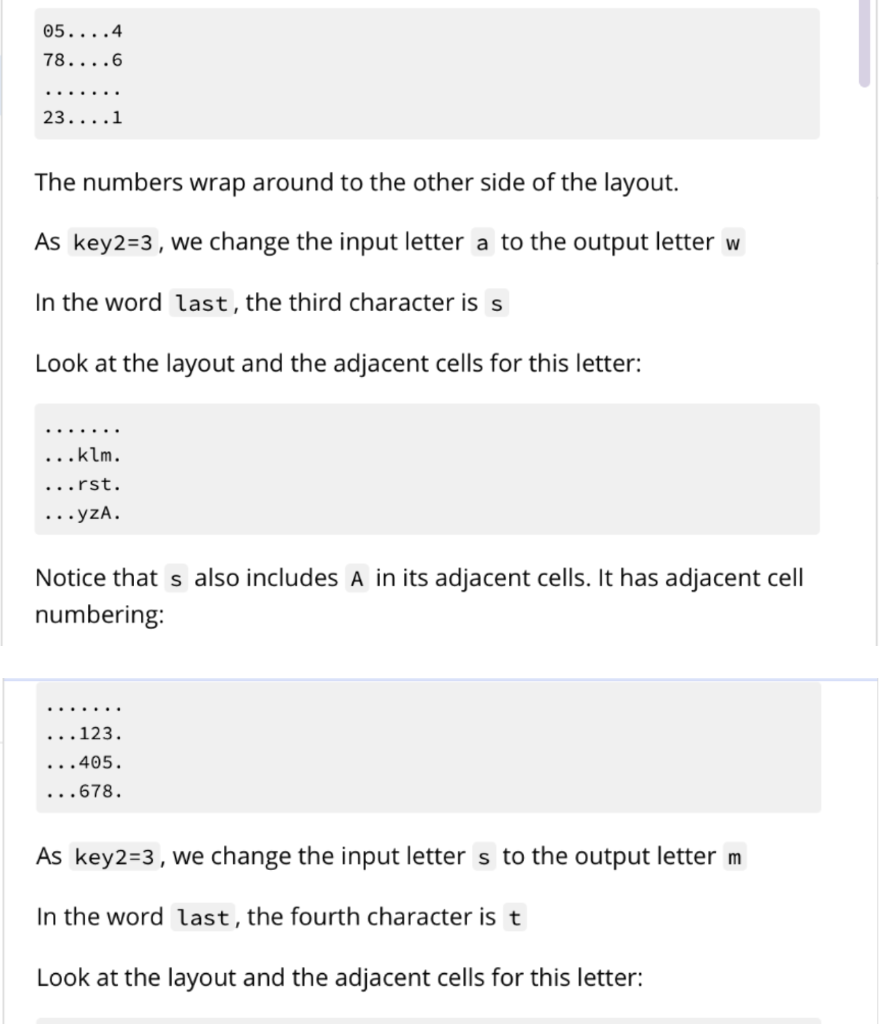
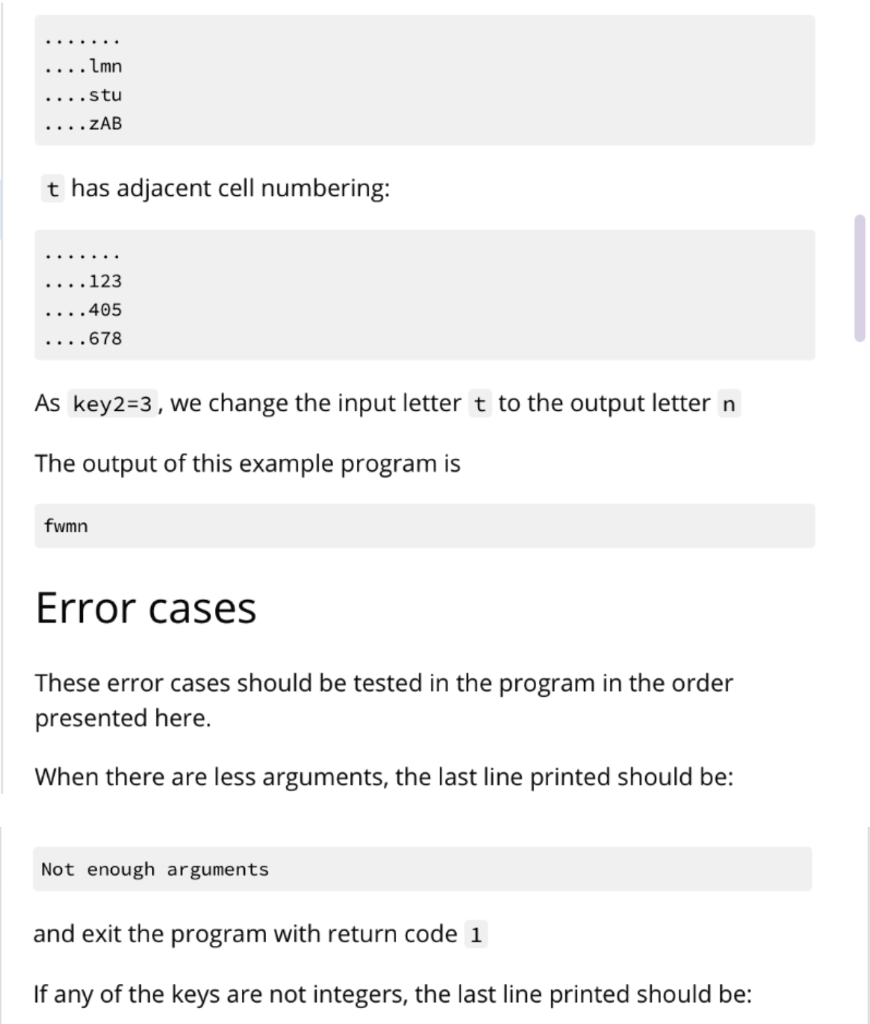
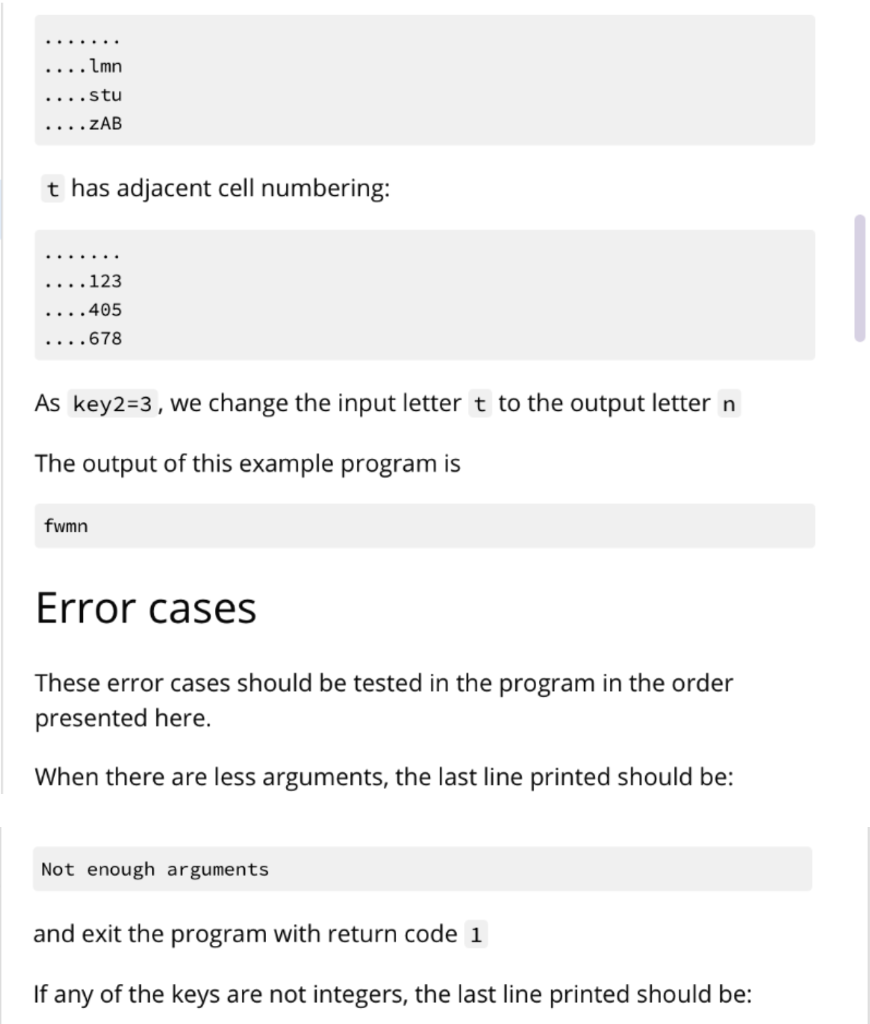
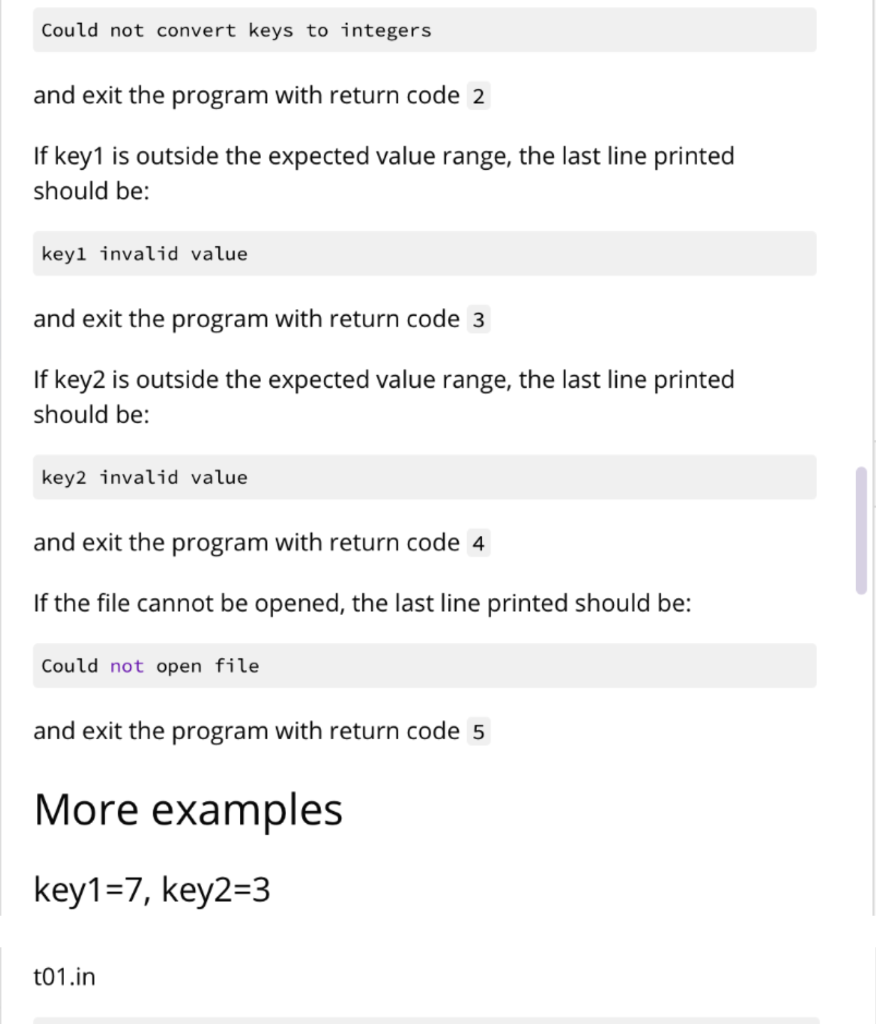
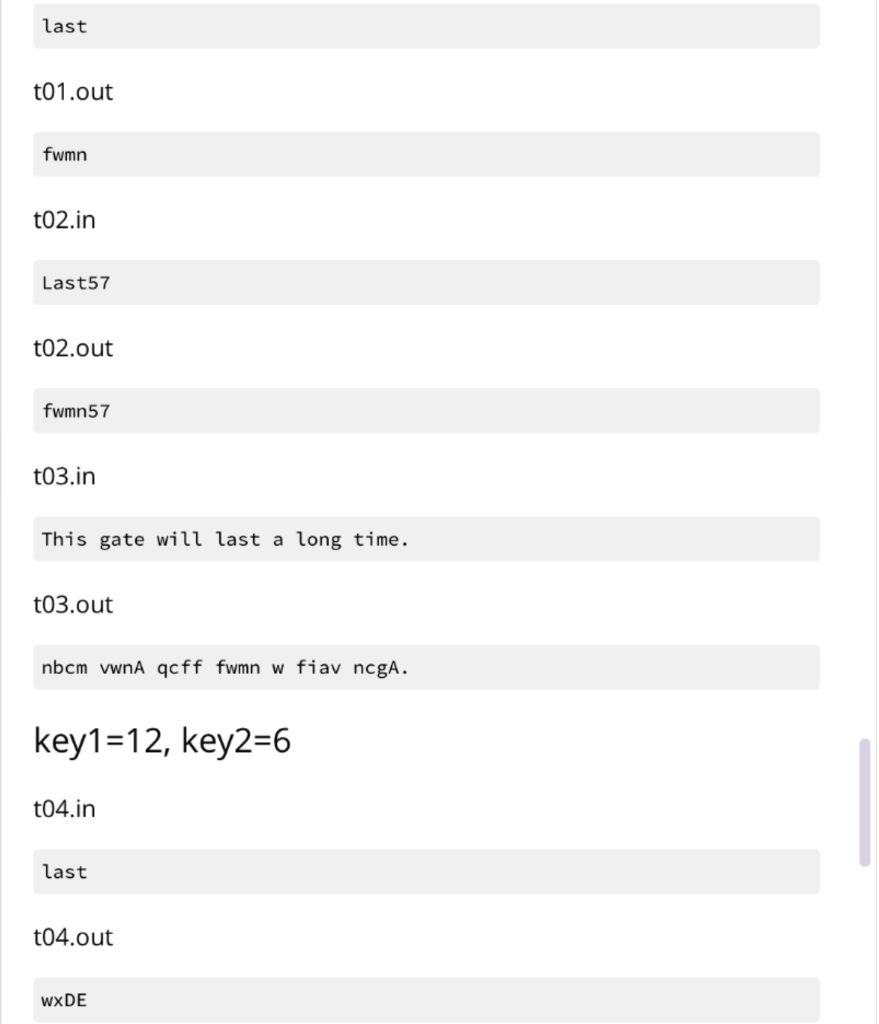
Your program will be run using $ python3 bespokkle.py . This program will open a file containing plaintext characters, convert the input text to lowercase and then perform the encryption operation using the two keys. The encryption operation will first create an arrangement of the alphabet in a 2D layout according to keyl. Next, for each input character, it will find the output character using key2 as the adjacent cell choice from the 2D layout derived in the first part. key1 should be any integer between 2 and 25 inclusive. key2 should be any integer between 0 and 8 inclusive. Any numbers or punctuation in the plaintext should not be encrypted. Hint: Refer to the ord() and chr() functions as they will be helpful for this problem Keys keyi defines the number of columns in the layout of the alphabet. Here is an example of key1 =7 abcdefg hijklmn opqrstu vwxYZAB The last few characters are upper cases characters beginning from A. Here is an example of key1 =12 abcdefghijkl mnopqrstuvwx YzABCDEFGHIJ Here is an example of key1 =13 abcdefghijklm nopqrstuvwxyz key2 defines the what will be the new output character for the input character. It is based on the alphabet layout using keyl. The cell layout numbers are as follows: 123 405 678 Single case example Consider the input text file containing the single word last column layout key1=7 cell choice key2=3 First, convert all characters of the input text to lowercase (leaving special symbols and numbers as they are) Second, create the layout abcdefg hijklmn opqrstu VWXYZAB Third, visit each character and derive its output The first character is 1 Look at the layout and the adjacent cells ...def. ...klm. ...rst. Now consider the numbering, notice key2=3 , it is the upper right corner ...123. ...405. ...678. As key2=3, we change the input letter 1 to the output letter f In the word last, the second character is a Look at the layout and the adjacent cells for this letter: ab....g hi....n vw....B Notice that a sits on the corner. It has adjacent cell numbering: 05....4 78....6 23....1 The numbers wrap around to the other side of the layout. As key2=3 , we change the input letter a to the output letter w In the word last, the third character is s Look at the layout and the adjacent cells for this letter: ...klm. ...rst. ...yzA. Notice that s also includes A in its adjacent cells. It has adjacent cell numbering: ...123. ...405. ...678. As key2=3 , we change the input letter s to the output letter m In the word last, the fourth character is t Look at the layout and the adjacent cells for this letter: .... lmn ...stu .... ZAB t has adjacent cell numbering: ....123 ....405 ....678 As key2=3 , we change the input letter t to the output letter n The output of this example program fwmn Error cases These error cases should be tested in the program in the order presented here. When there are less arguments, the last line printed should be: Not enough arguments and exit the program with return code 1 If any of the keys are not integers, the last line printed should be: .... lmn ...stu .... ZAB t has adjacent cell numbering: ....123 ....405 ....678 As key2=3 , we change the input letter t to the output letter n The output of this example program fwmn Error cases These error cases should be tested in the program in the order presented here. When there are less arguments, the last line printed should be: Not enough arguments and exit the program with return code 1 If any of the keys are not integers, the last line printed should be: Could not convert keys to integers and exit the program with return code 2 If key1 is outside the expected value range, the last line printed should be: keyl invalid value and exit the program with return code 3 If key2 is outside the expected value range, the last line printed should be: key2 invalid value and exit the program with return code 4 If the file cannot be opened, the last line printed should be: Could not open file and exit the program with return code 5 More examples key1=7, key2=3 t01.in last t01.out fwmn t02.in Last57 t02.out fwmn57 t03.in This gate will last a long time. t03.out nbcm vwnA qcff fwmn w fiav ncgA. key1 =12, key2=6 t04.in last t04.out WXDE Your program will be run using $ python3 bespokkle.py . This program will open a file containing plaintext characters, convert the input text to lowercase and then perform the encryption operation using the two keys. The encryption operation will first create an arrangement of the alphabet in a 2D layout according to keyl. Next, for each input character, it will find the output character using key2 as the adjacent cell choice from the 2D layout derived in the first part. key1 should be any integer between 2 and 25 inclusive. key2 should be any integer between 0 and 8 inclusive. Any numbers or punctuation in the plaintext should not be encrypted. Hint: Refer to the ord() and chr() functions as they will be helpful for this problem Keys keyi defines the number of columns in the layout of the alphabet. Here is an example of key1 =7 abcdefg hijklmn opqrstu vwxYZAB The last few characters are upper cases characters beginning from A. Here is an example of key1 =12 abcdefghijkl mnopqrstuvwx YzABCDEFGHIJ Here is an example of key1 =13 abcdefghijklm nopqrstuvwxyz key2 defines the what will be the new output character for the input character. It is based on the alphabet layout using keyl. The cell layout numbers are as follows: 123 405 678 Single case example Consider the input text file containing the single word last column layout key1=7 cell choice key2=3 First, convert all characters of the input text to lowercase (leaving special symbols and numbers as they are) Second, create the layout abcdefg hijklmn opqrstu VWXYZAB Third, visit each character and derive its output The first character is 1 Look at the layout and the adjacent cells ...def. ...klm. ...rst. Now consider the numbering, notice key2=3 , it is the upper right corner ...123. ...405. ...678. As key2=3, we change the input letter 1 to the output letter f In the word last, the second character is a Look at the layout and the adjacent cells for this letter: ab....g hi....n vw....B Notice that a sits on the corner. It has adjacent cell numbering: 05....4 78....6 23....1 The numbers wrap around to the other side of the layout. As key2=3 , we change the input letter a to the output letter w In the word last, the third character is s Look at the layout and the adjacent cells for this letter: ...klm. ...rst. ...yzA. Notice that s also includes A in its adjacent cells. It has adjacent cell numbering: ...123. ...405. ...678. As key2=3 , we change the input letter s to the output letter m In the word last, the fourth character is t Look at the layout and the adjacent cells for this letter: .... lmn ...stu .... ZAB t has adjacent cell numbering: ....123 ....405 ....678 As key2=3 , we change the input letter t to the output letter n The output of this example program fwmn Error cases These error cases should be tested in the program in the order presented here. When there are less arguments, the last line printed should be: Not enough arguments and exit the program with return code 1 If any of the keys are not integers, the last line printed should be: .... lmn ...stu .... ZAB t has adjacent cell numbering: ....123 ....405 ....678 As key2=3 , we change the input letter t to the output letter n The output of this example program fwmn Error cases These error cases should be tested in the program in the order presented here. When there are less arguments, the last line printed should be: Not enough arguments and exit the program with return code 1 If any of the keys are not integers, the last line printed should be: Could not convert keys to integers and exit the program with return code 2 If key1 is outside the expected value range, the last line printed should be: keyl invalid value and exit the program with return code 3 If key2 is outside the expected value range, the last line printed should be: key2 invalid value and exit the program with return code 4 If the file cannot be opened, the last line printed should be: Could not open file and exit the program with return code 5 More examples key1=7, key2=3 t01.in last t01.out fwmn t02.in Last57 t02.out fwmn57 t03.in This gate will last a long time. t03.out nbcm vwnA qcff fwmn w fiav ncgA. key1 =12, key2=6 t04.in last t04.out WXDE




