Question: Can you help me with this HW assignment a. Create a new JMenu with the name Look and Feel. b. Create a new JMenuItem with
Can you help me with this HW assignment
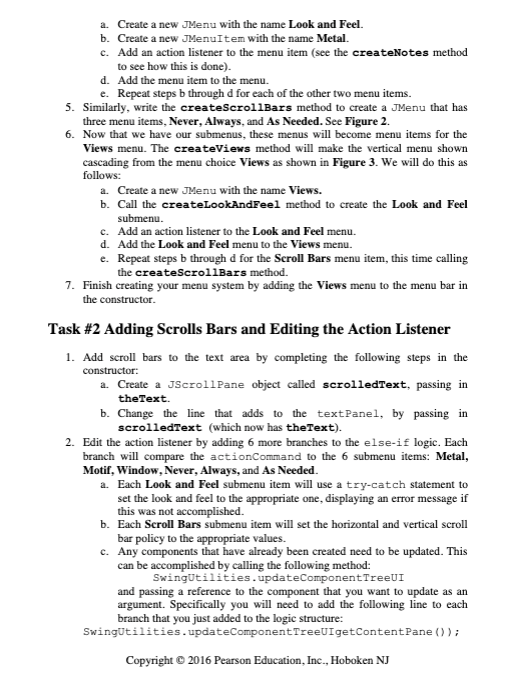
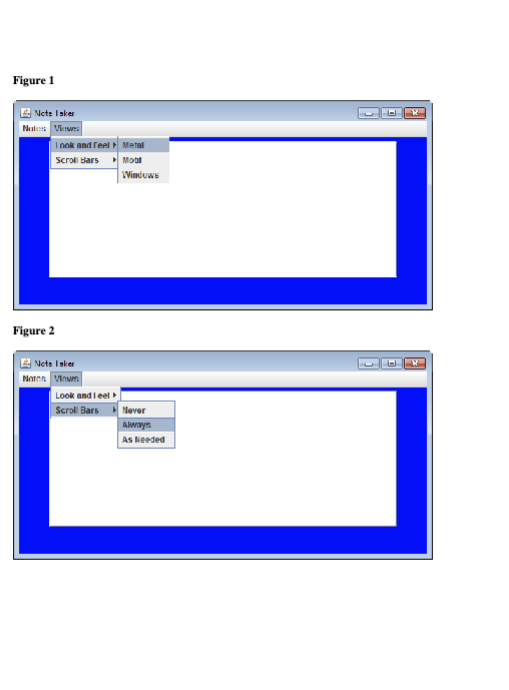
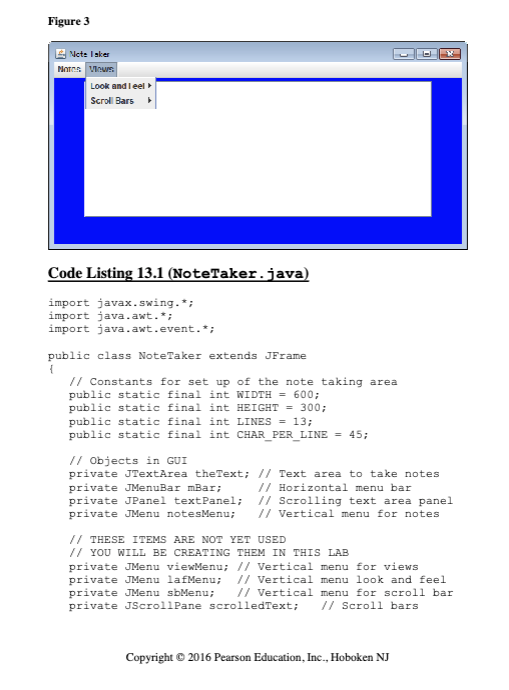
a. Create a new JMenu with the name Look and Feel. b. Create a new JMenuItem with the name Metal c. Add an action listener to the menu item (see the createNotes method to see how this is done). d. Add the menu item to the menu. e. Repeat steps b through d for each of the other two menu items. 5. Similarly, write the createScrollBars method to create a JMenu that has three menu items, Never, Always, and As Needed. See Figure 2. 6. Now that we have our submenus, these menus will become menu items for the Views menu. The createViews method will make the vertical menu shown cascading from the menu choice Views as shown in Figure 3. We will do this as follows: a. Create a new JMenu with the name Views. b. Call the createLookAndFeel method to create the Look and Feel submenu. c. Add an action listener to the Look and Feel menu. d. Add the Look and Feel menu to the Views menu. e. Repeat steps b through d for the Scroll Bars menu item, this time calling the createScrollBars method. 7. Finish creating your menu system by adding the Views menu to the menu bar in the constructor. Task #2 Adding Scrolls Bars and Editing the Action Listener 1. Add scroll bars to the text area by completing the following steps in the constructor: a. Create a JScrollPane object called scrolledText, passing in theText. b. Change the line that adds to the textPanel, by passing in scrolledText (which now has the Text). 2. Edit the action listener by adding 6 more branches to the else-if logic. Each branch will compare the actionCommand to the 6 submenu items: Metal, Motif, Window, Never, Always, and As Needed. a. Each Look and Feel submenu item will use a try-catch statement to set the look and feel to the appropriate one, displaying an error message if this was not accomplished. b. Each Scroll Bars submenu item will set the horizontal and vertical scroll bar policy to the appropriate values. C. Any components that have already been created need to be updated. This can be accomplished by calling the following method: SwingUtilities . updateComponent TreeUI and passing a reference to the component that you want to update as an argument. Specifically you will need to add the following line to each branch that you just added to the logic structure: SwingUtilities . updateComponentTreeUIgetContentPane () ) ; Copyright @ 2016 Pearson Education, Inc., Hoboken NJFigure 1 Note Isker I nok and feel Metal Scroll Bars Mobi Windows Figure 2 Noton Vinum Look and I eel Scroll Bars Never Always As HeededFigure 3 Note laker Notes Views Look and leel Scroll Bars Code Listing 13.1 (NoteTaker . java) import javax. swing.*; import java. awt.*; import java. awt. event.*; public class NoteTaker extends JFrame // Constants for set up of the note taking area public static final int WIDTH = 600; public static final int HEIGHT = 300; public static final int LINES = 13; public static final int CHAR PER LINE = 45; // Objects in GUI private JTextArea theText; // Text area to take notes private JMenuBar mBar; // Horizontal menu bar private JPanel textPanel; // Scrolling text area panel private JMenu notesMenu; // Vertical menu for notes // THESE ITEMS ARE NOT YET USED // YOU WILL BE CREATING THEM IN THIS LAB private JMenu viewMenu; // Vertical menu for views private JMenu lafMenu; // Vertical menu look and feel private JMenu sbMenu; // Vertical menu for scroll bar private JScrollPane scrolledText; // Scroll bars Copyright @ 2016 Pearson Education, Inc., Hoboken NJ
Step by Step Solution
There are 3 Steps involved in it
1 Expert Approved Answer
Step: 1 Unlock
Question Has Been Solved by an Expert!
Get step-by-step solutions from verified subject matter experts
Step: 2 Unlock
Step: 3 Unlock
Students Have Also Explored These Related Law Questions!









 Study Help