







Question: Can you please correct the errors in the code without changing the output and Main function of it. I am getting many errors for the
Can you please correct the errors in the code without changing the output and Main function of it. I am getting many errors for the AND stating there is only 2 operands and needs to be 3:Oh no! You've got an error in your assembly code:
- at line 76: expected AND instruction to have exactly 3 operands, but found 2
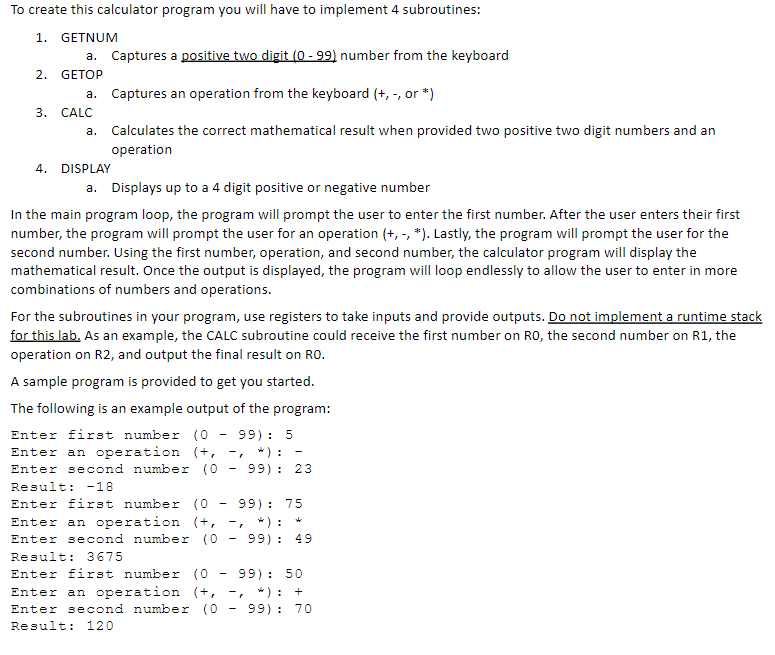
To create this calculator program you will have to implement 4 subroutines: 1. GETNUM a. Captures a positive two digit (0 - 99) number from the keyboard 2. GETOP a. Captures an operation from the keyboard (+, -, or *) 3. CALC a. Calculates the correct mathematical result when provided two positive two digit numbers and an operation 4. DISPLAY a. Displays up to a 4 digit positive or negative number In the main program loop, the program will prompt the user to enter the first number. After the user enters their first number, the program will prompt the user for an operation (+, -, *). Lastly, the program will prompt the user for the second number. Using the first number, operation, and second number, the calculator program will display the mathematical result. Once the output is displayed, the program will loop endlessly to allow the user to enter in more combinations of numbers and operations. For the subroutines in your program, use registers to take inputs and provide outputs. Do not implement a runtime stack for this lab. As an example, the CALC subroutine could receive the first number on RO, the second number on R1, the operation on R2, and output the final result on RO. A sample program is provided to get you started. The following is an example output of the program: Enter first number (0 - 99) : 5 Enter an operation (+, * ) : Enter second number (0 - 99) : 23 Result: -18 Enter first number (0 - 99) : 75 Enter an operation (t, -, * ) : Enter second number (0 - 99) : 49 Result: 3675 Enter first number (0 - 99) : 50 Enter an operation (+, * ) : + Enter second number (0 - 99) : 70 Result: 120
Step by Step Solution
There are 3 Steps involved in it

Get step-by-step solutions from verified subject matter experts
 Study Help