







Question: CAN YOU PLEASE DEMONSTRATE USING EXCEL AND FORMULAS Question 2: Payback Period As you have already seen, Excel does not have a function to calculate
CAN YOU PLEASE DEMONSTRATE USING EXCEL AND FORMULAS
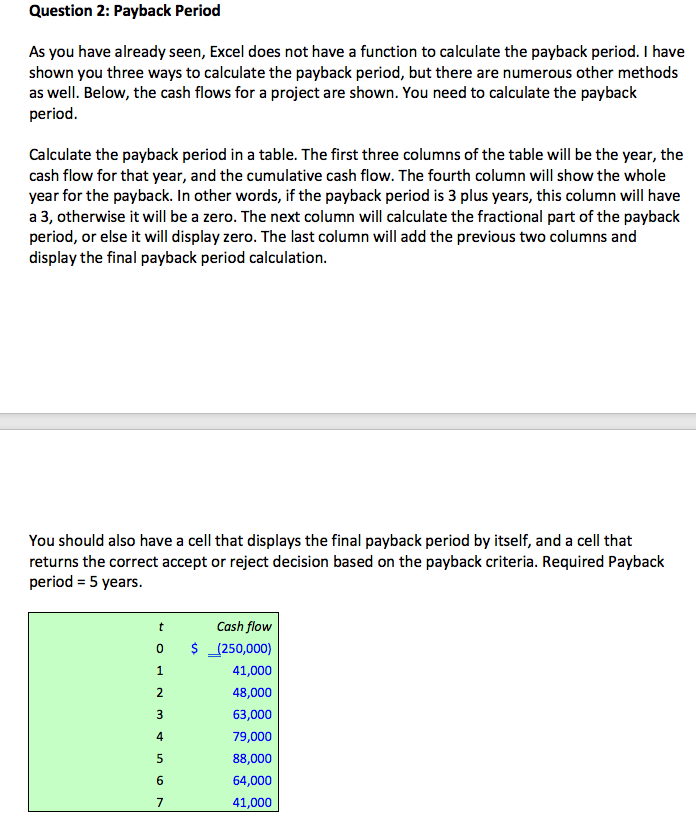
Question 2: Payback Period As you have already seen, Excel does not have a function to calculate the payback period. I have shown you three ways to calculate the payback period, but there are numerous other methods as well. Below, the cash flows for a project are shown. You need to calculate the payback period. Calculate the payback period in a table. The first three columns of the table will be the year, the cash flow for that year, and the cumulative cash flow. The fourth column will show the whole year for the payback. In other words, if the payback period is 3 plus years, this column will have a 3, otherwise it will be a zero. The next column will calculate the fractional part of the payback period, or else it will display zero. The last column will add the previous two columns and display the final payback period calculation. You should also have a cell that displays the final payback period by itself, and a cell that returns the correct accept or reject decision based on the payback criteria. Required Payback period = 5 years. t 0 1 2 3 Cash flow $ (250,000) 41,000 48,000 63,000 79,000 88,000 64,000 41,000 4 5 6 7
Step by Step Solution
There are 3 Steps involved in it

Get step-by-step solutions from verified subject matter experts
 Study Help