







Question: Can you please do this in the command line? (Important: the 3rd one). Using the Ch07_SaleCo database (ER Diagram attached), use SQL queries to answer
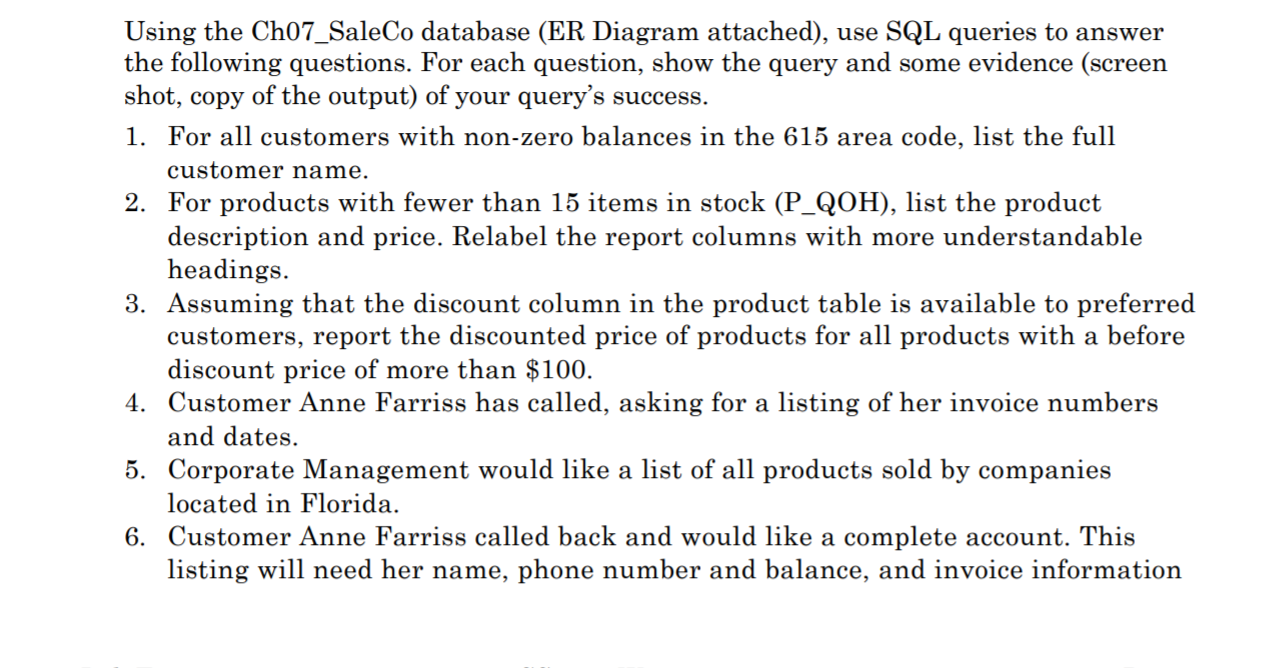

Can you please do this in the command line? (Important: the 3rd one).
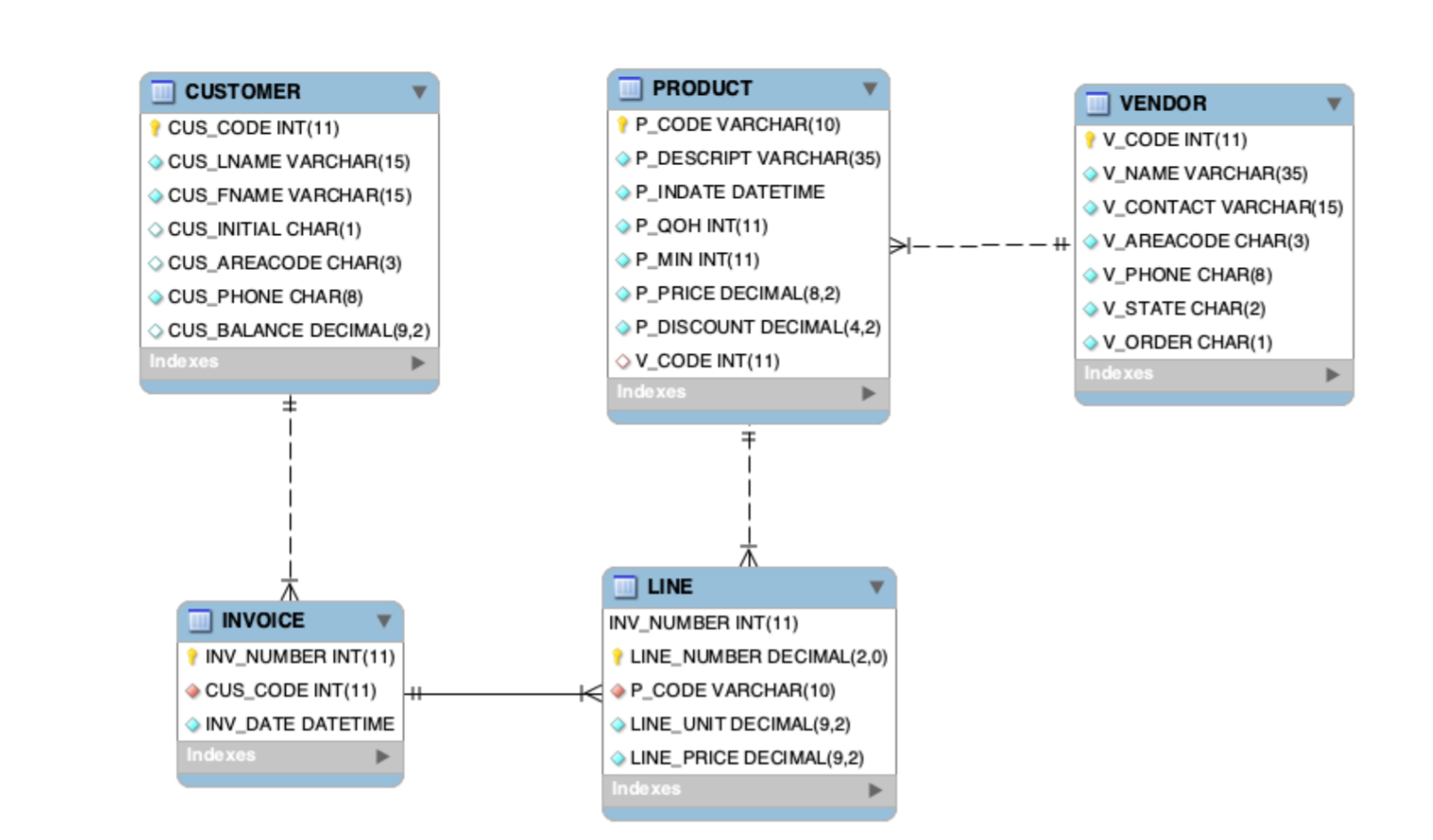
Using the Ch07_SaleCo database (ER Diagram attached), use SQL queries to answer the following questions. For each question, show the query and some evidence (screen shot, copy of the output) of your query's success. 1. For all customers with non-zero balances in the 615 area code, list the full customer name. 2. For products with fewer than 15 items in stock (P_QOH), list the product description and price. Relabel the report columns with more understandable headings. 3. Assuming that the discount column in the product table is available to preferred customers, report the discounted price of products for all products with a before discount price of more than $100. 4. Customer Anne Farriss has called, asking for a listing of her invoice numbers and dates. 5. Corporate Management would like a list of all products sold by companies located in Florida. 6. Customer Anne Farriss called back and would like a complete account. This listing will need her name, phone number and balance, and invoice information including line items in the invoices and the line items' product description and price. CUSTOMER CUS_CODE INT(11) CUS_LNAME VARCHAR(15) CUS_FNAME VARCHAR(15) CUS_INITIAL CHAR(1) CUS_AREACODE CHAR(3) CUS_PHONE CHAR(8) CUS_BALANCE DECIMAL(9,2) Indexes PRODUCT P_CODE VARCHAR(10) P_DESCRIPT VARCHAR(35) P_INDATE DATETIME P_QOH INT(11) P_MIN INT(11) P_PRICE DECIMAL(8,2) P_DISCOUNT DECIMAL(4,2) V_CODE INT(11) Indexes VENDOR V_CODE INT(11) V_NAME VARCHAR(35) V CONTACT VARCHAR(15) #V_AREACODE CHAR(3) V_PHONE CHAR(8) V_STATE CHAR(2) V_ORDER CHAR(1) Indexes F INVOICE INV_NUMBER INT(11) CUS_CODE INT(11) INV_DATE DATETIME Indexes LINE INV_NUMBER INT(11) LINE_NUMBER DECIMAL(2,0) *P_CODE VARCHAR(10) LINE_UNIT DECIMAL(9,2) LINE_PRICE DECIMAL(9,2) Indexes Using the Ch07_SaleCo database (ER Diagram attached), use SQL queries to answer the following questions. For each question, show the query and some evidence (screen shot, copy of the output) of your query's success. 1. For all customers with non-zero balances in the 615 area code, list the full customer name. 2. For products with fewer than 15 items in stock (P_QOH), list the product description and price. Relabel the report columns with more understandable headings. 3. Assuming that the discount column in the product table is available to preferred customers, report the discounted price of products for all products with a before discount price of more than $100. 4. Customer Anne Farriss has called, asking for a listing of her invoice numbers and dates. 5. Corporate Management would like a list of all products sold by companies located in Florida. 6. Customer Anne Farriss called back and would like a complete account. This listing will need her name, phone number and balance, and invoice information including line items in the invoices and the line items' product description and price. CUSTOMER CUS_CODE INT(11) CUS_LNAME VARCHAR(15) CUS_FNAME VARCHAR(15) CUS_INITIAL CHAR(1) CUS_AREACODE CHAR(3) CUS_PHONE CHAR(8) CUS_BALANCE DECIMAL(9,2) Indexes PRODUCT P_CODE VARCHAR(10) P_DESCRIPT VARCHAR(35) P_INDATE DATETIME P_QOH INT(11) P_MIN INT(11) P_PRICE DECIMAL(8,2) P_DISCOUNT DECIMAL(4,2) V_CODE INT(11) Indexes VENDOR V_CODE INT(11) V_NAME VARCHAR(35) V CONTACT VARCHAR(15) #V_AREACODE CHAR(3) V_PHONE CHAR(8) V_STATE CHAR(2) V_ORDER CHAR(1) Indexes F INVOICE INV_NUMBER INT(11) CUS_CODE INT(11) INV_DATE DATETIME Indexes LINE INV_NUMBER INT(11) LINE_NUMBER DECIMAL(2,0) *P_CODE VARCHAR(10) LINE_UNIT DECIMAL(9,2) LINE_PRICE DECIMAL(9,2) Indexes
Step by Step Solution
There are 3 Steps involved in it

Get step-by-step solutions from verified subject matter experts
 Study Help