







Question: can you please do this question a) and b) Instructions: Answer Question I using the given answer template. There are 8 printed pages for this
 can you please do this question a) and b)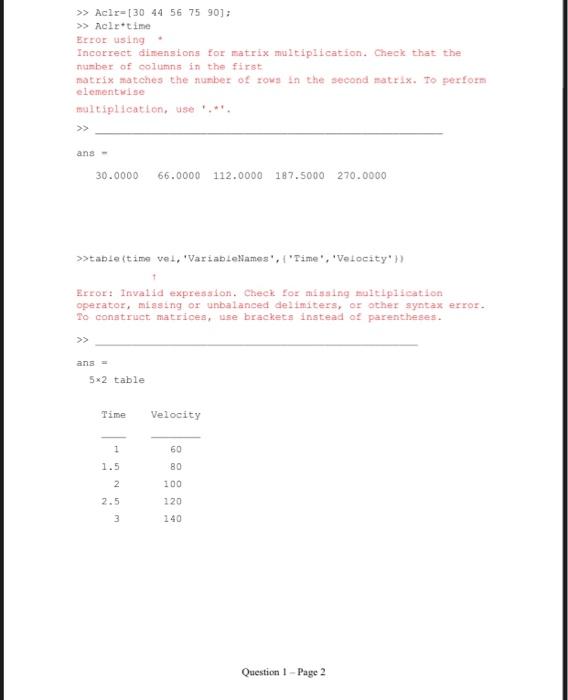
![[1 1.5 2.0 2.5 3.0], vel = [60 80 100 120 140].](https://dsd5zvtm8ll6.cloudfront.net/si.experts.images/questions/2024/09/66ef98584fe7f_13566ef9857e98c3.jpg)
![Acir= [30 44 56 75 90] Four different MATLAB commands involved vector](https://dsd5zvtm8ll6.cloudfront.net/si.experts.images/questions/2024/09/66ef985909fc2_13666ef98589816d.jpg)
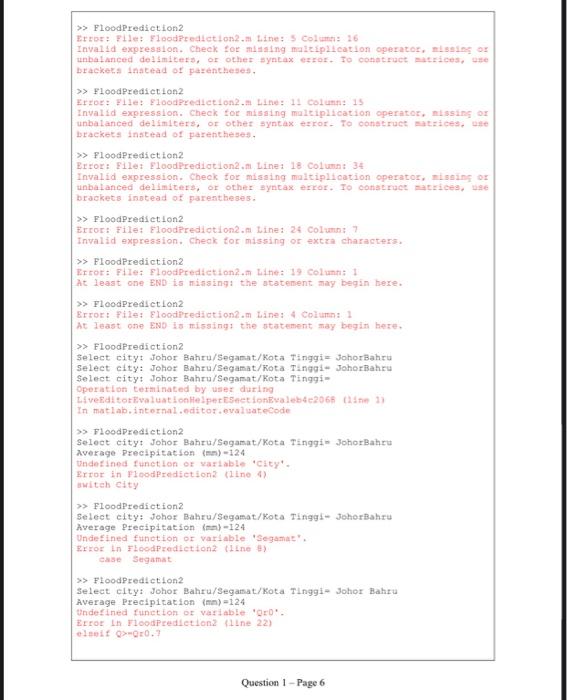
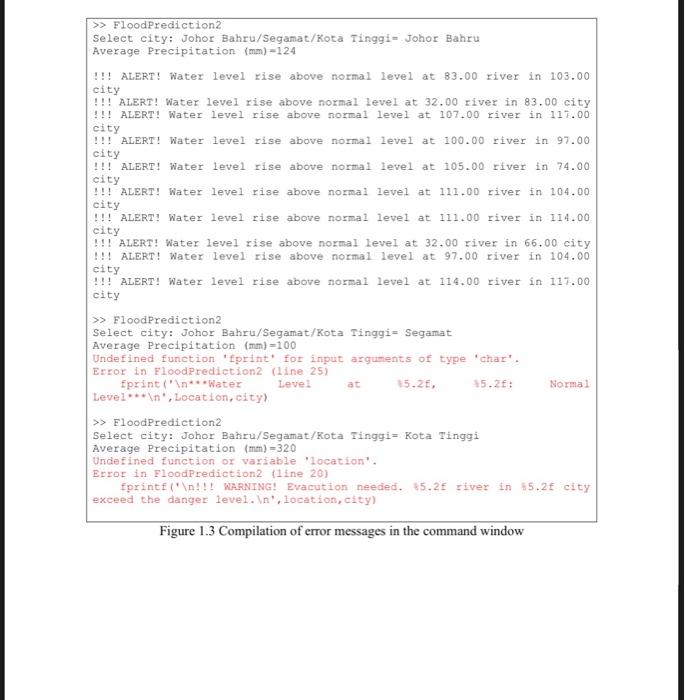
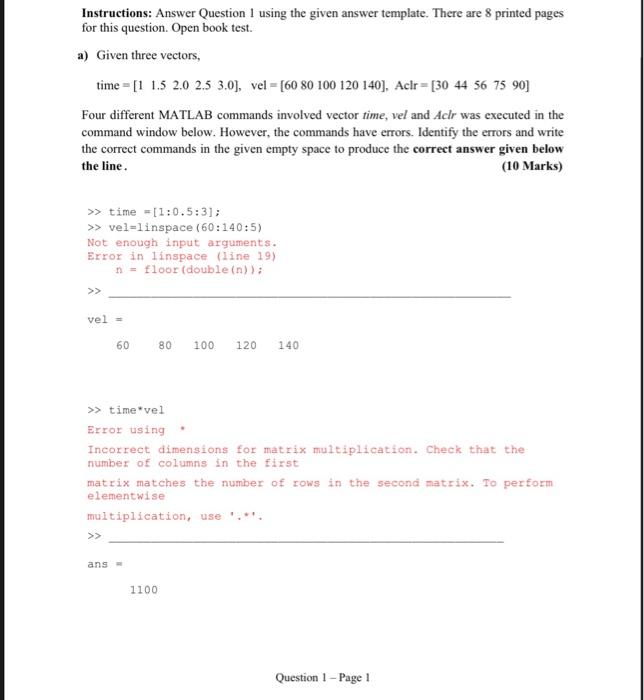
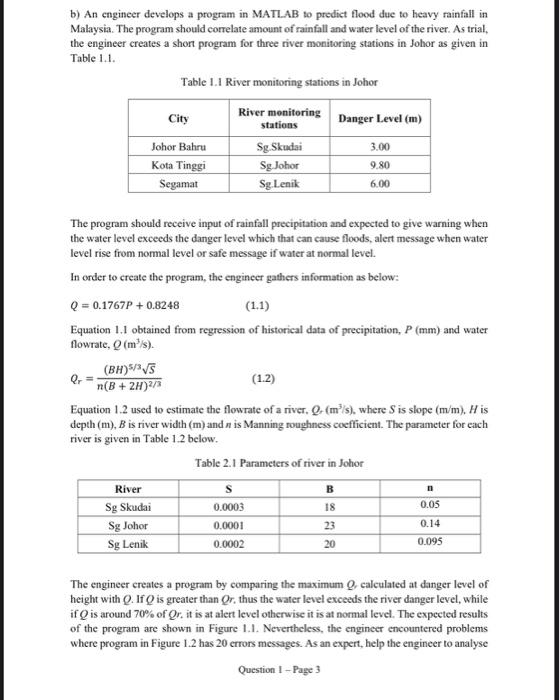
Instructions: Answer Question I using the given answer template. There are 8 printed pages for this question. Open book test. a) Given three vectors, time = [1 1.5 2.0 2.5 3.0], vel = [60 80 100 120 140]. Acir= [30 44 56 75 90] Four different MATLAB commands involved vector time, vel and Aclr was executed in the command window below. However, the commands have errors. Identify the errors and write the correct commands in the given empty space to produce the correct answer given below the line. (10 Marks) >> time = [1:0.5:3]; >> vel=linspace (60:140:5) Not enough input arguments. Error in linspace (line 19) n = floor (double(n)); >> vel = 60 80 100 120 140 >> time*vel Error using Incorrect dimensions for matrix multiplication. Check that the number of columns in the first matrix matches the number of rows in the second matrix. To perform elementwise multiplication, use >> ans- 1100 Question 1 - Page 1 >> Aclr=[30 44 56 75 90]; >> Aclr time Error using Incorrect dimensions for matrix multiplication. Check that the number of columns in the first matrix matches the number of rows in the second matrix. To perform elementwise multiplication use.* >> ans 30.0000 66.0000 112.0000 187.5000 270.0000 >>tabletima vel, 'VariableNames', 'Time', 'Velocity') Error: Invalid expression. Check for missing multiplication operator, missing or unbalanced delimiters, or other syntax error. To construct matrices, use brackets instead of parentheses. ans 5*2 table Time Velocity 1 1.5 60 80 100 2 2.5 3 120 140 Question 1 - Page 2 b) An engineer develops a program in MATLAB to predict flood due to heavy rainfall in Malaysia. The program should correlate amount of rainfall and water level of the river. As trial, the engineer creates a short program for three river monitoring stations in Johor as given in Table 1.1. Table 1.1 River monitoring stations in Johor City Danger Level (m) River monitoring stations Sg Skudai Sg Johor Sg Lenik Johor Bahru Kota Tinggi Segamat 3.00 9.80 6.00 The program should receive input of rainfall precipitation and expected to give warning when the water level exceeds the danger level which that can cause floods, alert message when water level rise from normal level or safe message if water at normal level. In order to create the program, the engineer gathers information as below: Q = 0.1767P + 0.8248 (1.1) Equation 1.1 obtained from regression of historical data of precipitation, P (mm) and water flowrate, Q (ms). (BH)55 n(B + 2H) (1.2) Equation 1.2 used to estimate the flowrate of a river. Q_(m's), where is slope (m/m). His depth (m), B is river width (m) and n is Manning roughness coefficient. The parameter for each river is given in Table 1.2 below. Table 2.1 Parameters of river in Johor River Sg Skudai Sg Johor Sg Lenik 0.0002 20 0.095 B S 0.0003 18 0.05 0.0001 23 0.14 The engineer creates a program by comparing the maximum calculated at danger level of height with Q. If Q is greater than Or, thus the water level exceeds the river danger level, while if is around 70% of Or, it is at alert level otherwise it is at normal level. The expected results of the program are shown in Figure 1.1. Nevertheless, the engineer encountered problems where program in Figure 1.2 has 20 errors messages. As an expert, help the engineer to analyse Question ! - Page 3 the errors messages shown in Figure 1.3. Rewrite all the MATLAB commands with corrections in Figure 1.4. Remain the program structure and number of lines as original MATLAB program. In your answer, please highlight fixed errors using highlighter. (40 Marks) >> Flood Prediction Select citys Johor Bahru/Segamat/Kota Tinggi Johorfahre Average Precipitation 124 Error in input. Please try ain >> Food Prediction Select city: Johor mahr/Sogamat/Kota Tinggi Johor Bahru Average Precipitation tom)-120 ALERT! Water level time above normal level at skadal river in Johor Bahru city >> ToodFrediction2 Select eity: Johor Bahru/Segamat /Kota Tinggi Segamat Average Precipitation from 100 ***Water Level at sig tonik, Segamat Sammal loro >> ToodPrediction Select eity: Johor Bahru/Segamat/Kota Tinggi Kota Tinggi Average Precipitation 320 # WRANINGI vacation needed. 5 Johor river in Kota Tinggi city exceed the danger level. Please evacuate people to the rest evacuation center. fx >> >> Figure 1.1 Expected results of program executed for different cases. Question 1 - Page 4 1 2 city=input(Select city: Johor Bahru/Segamat/Kota Tinggi : Painput('Average Precipitation (mm)"): Q-0.17679+0.8248; switch City 3 4 5 case Johor Bahru 6 $ 0.0003;B-18;n=0.05; max-3.0; 7 8 9 Location 'Sg Skudai'; case Segamat 5=0.0002;B=20;n=0.095; Hmax=6.0: Location 'Sg Lenik: 10 11 case Kota Tinggi 12 13 50,000l;B=23;n=0,14; Emax=0.8; Location 'Sg Johor': otherwise 14 15 disp('Error in input.Please try again') return 16 17 18 Or-((Bfimax) * (5/3)*sqrt(s)}* (3+2Himax) * (2/3): 19 if Q> 20 fprintf(" !!! WARNING! Evacution needed. 65.2 river in 85.2f city exceed the danger level. ', location, city) 21 disp("Please evacuate people to the nearest evacuation center.) 22 elseit Q>Or0.7 23 fprintf(" !!! ALERT! Water level rise above normal level at 15.2f river in %5.2f cityin'. Location, city 24 elselt 25 fprint(" ***Water Level at 15.2, 85.25: Normal Level*** ', Location, city) 26 Figure 1.2 The MATLAB program that contains errors Question 1 - Page 5 >> Flood Prediction2 Error: File Flood Prediction. Line: 5 Column 16 Invalid expression. Cheek for missing maltiplication operator, missing or unbalanced demiters, or other syntax error. To construct trices, se brackets instead of parentheses. >> FloodPrediction2 Error: File Flood Prediction 2. Line 11 Column: 15 Invalid expression. Check for missing multiplication operator, missing or unbalanced delimiters, or other syntax error. To construct atrices, brackets instead of parentheses. >> FloodPrediction2 Error: File Flood Prediction2. Line: 18 Column: 34 Invalid expression. Check for missing maltiplication operator, missing or unbalanced delimiters, or other syntax error. Io construct atrices, se brackets instead of parentheses. >> FloodPrediction2 Error: File: EloodPrediction2. Line: 24 Column 7 Invalid expression. Check for missing or extra characters. >> Flood Prediction2 Error: File: Flood Prediction2. Line: 19 Columns 1 At least one END is missing the statement may begin here. >> FloodPrediction2 Error: File: Floodprediction.m Line: 4 Column: 1 At least one END is missing the statement may begin here. >> FloodPrediction2 Select city: Johor Bahru/Segamat/Kota Tinggi= Johor Bahru Select city: Johor Bahru/Segamat/Kota Tinggi Johor Bahru Select city: Johor Bahru/Segamat/Kota Tinggi Operation terminated by user during Live ditor valuation Helper Sectiontvalebte2069 1 In matlab.internal.editor evaluateCode >> Flood Prediction2 Select city: Johor Bahru/Segamat/Kota Tinggi Johor Bahru Average Precipitation (m) 124 Undefined function or variable City'. Error in Flood Prediction (line with city >> Flood Prediction2 Select city: Johor Bahru/Segamat/Kota Tinggi Johorbahru Average Precipitation ()-124 Undefined function of variable: 'Segamat Error in FloodPrediction (line) case Segamat >> Flood Prediction2 Select city: Johor Bahru/Segamat/Kota Tinggi- Johor Bahru Average Precipitation (mm) - 124 Undefined function of variable 'D. Error in Flood Prediction2 line 22) elit >0.7 Question 1 - Page 6 >> Flood Prediction2 Select city: Johor Bahru/Segamat/Kota Tinggi- Johor Bahru Average Precipitation (mm) -124 !!! ALERT! Water level rise above normal level at 83.00 river in 103.00 city !!! ALERT! Water level rise above normal level at 32.00 river in 83.00 city !!! ALERT! Water level rise above normal level at 107.00 river in 117.00 city !!! ALERT! Water level rise above normal level at 100.00 river in 97.00 city !!! ALERT! Water level rise above normal level at 105.00 river in 74.00 city !!! ALERT! Water level rise above normal level at 111.00 river in 104.00 city !!! ALERT! Water level rise above normal level at 111.00 river in 114.00 city !!! ALERT! Water level rise above normal level at 32.00 river in 66.00 city !!! ALERT! Water level rise above normal level at 97.00 river in 104.00 city !!! ALERT! Water level rise above normal level at 114.00 river in 117.00 city >> FloodPrediction2 Select city: Johor Bahru/Segamat/Kota Tinggi= Segamat Average Precipitation (mm) =100 Undefined function 'print' for input arguments of type 'chart. Error in Flood Prediction2 (line 25) fprint(" ***Water Level at 15.2, 15.2: Level*** ', Location, city) >> FloodPrediction2 Select city: Johor Bahru/Segamat/Kota Tinggi= Kota Tinggi Average Precipitation (mm)=320 Undefined function or variable location'. Error in FloodPrediction2 (line 20) fprintf(" !!! WARNING! Evacution needed. 15.2 river in $5.2f city exceed the danger level. ', location, city) Normal Figure 1.3 Compilation of error messages in the command window
Step by Step Solution
There are 3 Steps involved in it

Get step-by-step solutions from verified subject matter experts
 Study Help