



Question: Can you please help me on this : This is a simple search word game and i have a couple of problems 1 i need
Can you please help me on this : This is a simple "search word game" and i have a couple of problems 1 i need the board Fill the green square or make the green part small but in the middle 2 When I select the The required word does not disappear and does not score me points I hope to solve this problem in the first place
Here is the code you can try it and feel free to know me if there's any Additional problems import string import random import tkinter as tk from tkinter import messagebox
root = tk.Tk() root.title("Word Search Game By EUI")
wordPressed = '' previous = [0, 0] route = [0, 0]
PlayerName = ''
width = 12 height = 12 xsize = 0 ysize = 0
counter = 0 currScore = tk.StringVar() currScore.set(0)
wordlist = ["CYBER", "MAGED", "TAMER", "ANDREW", "KNIGHTS"]
check = [0 for numWords in range(len(wordlist))] print("check => ", check)
grid = [["*" for i in range(width)] for j in range(height)]
button = [[random.choice(string.ascii_lowercase) for i in range(width)] for j in range(height)] print("button => ", button)
class buttonSquare: select = False char = ''
for x in range(width): for y in range(height): button[x][y] = buttonSquare()
class Square: status = False filled = False char = ''
arr = [[0 for x in range(width)] for y in range(height)]
for x in range(width): for y in range(height): arr[x][y] = Square()
def gameHeader(): game_header = tk.Frame(root) game_header.pack(fill=tk.X, side=tk.TOP)
heading = tk.Label(game_header, text='Word Search Game EUI', font=('Helvetica', 23, 'bold'), fg='blue') heading.pack(expand=True, fill=tk.X, pady=12)
def gameFooter(): game_footer = tk.Frame(root) game_footer.pack(fill=tk.X, side=tk.BOTTOM, pady=12)
footer = tk.Label( game_footer, text= 'Mohamed Maged Team EUI 2024', ) footer.pack(expand=True, fill=tk.X, pady=0)
def fill(x, y, word, direction): for i in range(len(word)): arr[x + direction[0] * i][y + direction[1] * i].char = word[i] arr[x + direction[0] * i][y + direction[1] * i].filled = True
def buttonPress(x, y): global wordPressed, previous, route newPressed = [x, y] print("wordPressed before =>", wordPressed) print("previous before =>", previous) print("route before =>", route) if (len(wordPressed) == 0): previous = newPressed wordPressed = arr[x][y].char button[x][y].configure(bg='yellow', fg='#255059')
elif (len(wordPressed) == 1 and (x - previous[0]) * 2
elif (len(wordPressed) > 1 and x - previous[0] == route[0] and y - previous[1] == route[1]): wordPressed += arr[x][y].char button[x][y].configure(bg='yellow', fg='#255059') previous = [x, y] print("wordPressed After =>", wordPressed) print("previous After =>", previous) print("route After =>", route)
def put_word(word): word = random.choice([word]) direction = random.choice([[1, 0], [0, 1], [1, 1]])
if direction[0] == 0: xsize = width else: xsize = width - len(word)
if direction[1] == 0: ysize = height else: ysize = height - len(word)
placed = False while not placed: x = random.randrange(0, xsize) y = random.randrange(0, ysize)
overlap = False for i in range(len(word)): if arr[x + direction[0] * i][y + direction[1] * i].filled: overlap = True break
if not overlap: fill(x, y, word, direction) placed = True
def save_score(player_name, score): with open("scores.txt", "a") as file: file.write(f"{player_name}: {score} ")
def startGame(): frame1 = tk.Frame(master=root, bg="green") frame1.pack(fill=tk.BOTH, side=tk.LEFT, expand=True, padx=20, pady=12)
frame2 = tk.Frame(master=root, bg="#FDF7F1") frame2.pack(fill=tk.BOTH, side=tk.LEFT, expand=True, padx=10, pady=12)
frame3 = tk.Frame(master=root, bg="#FDF1F9") frame3.pack(fill=tk.BOTH, side=tk.RIGHT, padx=20, pady=40)
for word in wordlist: put_word(word)
for x in range(width): for y in range(height): if (arr[x][y].filled == False): arr[x][y].char = "*"
if (arr[x][y].filled == True): print("arr[x][y].char=>", arr[x][y].char)
button[x][y] = tk.Button( frame1, text=arr[x][y].char, bg='#255059', fg='white', width=2, height=1, relief=tk.FLAT, command=lambda x=x, y=y: buttonPress(x, y)) button[x][y].grid(row=x, column=y) button[x][y].char = arr[x][y].char
def displaywords(i, wordlist): word = wordlist[i] check[i] = tk.Label(frame2, text=word, height=1, width=15, font=('Helvetica', 10), fg='#254359', bg='#cbe5f7', anchor='c') check[i].grid()
for i in range(len(wordlist)): displaywords(i, wordlist)
def colourWord(wordPressed, valid): route[0] *= -1 route[1] *= -1 for i in range(len(wordPressed)): if valid == True or arr[previous[0] + i * route[0]][previous[1] + i * route[1]].status == True: button[previous[0] + i * route[0]][previous[1] + i * route[1]].config(bg='red', fg='white') arr[previous[0] + i * route[0]][previous[1] + i * route[1]].status = True elif (arr[previous[0] + i * route[0]][previous[1] + i * route[1]].status == False): button[previous[0] + i * route[0]][previous[1] + i * route[1]].config(bg='#255059', fg='white')
def checkWord(): global wordPressed global counter global currScore
if wordPressed in wordlist: check[int(wordlist.index(wordPressed))].configure(font=('Helvetica', 10), fg='white', bg='blue') colourWord(wordPressed, True) counter += 1 currScore.set(counter)
# Disable buttons for i in range(len(wordPressed)): button[previous[0] + i * route[0]][previous[1] + i * route[1]].config(state=tk.DISABLED)
# Reset the wordPressed variable wordPressed = ""
# Reset button states to normal for x in range(width): for y in range(height): button[x][y].config(state=tk.NORMAL) else: # Reset the wordPressed variable if the checked word is incorrect wordPressed = ""
def endGame(): tk.messagebox.showinfo("Game Over", f"Congratulations, {PlayerName}! Your final score is {counter}.") save_choice = tk.messagebox.askyesno("Save Score", "Do you want to save your score?") if save_choice: save_score(PlayerName, counter) root.destroy()
checkWordBtn = tk.Button(frame2, text="Check Word", height=1, width=15, anchor='c', bg="#70889c", font=('Helvetica', 10), fg='white', command=checkWord) checkWordBtn.grid()
tk.Button(frame2, text="End Game", height=1, width=15, anchor='c', bg="#70889c", font=('Helvetica', 10), fg='white', command=endGame).grid()
labelWelcome = tk.Label(master=frame3, text="Welcome", fg='#2c334a', font=('Helvetica', 12, 'bold')).grid(row=0, column=0)
labelWName = tk.Label(master=frame3, text=PlayerName, fg='#2c334a', font=('Helvetica', 12, 'bold')).grid(row=0, column=1)
labelLevelLbl = tk.Label(master=frame3, text="Score", fg='#2c334a', font=('Helvetica', 12)).grid(row=3, column=0)
labelLevel = tk.Label(master=frame3, textvariable=currScore, fg='#2c334a', font=('Helvetica', 12, 'bold')).grid(row=3, column=1)
def main(): gameHeader() frame0 = tk.Frame(root) frame0.pack(pady=56, padx=180)
def updateUserInput(): global PlayerName PlayerName = str(PlayerNameField.get()) startGame() frame0.destroy()
tk.Label(frame0, text="Player Name", font=('Helvetica', 15), fg='#456263').grid(row=0, padx=10, pady=6) PlayerNameField = tk.Entry(frame0) PlayerNameField.grid(row=0, column=1, ipady=6, ipadx=20)
tk.Button(frame0, text="Start Game", font=('Helvetica', 12), bg='blue', fg='white', command=updateUserInput).grid(row=3, column=1, pady=8, ipady=6, ipadx=10)
gameFooter() root.mainloop()
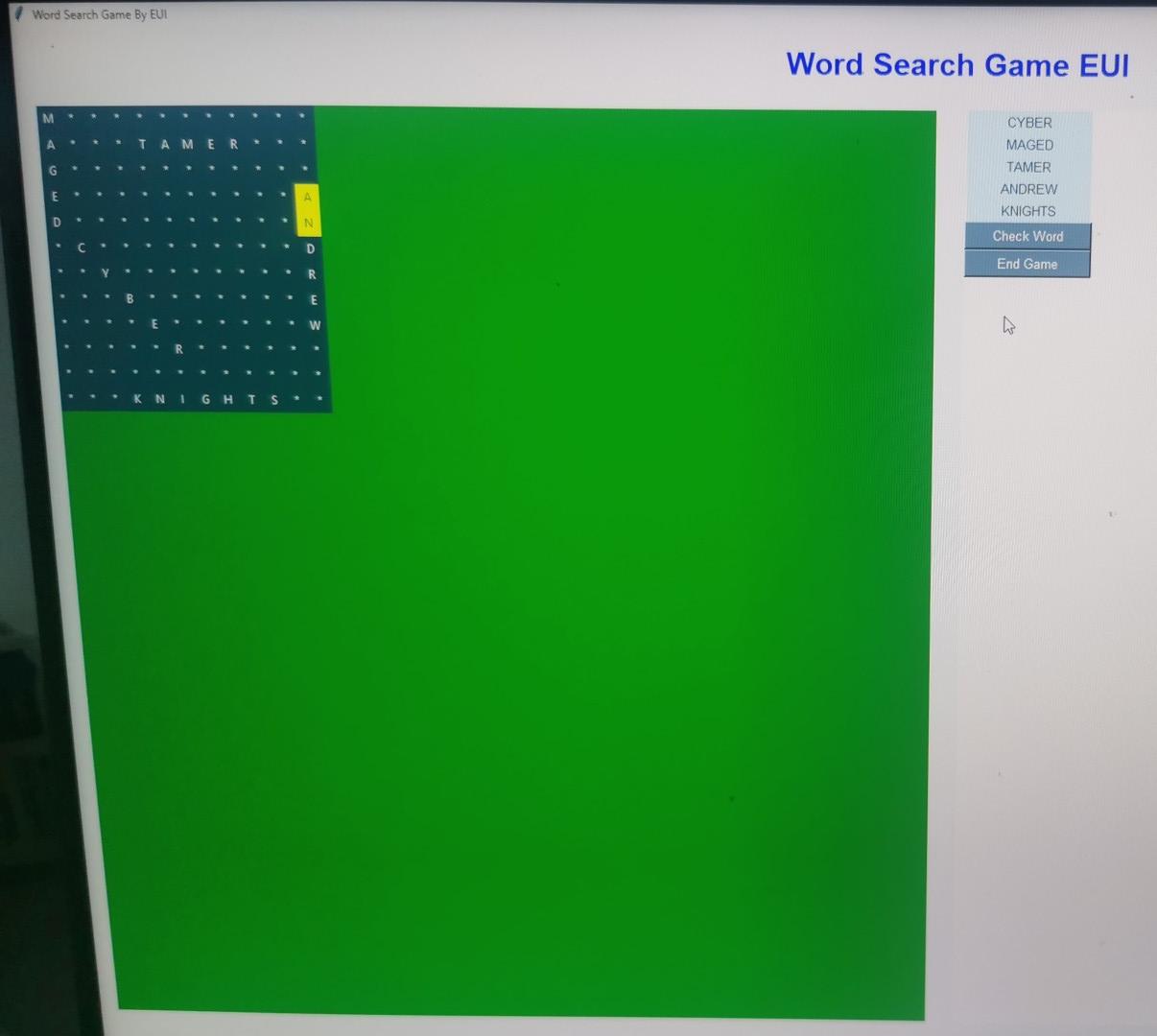
Word Search Game By EUl INInad Canch Game EUI
Step by Step Solution
There are 3 Steps involved in it

Get step-by-step solutions from verified subject matter experts