







Question: Can you please show me how to modify the program $01_blink_led lab(2 > @ main /* mbed Microcontroller Library target * Copyright (c) 2019 ARM
Can you please show me how to modify the program
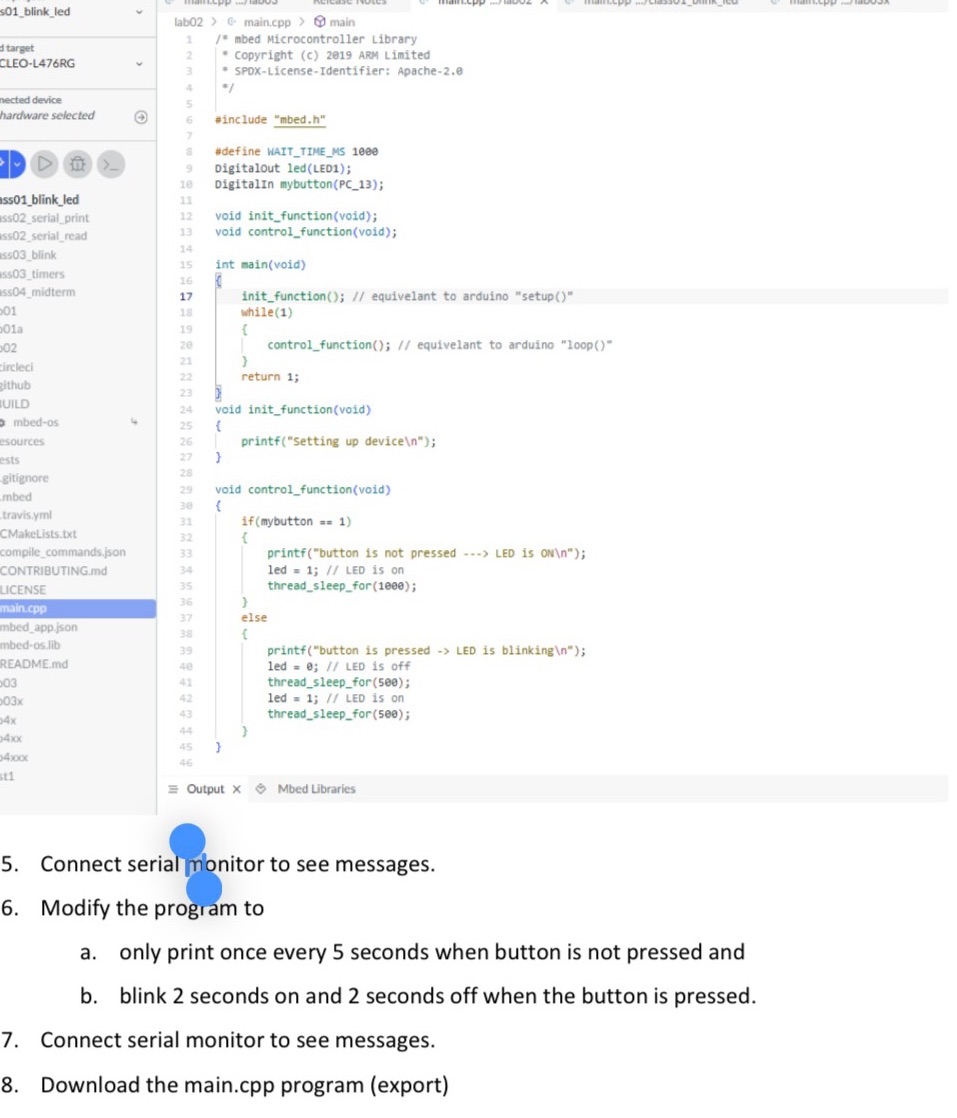
$01_blink_led lab(2 > @ main /* mbed Microcontroller Library target * Copyright (c) 2019 ARM Limited CLEO-L476RG * SPDX-License-Identifier: Apache-2.0 ected device hardware selected #include "mbed.h" #define WAIT_TIME_MS 1080 9 Digitalout led(LED1); 10 DigitalIn mybutton(PC_13); $501_blink_led 11 $502_serial_print 12 void init_function(void); is02_serial_read 13 void control_function(void); 14 503_blink 15 int main(void) 6503_timers 16 $504_midterm 17 init_function(); // equivelant to arduino "setup()" 01 18 while (1) 01a 19 02 20 control_function(); // equivelant to arduino "loop()" 21 ircleci 22 zithub return 1; 23 UILD 24 void init_function(void) mbed-os 25 sources 26 printf("setting up device\ "); ests 27 gitignore 28 29 void control_function(void) mbed 38 travis.yml 31 if (mybutton = = 1) CMakeLists.txt 32 compile_commands.json 33 printf("button is not pressed ---> LED is ON\\"); CONTRIBUTING.md 34 led = 1; // LED is on LICENSE 35 thread_sleep_for (1080); 36 nain.cpp 37 else mbed_app.json 38 nbed-os.lib 39 printf("button is pressed -> LED is blinking\\"); README.md 48 led = 0; // LED is off 03 41 thread_sleep_for(500); 103x 42 led = 1; // LED is on 43 14x thread_sleep_for(see); 44 14xx 45 46 st1 Output X Mbed Libraries 5 . Connect serial monitor to see messages. 6. Modify the program to a. only print once every 5 seconds when button is not pressed and b. blink 2 seconds on and 2 seconds off when the button is pressed. 7. Connect serial monitor to see messages. 8. Download the main.cpp program (export)
Step by Step Solution
There are 3 Steps involved in it

Get step-by-step solutions from verified subject matter experts
 Study Help