







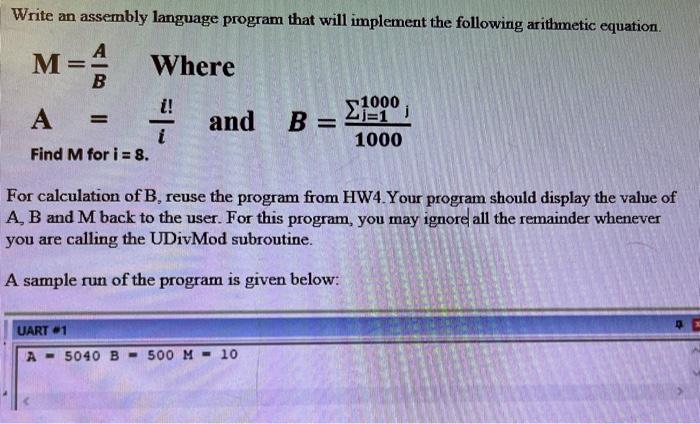
Question: Can you write under this template: ; File: HA 5 - main.s ; Student Name: EXPORT main ; this line is needed to interface with
Can you write under this template:
; File: HAmain.s
; Student Name:
EXPORT main ; this line is needed to interface with init.s
IMPORT GetCh ; Input one ASCII character from the UART # window from keyboard
IMPORT PutCh ; Output one ASCII character to the UART # window
IMPORT PutCRLF ; Output CR and LF to the UART # window
IMPORT UDivMod ; Perform unsigned division to obtain quotient and remainder
IMPORT GetDec ; Input a signed number from the UART # window
IMPORT PutDec ; Output a signed number to the UART # window
IMPORT GetStr ; Input a CRterminated ASCII string from the UART # window
IMPORT PutStr ; Output nullterminated ASCII string to the UART # window
AREA MyCode, CODE, READONLY
ALIGN
main
PUSH LR
POP PC
ALIGN
END ; end of source program in this file
This is the reference that you can reviews for the Calculation B
; File: HAmain.s
; Student's Name:
; This file needs to be in a Keil version project, together with file init.s
; This is an initial demo program for HA which you need to change to complete HA
; All future CS Home Assignments, will have similar but different files,
; like HAmain.s HAmain.s etc.
; Executable code in HAxmain.s files should start at label main
EXPORT main ; this line is needed to interface with init.s
; Usable utility functions defined in file init.s
; Importing any label from another source file is necessary
; in order to use that label in this source file
IMPORT GetCh ; Input one ASCII character from the UART # window from keyboard
IMPORT PutCh ; Output one ASCII character to the UART # window
IMPORT PutCRLF ; Output CR and LF to the UART # window
IMPORT UDivMod ; Perform unsigned division to obtain quotient and remainder
IMPORT GetDec ; Input a signed number from the UART # window
IMPORT PutDec ; Output a signed number to the UART # window
IMPORT GetStr ; Input a CRterminated ASCII string from the UART # window
IMPORT PutStr ; Output nullterminated ASCII string to the UART # window
AREA MyCode, CODE, READONLY
ALIGN ; highly recommended to start and end any area with ALIGN
; Start of executable code is at following label: main
main
; START OF MODIFIABLE CODE
PUSH LR ; save return address
; Prompt for the number of terms n
LDR RPrompt
BL PutStr ; display prompt for number of terms
BL GetDec ; read number into R
MOV R R ; store input number in R
; Calculate the sum using the formula: n n
ADD R R # ; R n
MUL R R R ; R n n
; Divide by to get the sum
MOV R R ; Move product n n to R for division
MOV R # ; R
BL UDivMod ; R quotient R R remainder ignored
; Output the result
LDR RResultMsg
BL PutStr ; display result message
MOV R R ; move result to r
BL PutDec ; display result
; Final message
LDR RByeMsg
BL PutStr ; display goodbye message
POP PC ; return from main
; Some commonly used ASCII codes
CR EQU xD ; Carriage Return to move cursor to beginning of current line
LF EQU xA ; Line Feed to move cursor to same column of next line
; The following data items are in the CODE area,
; so they are all READONLY ie cannot be modified at runtime
; but they can be initialized at assemblytime to any value
Prompt DCB "Please enter the number of terms in your series:
ResultMsg DCB "The sum of your series is
ByeMsg DCB "Bye!",
ALIGN
; The following data items are in the DATA area,
; so they are all READWRITE ie can be modified at runtime
; but are automatically initialized at assemblytime to zeroes
AREA MyData, DATA, READWRITE
ALIGN
MaxName EQU ; your name better be within characters :
Name SPACE MaxName ; storage space for name and NULL byte at end
Value SPACE ; bytes for storing input number
; END OF MODIFIABLE CODE
ALIGN
END ; end of source program in this file
Step by Step Solution
There are 3 Steps involved in it
1 Expert Approved Answer
Step: 1 Unlock

Question Has Been Solved by an Expert!
Get step-by-step solutions from verified subject matter experts
Step: 2 Unlock
Step: 3 Unlock
 Study Help