







Question: Cannot get this code to run properly. Please help and fix it! orksheet Query Builder create table Customer4 (CustomerID number (20) prinary ker, Customer Name
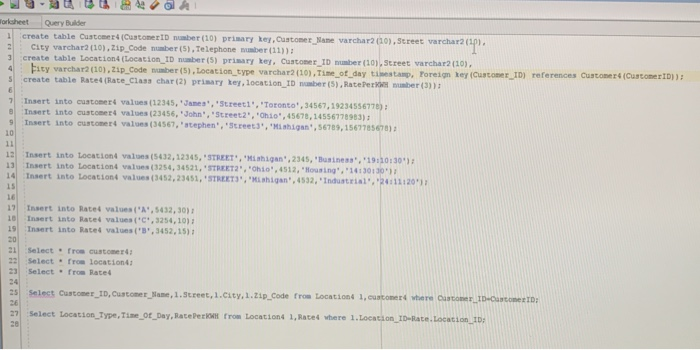
orksheet Query Builder create table Customer4 (CustomerID number (20) prinary ker, Customer Name varchar2 (20), Street varchar2 (cp City varchar2 (10),21p Code number (5) , Telephone number (11)) 2 create table Location4 (Location ID number (5) prisary ke, Custoner ID number (10), Street varchar2 (10) create table Rate4 (Rate Class char(2) prisary ke,Location ID number (S), RatePeber (3)) r(5)Location-type varchar2 (10),Tine_ct-day tine, tamp, roreigner (Custo" r_1p) references curosericuteertD),, Insert into customers values (12345, "James', Streeti', 'Toronto , 34567,19234556778) Insert into custoners values (23456, John Insert into customer4 values (34567, Street2", ohio" 45678,14556778983) stephen, Screeta','Mhigan,56789,1567785678) 1: Insert into Location4 values (5432, 12345, STREET,hgan,2345, Business", 19 30:30) i, Insert into Location4 values (3254. 34521..STREET2",'Ohio',4512,'Housing 14130120'); 4Insert into Locationt values (3452,23451, STREETS",Mshigan,4532, Industrial,24:11120 Le 171 Insert into Rate4 values (%",s432, 30): 10 Insert into Rates values(,3254,10) 19 Insert into Rate4 values('B,3452,15) 20 Select from customer4 22 Select from location4 23 Select from Rate Select Custome TD, ustomes ame, 1.street, 1.caty. I.tip Code from tocations 1, cusconers yhere ourcone.. .D-urcome 1D 27Select Location Type, Tie_ot_Day,RacePecK rom Locations 1, Rated where 1.Location ID-Bate.Locacion D 2E 2e
Step by Step Solution
There are 3 Steps involved in it

Get step-by-step solutions from verified subject matter experts
 Study Help