







Question: Capital Budgeting Project: Basic Capital Budgeting Techniques: Uneven Net Cash Inflows with Taxes; Spreadsheet Application Sherry Li Inc. purchased a $650.000 machine to manufacture computer
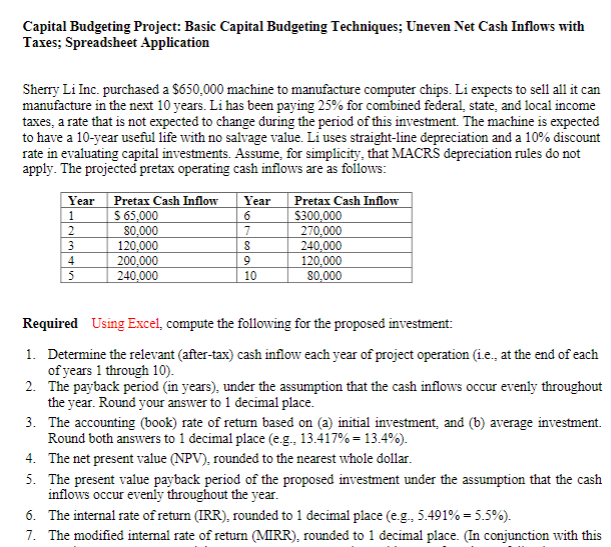
Capital Budgeting Project: Basic Capital Budgeting Techniques: Uneven Net Cash Inflows with Taxes; Spreadsheet Application Sherry Li Inc. purchased a $650.000 machine to manufacture computer chips. Li expects to sell all it can manufacture in the next 10 years. Li has been paying 25% for combined federal state, and local income taxes, a rate that is not expected to change during the period of this investment. The machine is expected to have a 10-year useful life with no salvage value. Li uses straight-line depreciation and a 10% discount rate in evaluating capital investments. Assume, for simplicity, that MACRS depreciation rules do not apply. The projected pretax operating cash inflows are as follows: Year 1 2 3 4 5 Pretax Cash Inflow $ 65,000 80.000 120.000 200,000 240.000 Year 6 7 8 9 10 Pretax Cash Inflow $300,000 270.000 240.000 120.000 80.000 Required Using Excel, compute the following for the proposed investment: 1. Determine the relevant (after-tax) cash inflow each year of project operation (1.e., at the end of each of years 1 through 10). 2. The payback period (in years), under the assumption that the cash inflows occur evenly throughout the year. Round your answer to 1 decimal place. 3. The accounting (book) rate of retum based on (a) initial investment, and (b) average investment. Round both answers to 1 decimal place (eg. 13.417%= 13.4%). 4. The net present value (NPV), rounded to the nearest whole dollar. 5. The present value payback period of the proposed investment under the assumption that the cash inflows occur evenly throughout the year. 6. The internal rate of return (IRR), rounded to 1 decimal place (eg, 5.491% = 5.5%). 7. The modified internal rate of return (MIRR), rounded to 1 decimal place. In conjunction with this
Step by Step Solution
There are 3 Steps involved in it

Get step-by-step solutions from verified subject matter experts
 Study Help