







Question: Carefully read the instructions below to complete this homework: 1. Download and import the attached file CMPS251-HW1.zip to your Eclipse 2. Fix the program and
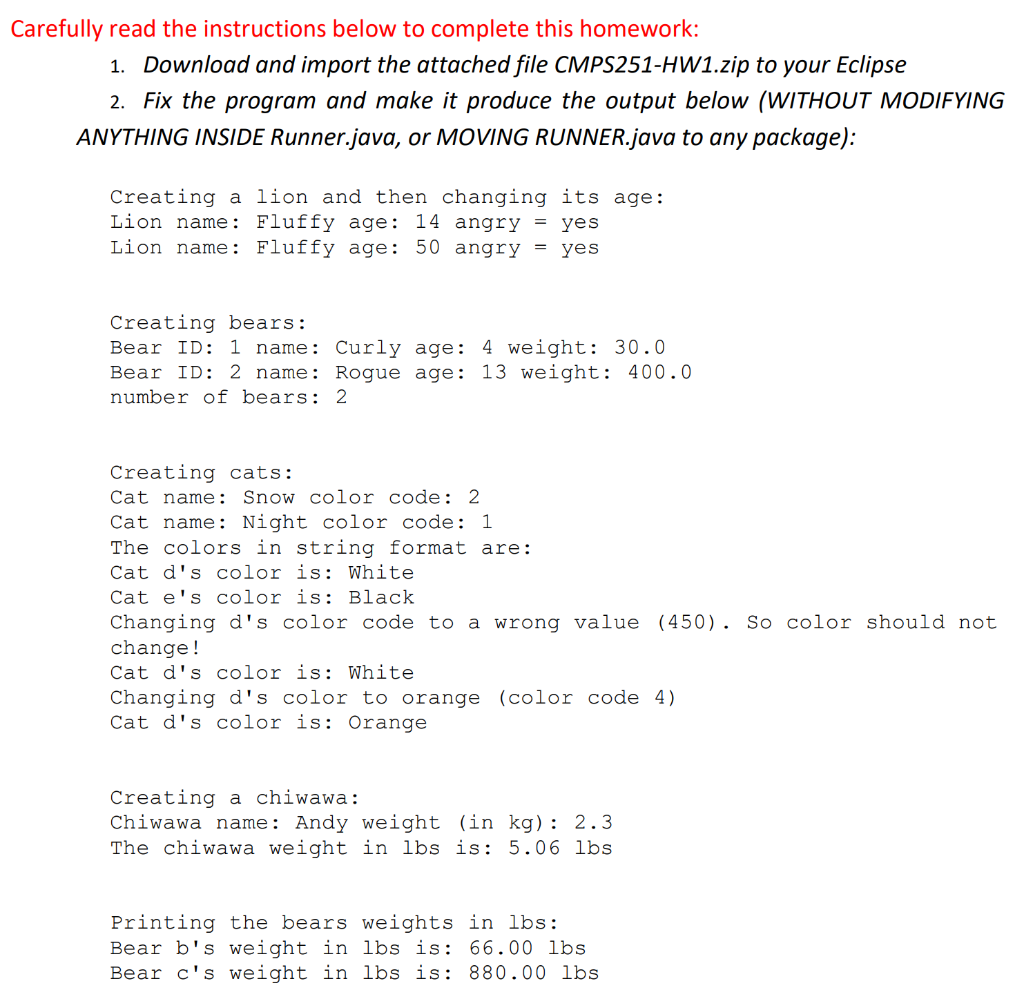
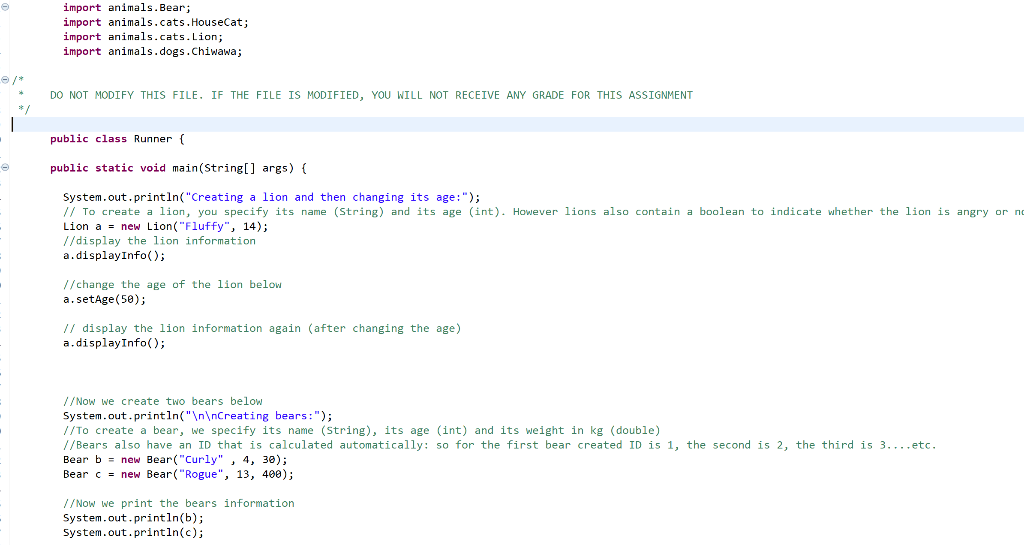
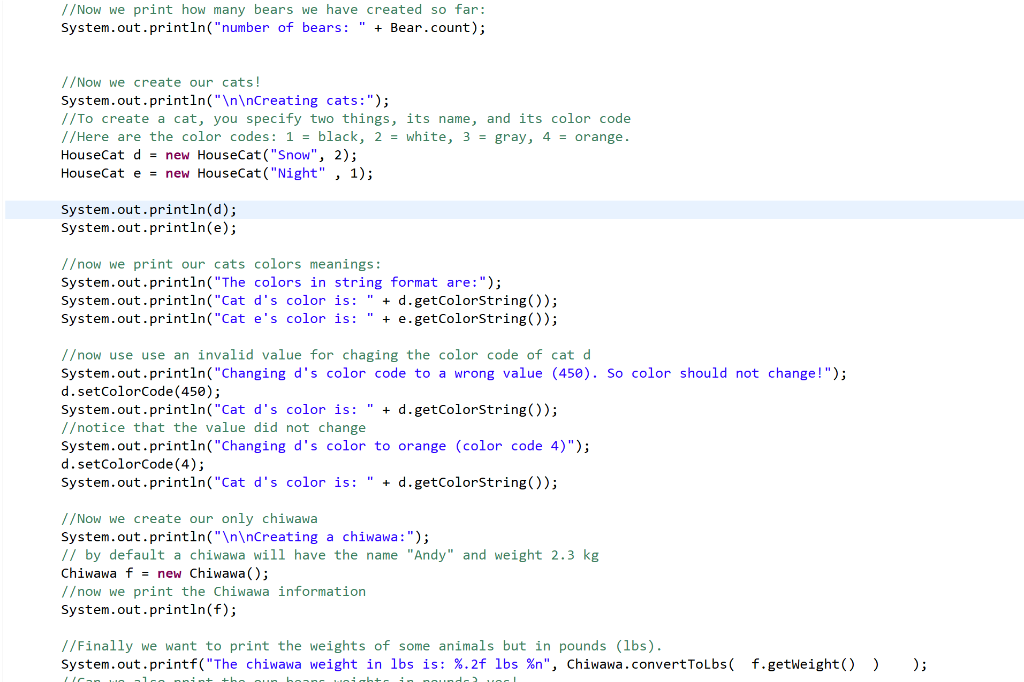


Carefully read the instructions below to complete this homework: 1. Download and import the attached file CMPS251-HW1.zip to your Eclipse 2. Fix the program and make it produce the output below (WITHOUT MODIFYING ANYTHING INSIDE Runner.java, or MOVING RUNNER.java to any package): Creating a lion and then changing its age: Lion name: Fluffy age: 14 angry = yes Lion name: Fluffy age: 50 angry = yes Creating bears: Bear ID: 1 name: Curly age: 4 weight: 30.0 Bear ID: 2 name: Rogue age: 13 weight: 400.0 number of bears: 2 Creating cats: Cat name: Snow color code: 2 Cat name: Night color code: 1 The colors in string format are: Cat d's color is: White Cat e's color is: Black Changing d's color code to a wrong value (450). So color should not change! Cat d's color is: White Changing d's color to orange (color code 4) Cat d's color is: Orange Creating a chiwawa: Chiwawa name: Andy weight (in kg): 2.3 The chiwawa weight in lbs is: 5.06 lbs Printing the bears weights in lbs: Bear b's weight in lbs is: 66.00 lbs Bear c's weight in lbs is: 880.00 lbs import animals. Bear; import animals.cats. HouseCat; import animals.cats.Lion; import animals.dogs.Chiwawa; DO NOT MODIFY THIS FILE. IF THE FILE IS MODIFIED, YOU WILL NOT RECEIVE ANY GRADE FOR THIS ASSIGNMENT public class Runner ( public static void main(String[] args) { System.out.println("Creating a lion and then changing its age:"); // To create a lion, you specify its name (String) and its age (int). However lions also contain a boolean to indicate whether the lion is angry or no Lion a = new Lion("Fluffy", 14); //display the lion information a. displayInfo(); // change the age of the lion below a.setAge(50); // display the lion information again (after changing the age) a.displayInfo(); // Now we create two bears below System.out.println(" Creating bears:"); //To create a bear, we specify its name (String), its age (int) and its weight in kg (double) //Bears also have an ID that is calculated automatically: so for the first bear created ID is 1, the second is 2, the third is 3. ...etc. Bear b = new Bear("Curly", 4, 30); Bear c = new Bear("Rogue", 13, 400); // Now we print the bears information System.out.println(b); System.out.println(); // Now we print how many bears we have created so far: System.out.println("number of bears: " + Bear.count); / /Now we create our cats! System.out.println(" Creating cats:"); //To create a cat, you specify two things, its name, and its color code //Here are the color codes: 1 = black, 2 = white, 3 = gray, 4 = orange. HouseCat d = new HouseCat("Snow", 2); HouseCat e = new HouseCat("Night" , 1); System.out.println(d); System.out.println(e); /ow we print our cats colors meanings: System.out.println("The colors in string format are:"); System.out.println("Cat d's color is: " + d.getColorString(); System.out.println("Cat e's color is: " + e.getColorString(); /ow use use an invalid value for chaging the color code of cat d System.out.println("Changing d's color code to a wrong value (450). So color should not change!"); d.setColorCode(450); System.out.println("Cat d's color is: " + d.getColorString()); /otice that the value did not change System.out.println("Changing d's color to orange (color code 4)"); d.setColorCode(4); System.out.println("Cat d's color is: " + d.getColorString(); 1/Now we create our only chiwawa System.out.println(" Creating a chiwawa:"); // by default a chiwawa will have the name "Andy" and weight 2.3 kg Chiwawa f = new Chiwawa(); 1ow we print the Chiwawa information System.out.println(f); //Finally we want to print the weights of some animals but in pounds (lbs). System.out.printf("The chiwawa weight in lbs is: %.2f lbs %n", Chiwawa.convertToLbs( f.getWeight() ) ); le + ); // Finally we want to print the weights of some animals but in pounds (lbs). System.out.printf("The chiwawa weight in lbs is: %.2f lbs %n", Chiwawa.convertToLbs( f.getWeight() ) //Can we also print the our bears weights in pounds? yes! System.out.println(" Printing the bears weights in lbs:"); System.out.printf("Bear b's weight in lbs is: %.2f lbs %n", Chiwawa.convertToLbs! b.getWeight() ) System.out.printf("Bear c's weight in lbs is: %.2f lbs %n", Chiwawa.convertToLbs ( c.getWeight() ) ); ); Download and import the attached CMPS251-HW1.zip eclipse project file. Then, follow the instructions in the attached pdf file. Make sure you do not modify the Runner.java class, or move it to any package. Your task is to create other classes and packages to make Runner.java work and produce the output in the attached .pdf file. You will be submitting an exported Eclipse project .zip file in the end. If you do not know how to import a project, CLICK HERE Carefully read the instructions below to complete this homework: 1. Download and import the attached file CMPS251-HW1.zip to your Eclipse 2. Fix the program and make it produce the output below (WITHOUT MODIFYING ANYTHING INSIDE Runner.java, or MOVING RUNNER.java to any package): Creating a lion and then changing its age: Lion name: Fluffy age: 14 angry = yes Lion name: Fluffy age: 50 angry = yes Creating bears: Bear ID: 1 name: Curly age: 4 weight: 30.0 Bear ID: 2 name: Rogue age: 13 weight: 400.0 number of bears: 2 Creating cats: Cat name: Snow color code: 2 Cat name: Night color code: 1 The colors in string format are: Cat d's color is: White Cat e's color is: Black Changing d's color code to a wrong value (450). So color should not change! Cat d's color is: White Changing d's color to orange (color code 4) Cat d's color is: Orange Creating a chiwawa: Chiwawa name: Andy weight (in kg): 2.3 The chiwawa weight in lbs is: 5.06 lbs Printing the bears weights in lbs: Bear b's weight in lbs is: 66.00 lbs Bear c's weight in lbs is: 880.00 lbs import animals. Bear; import animals.cats. HouseCat; import animals.cats.Lion; import animals.dogs.Chiwawa; DO NOT MODIFY THIS FILE. IF THE FILE IS MODIFIED, YOU WILL NOT RECEIVE ANY GRADE FOR THIS ASSIGNMENT public class Runner ( public static void main(String[] args) { System.out.println("Creating a lion and then changing its age:"); // To create a lion, you specify its name (String) and its age (int). However lions also contain a boolean to indicate whether the lion is angry or no Lion a = new Lion("Fluffy", 14); //display the lion information a. displayInfo(); // change the age of the lion below a.setAge(50); // display the lion information again (after changing the age) a.displayInfo(); // Now we create two bears below System.out.println(" Creating bears:"); //To create a bear, we specify its name (String), its age (int) and its weight in kg (double) //Bears also have an ID that is calculated automatically: so for the first bear created ID is 1, the second is 2, the third is 3. ...etc. Bear b = new Bear("Curly", 4, 30); Bear c = new Bear("Rogue", 13, 400); // Now we print the bears information System.out.println(b); System.out.println(); // Now we print how many bears we have created so far: System.out.println("number of bears: " + Bear.count); / /Now we create our cats! System.out.println(" Creating cats:"); //To create a cat, you specify two things, its name, and its color code //Here are the color codes: 1 = black, 2 = white, 3 = gray, 4 = orange. HouseCat d = new HouseCat("Snow", 2); HouseCat e = new HouseCat("Night" , 1); System.out.println(d); System.out.println(e); /ow we print our cats colors meanings: System.out.println("The colors in string format are:"); System.out.println("Cat d's color is: " + d.getColorString(); System.out.println("Cat e's color is: " + e.getColorString(); /ow use use an invalid value for chaging the color code of cat d System.out.println("Changing d's color code to a wrong value (450). So color should not change!"); d.setColorCode(450); System.out.println("Cat d's color is: " + d.getColorString()); /otice that the value did not change System.out.println("Changing d's color to orange (color code 4)"); d.setColorCode(4); System.out.println("Cat d's color is: " + d.getColorString(); 1/Now we create our only chiwawa System.out.println(" Creating a chiwawa:"); // by default a chiwawa will have the name "Andy" and weight 2.3 kg Chiwawa f = new Chiwawa(); 1ow we print the Chiwawa information System.out.println(f); //Finally we want to print the weights of some animals but in pounds (lbs). System.out.printf("The chiwawa weight in lbs is: %.2f lbs %n", Chiwawa.convertToLbs( f.getWeight() ) ); le + ); // Finally we want to print the weights of some animals but in pounds (lbs). System.out.printf("The chiwawa weight in lbs is: %.2f lbs %n", Chiwawa.convertToLbs( f.getWeight() ) //Can we also print the our bears weights in pounds? yes! System.out.println(" Printing the bears weights in lbs:"); System.out.printf("Bear b's weight in lbs is: %.2f lbs %n", Chiwawa.convertToLbs! b.getWeight() ) System.out.printf("Bear c's weight in lbs is: %.2f lbs %n", Chiwawa.convertToLbs ( c.getWeight() ) ); ); Download and import the attached CMPS251-HW1.zip eclipse project file. Then, follow the instructions in the attached pdf file. Make sure you do not modify the Runner.java class, or move it to any package. Your task is to create other classes and packages to make Runner.java work and produce the output in the attached .pdf file. You will be submitting an exported Eclipse project .zip file in the end. If you do not know how to import a project, CLICK HERE
Step by Step Solution
There are 3 Steps involved in it

Get step-by-step solutions from verified subject matter experts
 Study Help