







Question: CASE ANALYSES 15-15. BSN Bicycles I (Creating a Database from Scratch with Microsoft Access) Bill Barnes and Tom Freeman opened their BSN bicycle shop in
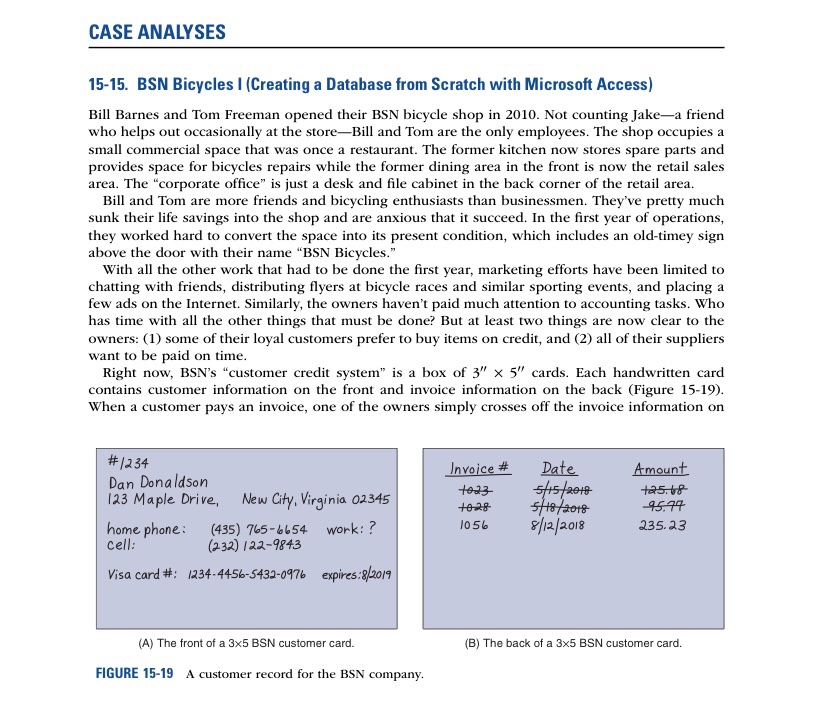
CASE ANALYSES 15-15. BSN Bicycles I (Creating a Database from Scratch with Microsoft Access) Bill Barnes and Tom Freeman opened their BSN bicycle shop in 2010. Not counting Jake-a friend who helps out occasionally at the store-Bill and Tom are the only employees. The shop occupies a small commercial space that was once a restaurant. The former kitchen now stores spare parts and provides space for bicycles repairs while the former dining area in the front is now the retail sales area. The "corporate office" is just a desk and file cabinet in the back corner of the retail area. Bill and Tom are more friends and bicycling enthusiasts than businessmen. They've pretty much sunk their life savings into the shop and are anxious that it succeed. In the first year of operations, they worked hard to convert the space into its present condition, which includes an old-timey sign above the door with their name "BSN Bicycles." With all the other work that had to be done the first year, marketing efforts have been limited to chatting with friends, distributing flyers at bicycle races and similar sporting events, and placing a few ads on the Internet. Similarly, the owners haven't paid much attention to accounting tasks. Who has time with all the other things that must be done? But at least two things are now clear to the owners: (1) some of their loyal customers prefer to buy items on credit, and (2) all of their suppliers want to be paid on time. Right now, BSN's "customer credit system" is a box of 3" x 5" cards. Each handwritten card contains customer information on the front and invoice information on the back (Figure 15-19). When a customer pays an invoice, one of the owners simply crosses off the invoice information on # 1 234 Invoice # Date Amount Dan Donaldson 123 Maple Drive, New City, Virginia 02345 5/15 /2010 to28 5/18 / 2018 45.77 home phone : (435) 765-6654 work:? 1056 8/12/2018 235.23 cell: (232) 122-9843 Visa card #: 1234-4456-5432-0976 expires: 8/20/9 (A) The front of a 3x5 BSN customer card. (B) The back of a 3x5 BSN customer card. FIGURE 15-19 A customer record for the BSN company.the card. The "supplier accounts system" is similar, except that the vendor box of 3\" X 5-" cards is green, whereas the customer box is gray. jake is a student at the local university. He is taking an AIS course that includes a segment on Mien'lsoft Access. He is still learning about database theory, but thinks that converting the shop's eurrent \"accounting systems" to a DBMS might be a good idea. He thinks, for example, that BSN needs a customer table and a vendor (supplier) table. He also thinks that BSN will need an inventory table to keep track of inventory, but that even more tables might be required. Can you help them? Requirements 1. Identify the resources, events, and agents [or BSN's accounting systems. Draw one or more ER diagrams that illustrate the relationships between these items. 2. Identify the tables that you would need to create a working database for the company's receiv- ables, payables, and inventory. 3. Using Access or another DBMS required by your instructor, create at least three records [or each of' the tables you identied in part 2. Hints: {I} Use the information on the front of the 3:\" x 5\" card in Figure 15-19 [or the customer record structure. {2) The data elds for the Vendors table should include the vendor ID, vendor name and address inft'lrmation, phone number, [as number, and contact person. {3:} The data elds for the Inventory table should include item number, item description, units {e.g., dozen, each, etc.), unit cost, unit retail sales price, and quantity on hand. 4. Create relationships for your various tables. 5'. Document your work by printing the relationships window
Step by Step Solution
There are 3 Steps involved in it

Get step-by-step solutions from verified subject matter experts
 Study Help