







Question: Case Study Final mark for both BIT and DIT students: Recall the assessment regime used in COMP101 Foundations of Computer Systems. It has three assessments
Case Study
Final mark for both BIT and DIT students: Recall the assessment regime used in COMP101 Foundations of Computer Systems. It has three assessments with the following weightings.
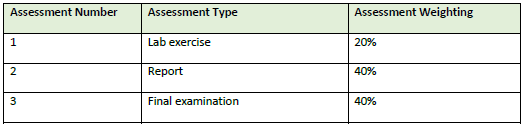
The assessment regime in COMP101 applies to both BIT and DIT students. Upon completion of all three assessments, both groups of students will receive a final mark that is calculated in the following way.
Each assessment is marked out of 100 and the mark for each assessment may be a decimal number with at most two decimal points (e.g., 68, or 68.5, or 68.45). The final mark for COMP101 is the weighted sum of all three assessments, rounded up to the nearest integer. For instance, Student A received 75.67/100, 45.8/100, 32/100 for Assessment 1, 2 and 3 respectively. Their final mark for COMP101 is 47 (46.254 rounded up to the nearest integer). 75.67 20%+45.8 40%+3240%=46.254
For simplicity, we will use a bracket that consists of three numbers to denote the marks of a students three assignments in order. For instance, (75.67, 45.8, 32) denote a student who received 75.67/100 for the first assessment, 45.8/100 for the second, and 32/100 for the third. Once the final mark is calculated, it is used to determine the interim grade. However, the way the interim grade is calculated differs depending on the type of students.
Interim Grade Letter for BIT students
The Assessment Policy and Procedures of ABC University stipulates the following rules for determining the interim grade letter for undergraduate students (including BIT students). The range in the Final mark column includes the numbers on both ends.
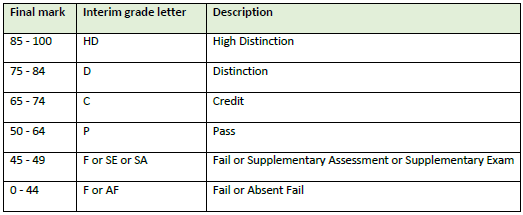
BIT students whose final mark is between 0 and 44 (inclusive) may be awarded an F (Fail) or an AF (Absent Fail). If two or more assessments are awarded zero and the final mark is between 0 and 44 (inclusive), the student will be awarded an AF (Absent Fail), otherwise they are awarded an F (Fail).
For example, BIT students with (0, 100, 0) should be awarded an AF because their final mark is 40, and two assessments are marked zero. However, BIT students with (100, 50, 0) should be awarded an F because although their final mark is 40, they only have one assessment awarded zero.
BIT students who have marginally failed, that is, their final mark is between 45 49 (inclusive), may be awarded an F (Fail) or Supplementary Examination (SE) or Supplementary Assessment (SA). If a students final mark is between 45 49, they will receive an F (Fail) unless they satisfy all the following conditions: o Their final mark is between 45 49 (inclusive). o They do not have any assessment marked zero. o They only failed (i.e., less than 50) one assessment.
BIT students whose final mark is between 45 49 will receive an SE or SA if they satisfy all the conditions above. If the assessment they failed is Assessment 1 or Assessment 2, they will receive an SA and they will be given an opportunity to attempt a supplementary assessment. If the assessment they failed is Assessment 3, they will receive an SE and they will be given an opportunity to sit a supplementary exam.
For example, BIT students with (40, 100, 0) will receive an F (Fail) because although their final mark is 48 (i.e., between 45 49), they have one assessment marked zero (Assessment 3). Students with (10, 100, 10) will equally be awarded an F (Fail) because although their final mark is 46 (i.e., between 45 49), they have failed more than one assessment (Assessment 1 and Assessment 3). Students with (50, 50, 40) will be awarded an SE because their final mark is 46 (i.e., between 45 49) and satisfy all the three conditions above. The only failed assessment is Assessment 3, and they will be given an opportunity to sit a supplementary examination.
Interim Grade Letter for DIT students
For diploma level students (including DIT students), the calculation of interim grade is much more straightforward as shown in the following table.

Students who received an NYC (not yet competent) will be provided with an opportunity to resubmit all three assessments.
Final Grade Letter A couple of weeks after the Release of Grade date, all supplementary assessments and examinations have been finalised for BIT students. For DIT students who have been given an opportunity to resubmit their assessments, their submissions have been marked and finalised. All the interim grade letters now need to be converted to a final grade letter, that is, the grade letter that appear on students transcript.
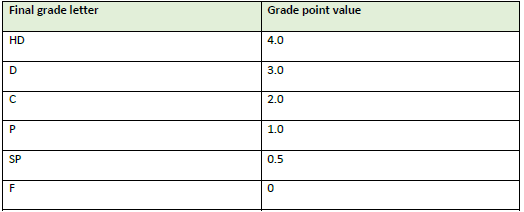
Final Grade Letter - BIT students For HD (High distinction), D (Distinction), C (Credit), P (Pass) and F (Fail), they will not be converted as they themselves are final grade letters. For SA and SE, they will be converted to either a SP (Supplementary Pass) or F (Fail). If the student who have been awarded an SA or SE passed the supplementary assessment or supplementary examination (that is, they achieved no less than 50/100), their grade letter will be converted to SP (Supplementary Pass), otherwise it will be converted to F (Fail). For AF (Absent Fail), it will be converted to F (Fail). Each final grade letter carries some grade point value as detailed in the table below.
Final Grade Letter - DIT students For CP (Competent), it does not need to be converted as it is a final grade letter itself. For NYC (Not yet competent), it will be converted to either a CP (Competent) or NC (Not competent). For students who received NYC (Not yet competent) and resubmitted all three assessments, if the final mark of the resubmitted assessments is no less than 50 marks, then NYC (Not yet competent) will be converted to CP (Competent), otherwise, it will be converted to NC (Not competent). At this stage, if the final mark of the resubmitted assessments is no less than 50 marks, then the students all assessment marks and final mark are determined by the resubmission of assessments, that is, the information of the marks of their first submissions will be discarded. Each final grade letter carries some grade point value as detailed in the table below.

The program you need to implement The Subject Coordinator (the user) will use your program to manage students grade. This section describes several scenarios in which the subject coordinator (the user) can interact with your program.
Menu Once your program starts, it should prompt the user the following main menu, allowing the user to choose any one of the options: >>> Choose one of the following options: >>> 1 - Enter student grade information >>> 2 - Print all student grade information >>> 3 - Print class performance statistics >>> 4 - Exit You should read in the user choice an integer between 1 and 4. Your program should detect illegal inputs (that is, inputs that should not be allowed, e.g. letter a or number 6), and prompt to the user that they should only enter a whole number between 1 and 4. For the rest part of your program, you should always verify input validity.
Option 1 Enter student grade information If the user chooses option 1, your program should then prompt the user with the following Option 1 menu: >>> Choose one of the following options: >>> 1.1 - Enter a BIT student information >>> 1.2 - Enter a DIT student information >>> 1.3 - Go back to the main menu
Option 1.1 Enter a BIT student information If the user chooses 1.1, your program should then allow the user to enter the following information Student ID (A capital letter A followed by 8 digits) Students name Students assessment marks (separated by comma) [Optional] Students SE/SA mark (If your program detects that the student would have been given an SE or SA, your program should then ask for their supplementary assessment or supplementary examination mark). Your program will then prompt the user Option 1 menu. For example, >>> Enter student ID: >>> A12345678 >>> Enter student name: >>> Josh Hutter >>> Enter student assessment marks (separated by comma): >>> 40,100,0 >>> Choose one of the following options: >>> 1.1 - Enter a BIT student information >>> 1.2 - Enter a DIT student information >>> 1.3 - Go back to the main menu
Option 1.2 Enter a DIT student information If the user chooses 1.2, your program should then allow the user to enter the following information Student ID (A capital letter A followed by 8 digits) Students name Students assessment marks (separated by comma) [Optional] Students resubmission assessment marks (If your program detects that the student would have been given an NYC, your program should then ask for their resubmission marks). Your program will then prompt the user Option 1 menu. For example, >>> Enter student ID: >>> A12345678 >>> Enter student name: >>> Josh Hutter >>> Enter student assessment marks (separated by comma): >>> 90,100,100 >>> Choose one of the following options: >>> 1.1 - Enter a BIT student information >>> 1.2 - Enter a DIT student information >>> 1.3 - Go back to the main menu
Option 1.3 Go back to the main menu If the user chooses 1.3, your program will then prompt the user the main menu and await users choice.
Option 2 Print all student grade information If the user chooses option 2, your program should then prompt the user with the following Option 2 menu: >>> Choose one of the following options: >>> 2.1 Print all student grade information ascendingly by final mark >>> 2.2 Print all student grade information descendingly by final mark >>> 2.3 Go back to the main menu
Option 2.1 Print all student grade information ascendingly by final mark If the user chooses option 2.1, your program should print student ID, student name, student type (BIT or DIT), student final mark and student final grade letter separated by a tabular character. They are sorted ascendingly by final marks. Your program will then prompt the user with Option 2 menu. >>> A47586734 Mary Lastname DIT 95 CP >>> A12345678 Josh Lastname BIT 90 HD >>> A85769234 Lovejeet Singh BIT 34 F >>> Choose one of the following options: >>> 2.1 Print all student grade information ascendingly by final mark >>> 2.2 Print all student grade information descendingly by final mark >>> 2.3 Go back to the main menu
Option 2.2 Print all student grade information descendingly by final mark If the user chooses option 2.2, your program should print student ID, student name, student type (BIT or DIT), student final mark and student final grade letter separated by a tabular character. They are sorted descendingly by final marks. Your program will then prompt the user with Option 2 menu. >>> A85769234 Lovejeet Singh BIT 34 F >>> A12345678 Josh Lastname BIT 90 HD >>> A47586734 Mary Lastname DIT 95 CP >>> Choose one of the following options: >>> 2.1 Print all student grade information ascendingly by final mark >>> 2.2 Print all student grade information descendingly by final mark >>> 2.3 Go back to the main menu
Option 2.3 Go back to the main menu If the user chooses 2.3, your program will then prompt the user the main menu and await users choice.
Option 3 - Print class performance statistics If the user chooses option 3, your program will output the following class performance statistics: o Number of students: This number shows the total number of students that the user typed in. o Number of BIT students: This number shows the total number of students that the user typed in. o Number of DIT students: o Student pass rate: The percentage of students who received a final grade letter of HD, D, C, P SP or CP, that is, (#+#+#+#+#+#) / # #HD represents the number of students who received HD. #student represents the total number of students. Rounded to two decimal points. o Student pass rate (adjusted): The percentage of students who received a final grade letter of HD, D, C, P, SP or CP. This percentage excludes students who received an AF from the total number of students, that is, (#+#+#+#+#+#) / (##) Rounded to two decimal points. o Average mark for Assessment 1: the average mark for Assessment 1 with two decimal points. o Average mark for Assessment 2: the average mark for Assessment 2 with two decimal points. o Average mark for Assessment 3: the average mark for Assessment 3 with two decimal points. o Average final mark: the average mark for final mark with two decimal points. o Average grade point: the average grade point for all students in COMP101 with one decimal point. o Number of HDs: the number of students who received a final grade letter HD. o Number of Ds: the number of students who received a final grade letter D. o Number of Cs: the number of students who received a final grade letter C. o Number of Ps: the number of students who received a final grade letter P. o Number of SPs: the number of students who received a final grade letter SP. o Number of CPs: the number of students who received a final grade letter CP. o Number of Fs: the number of students who received a final grade letter F. Then prompt the user with the main menu.
Option 4 Exit If the user chooses option 4, your program should terminate.
Assessment Number Assessment Type Assessment Weighting 1 Lab exercise 20% 2 2 Report 40% 3 Final examination 40% Final mark Interim grade letter Description 85 - 100 HD High Distinction 75 - 84 D Distinction 65 - 74 Credit 50-64 P Pass 45-49 For SE or SA Fail or Supplementary Assessment or Supplementary Exam 0-44 For AF Fail or Absent Fail Final mark Interim grade letter Description 50 - 100 CP Competent 0-49 NYC Not yet competent Final grade letter Grade point value HD 4.0 D 3.0 2.0 1.0 SP 0.5 0 F 0 Final grade letter Grade point value CP 4.0 NC 0
Step by Step Solution
There are 3 Steps involved in it

Get step-by-step solutions from verified subject matter experts
 Study Help