Question: CBSA CBSA Style Guide Style Guide Our Target Audience Numbered lists Small, medium, and enterprise size organisations. Used when order is important. Each item expresses
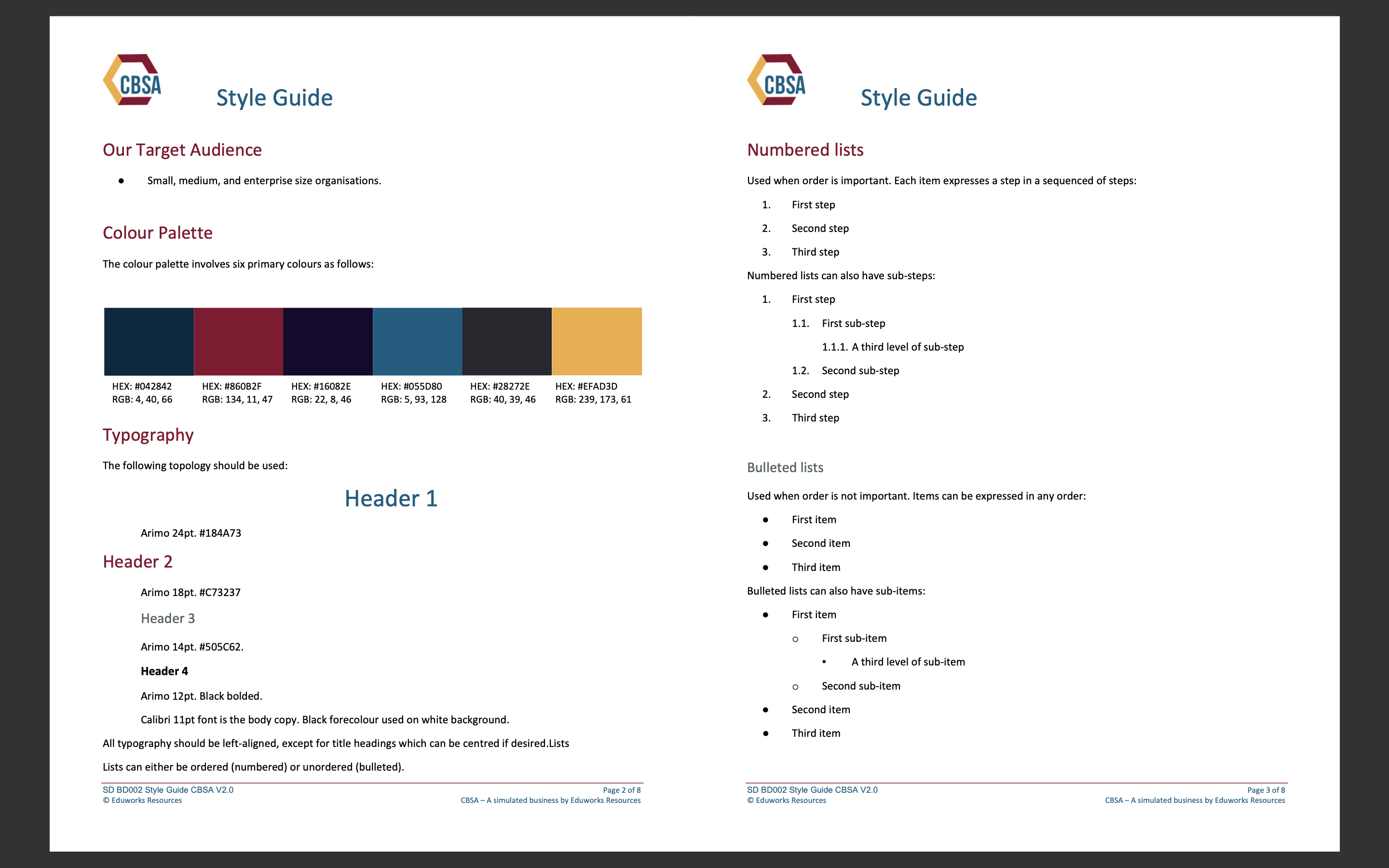
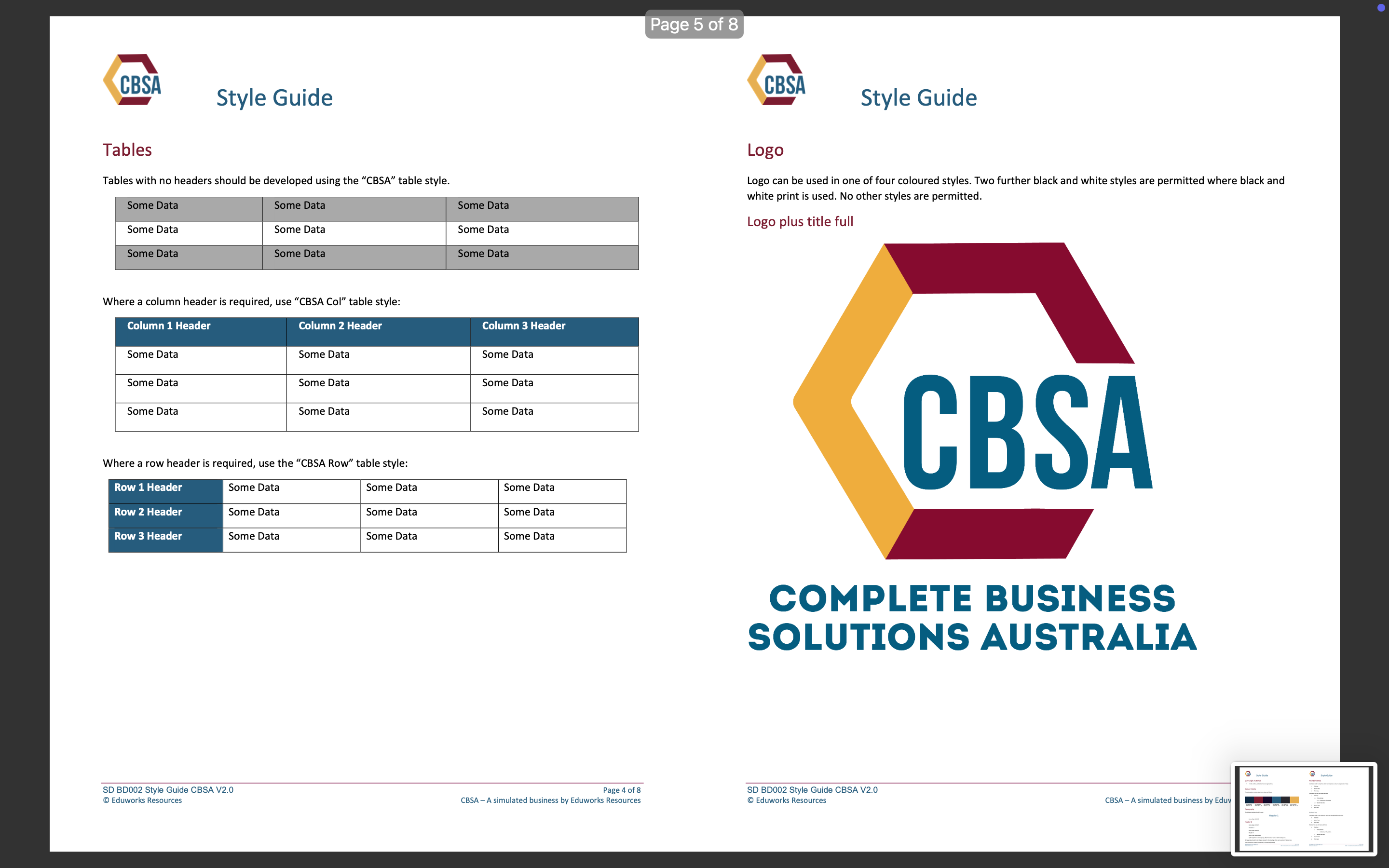
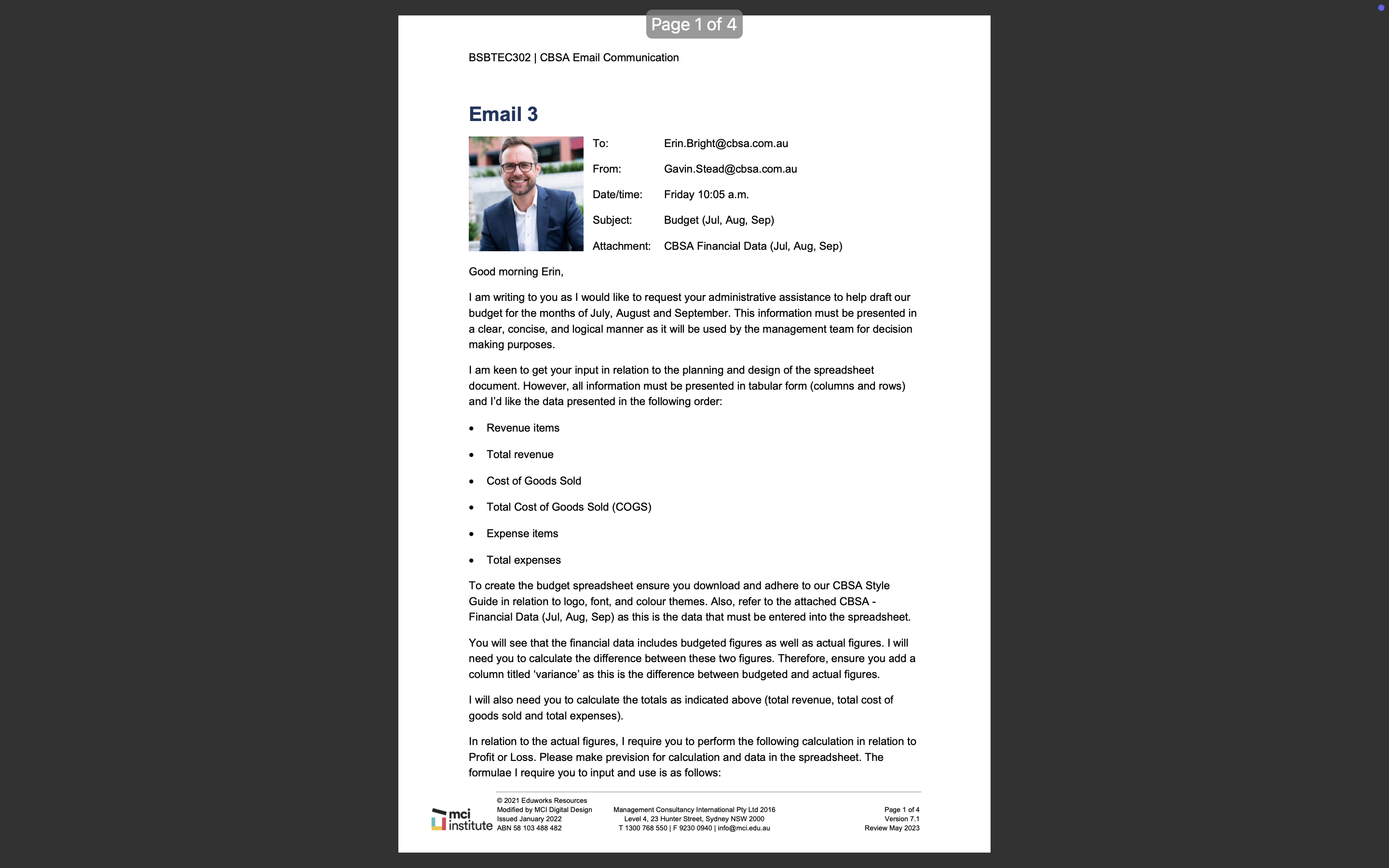
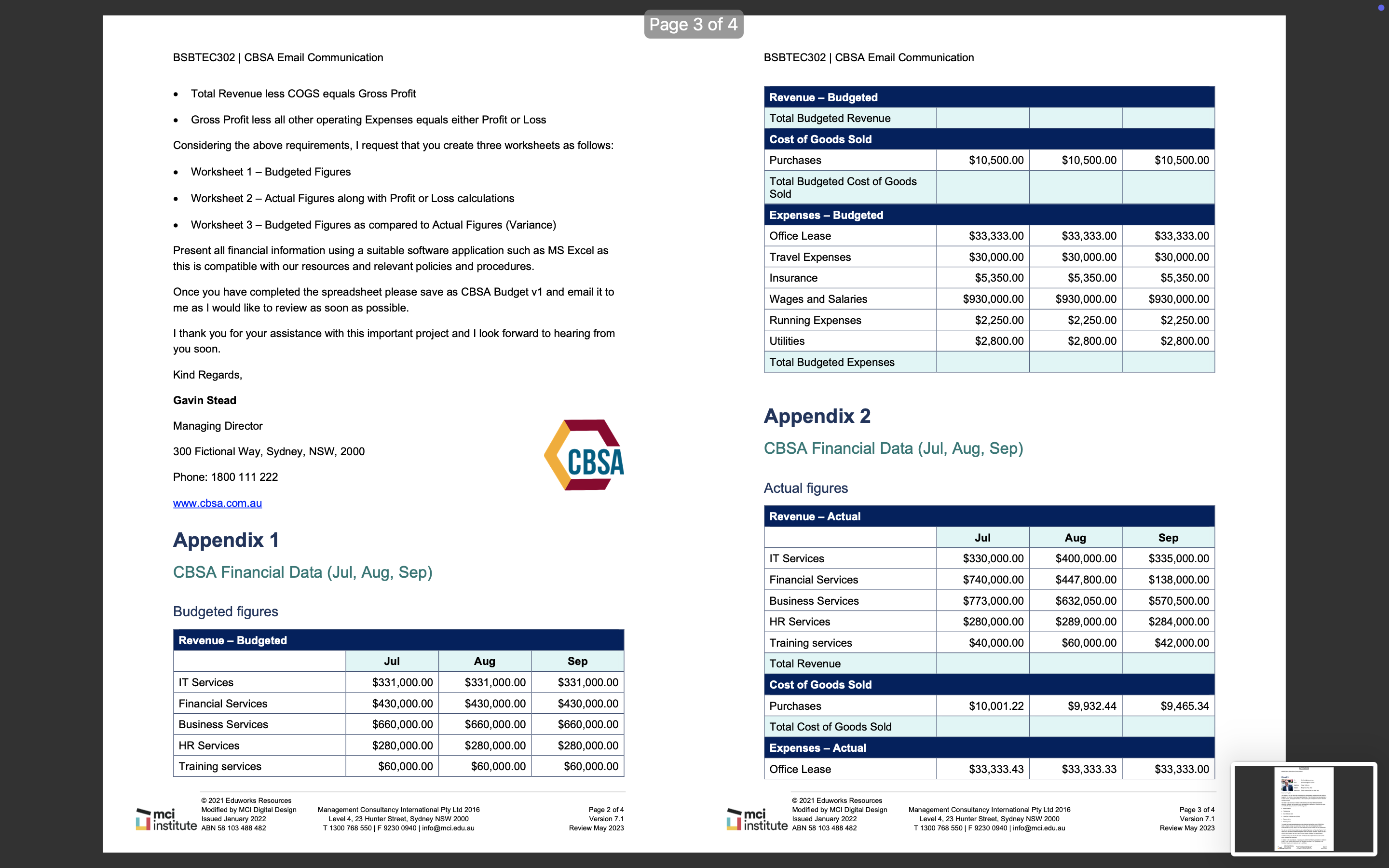
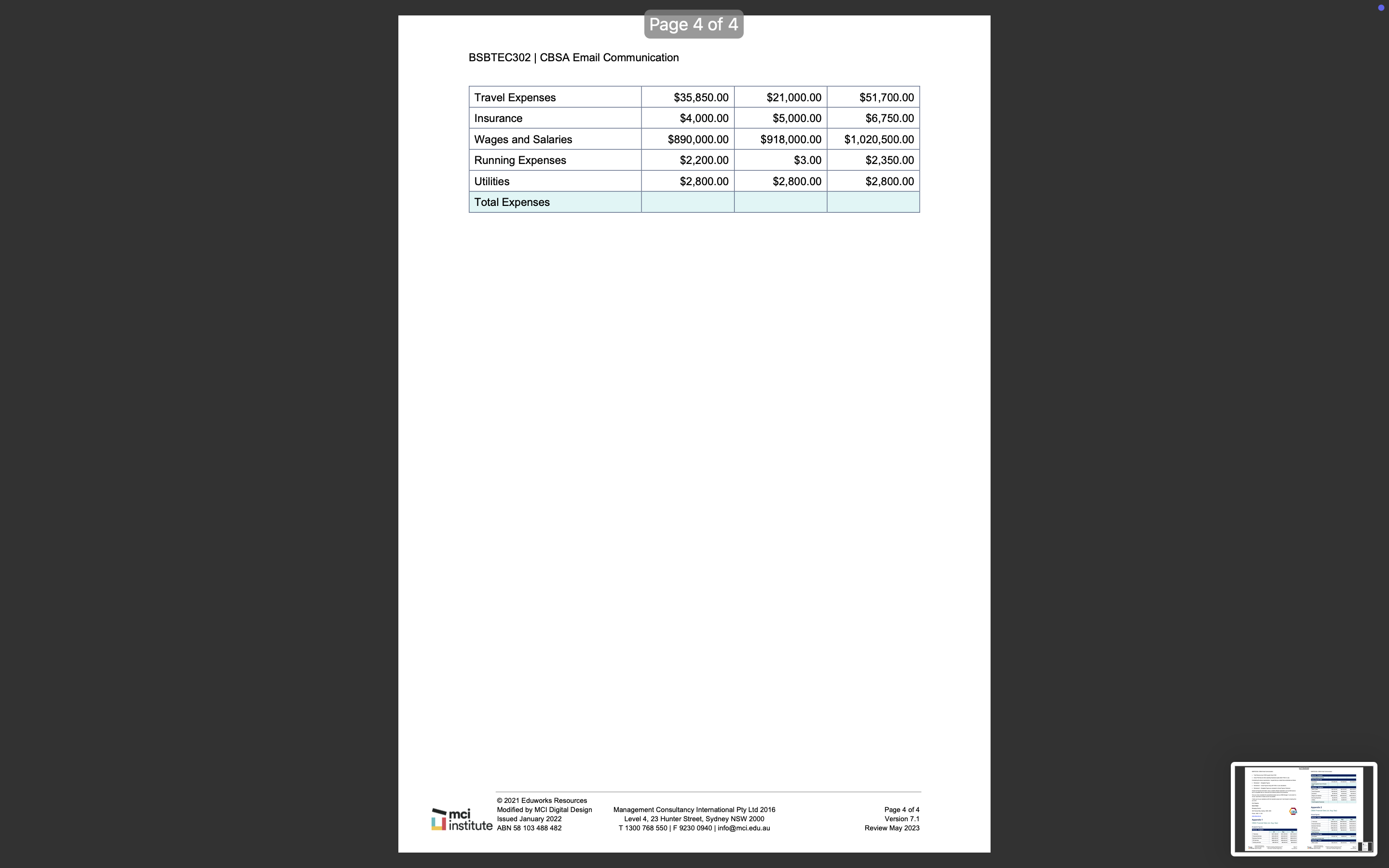
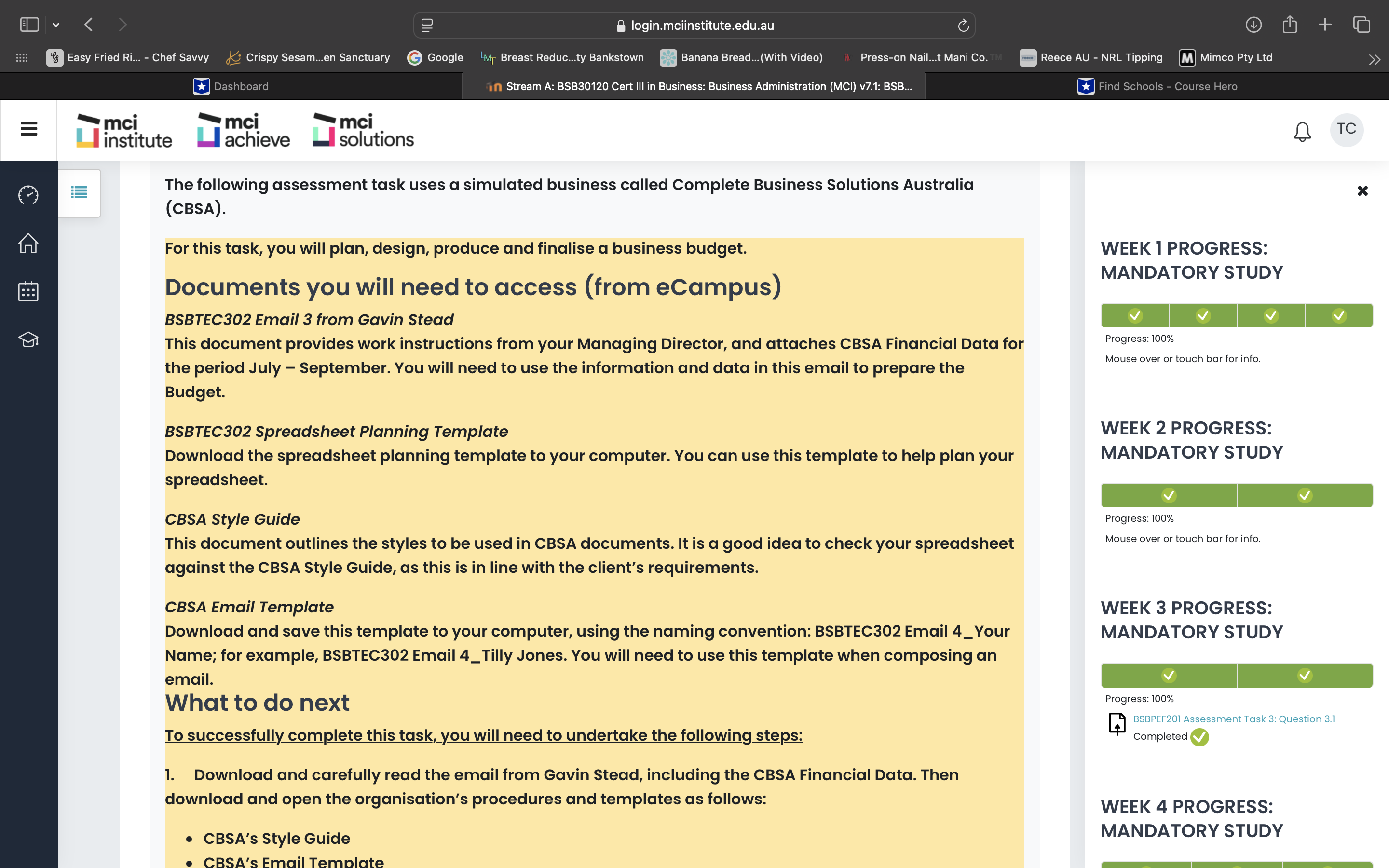
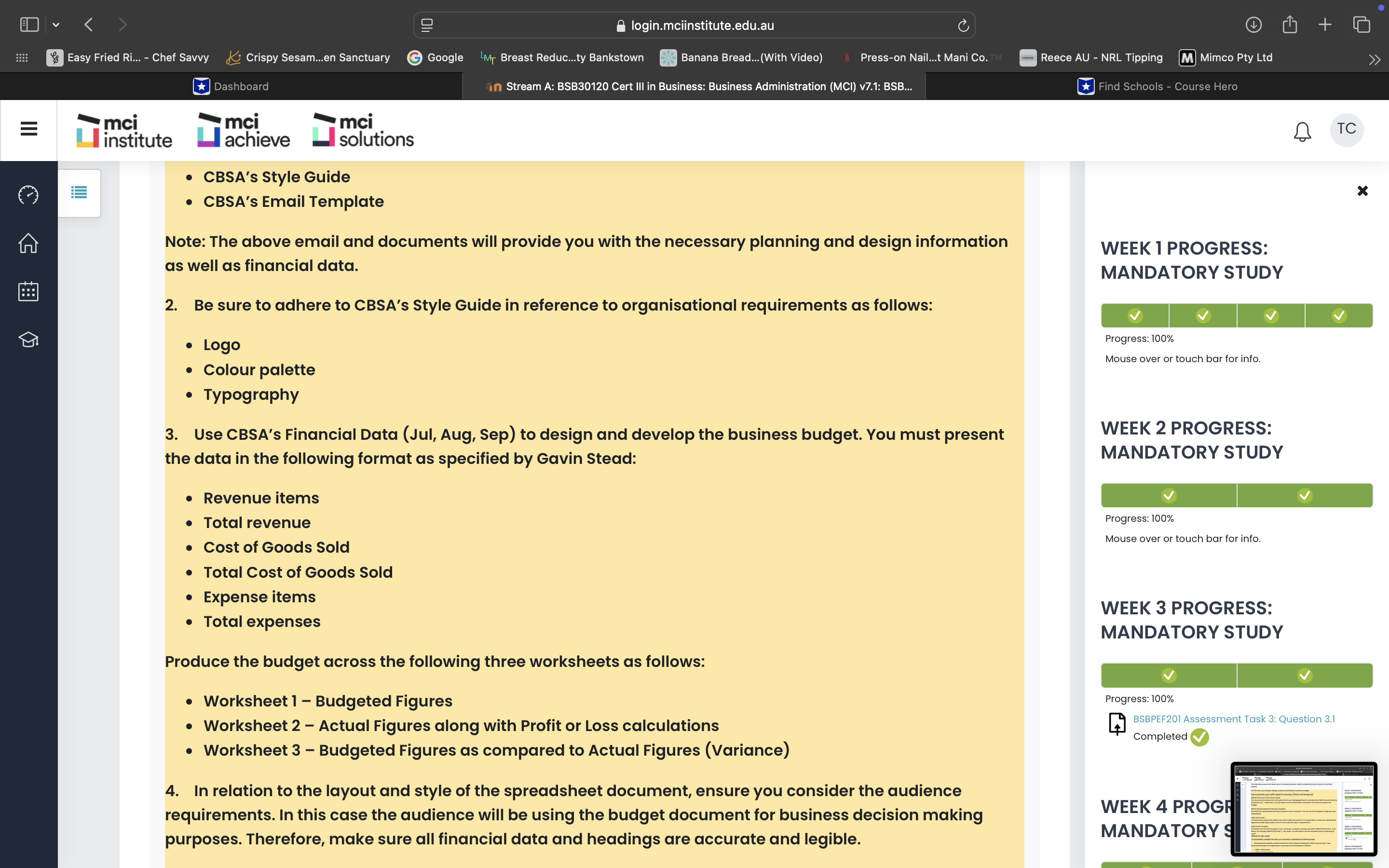
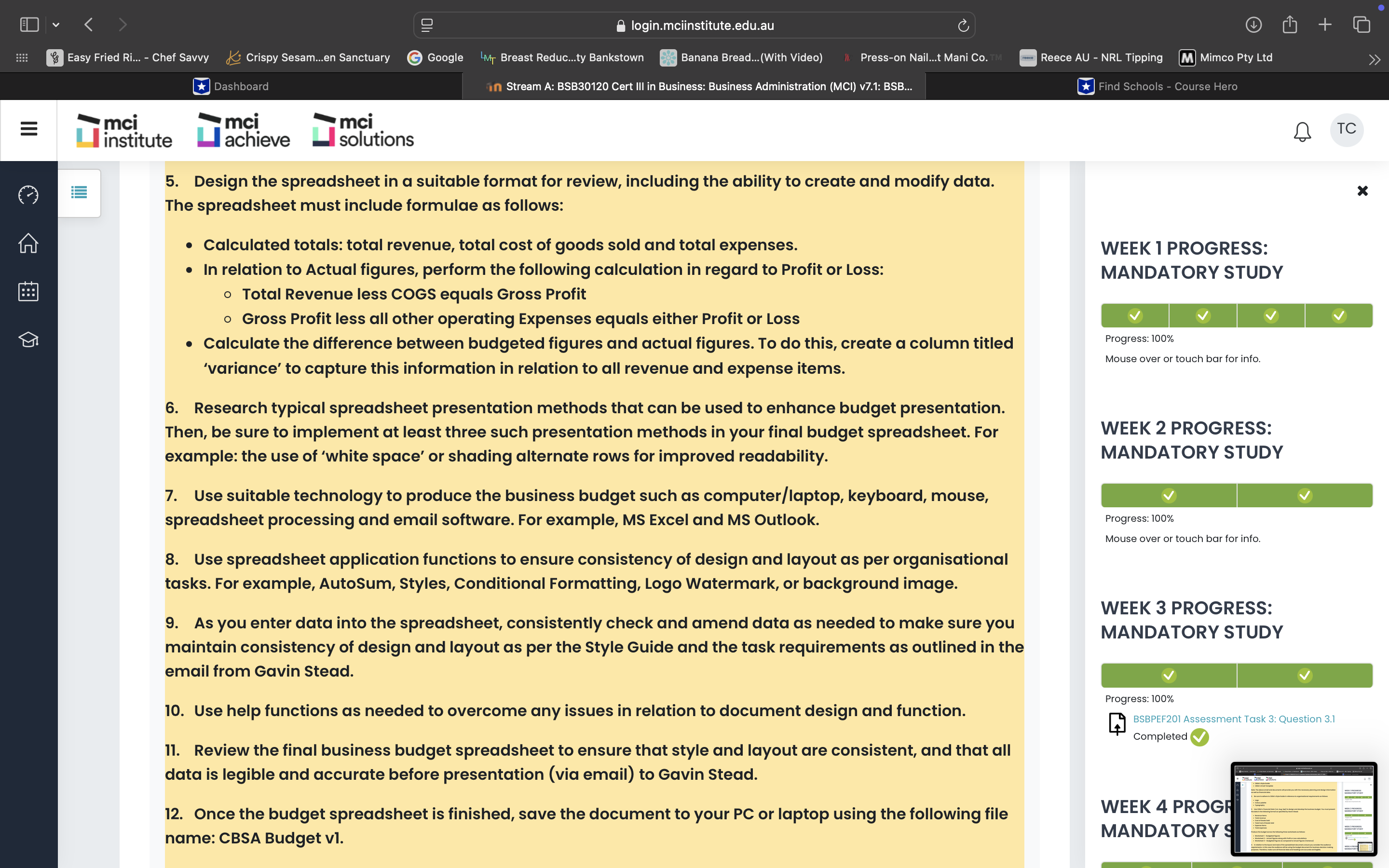
CBSA CBSA Style Guide Style Guide Our Target Audience Numbered lists Small, medium, and enterprise size organisations. Used when order is important. Each item expresses a step in a sequenced of steps: 1. First step Colour Palette 2. Second step 3. Third step The colour palette involves six primary colours as follows: Numbered lists can also have sub-steps: 1. First step 1.1. First sub-step 1.1.1. A third level of sub-step 1.2. Second sub-step HEX: #042842 HEX: #860B2F HEX: #16082E HEX: #055D80 HEX: #28272E HEX: #EFAD3D 2. Second step RGB: 4, 40, 66 RGB: 134, 11, 47 RGB: 22, 8, 46 RGB: 5, 93, 128 RGB: 40, 39, 46 RGB: 239, 173, 61 3. Third step Typography The following topology should be used: Bulleted lists Header 1 Used when order is not important. Items can be expressed in any order: First item Arimo 24pt. #184A73 Second item Header 2 Third item Arimo 18pt. #C73237 Bulleted lists can also have sub-items: First item Header 3 O First sub-item Arimo 14pt. #505C62. A third level of sub-item Header 4 O Second sub-item Arimo 12pt. Black bolded. Second item Calibri 11pt font is the body copy. Black forecolour used on white background. Third item All typography should be left-aligned, except for title headings which can be centred if desired. Lists Lists can either be ordered (numbered) or unordered (bulleted). SD BD002 Style Guide CBSA V2.0 Page 2 of 8 SD BD002 Style Guide CBSA V2.0 Page 3 of 8 Eduworks Resources CBSA - A simulated business by Eduworks Resources Eduworks Resources CBSA - A simulated business by Eduworks ResourcesPage 5 of 8 CBSA Style Guide CBSA Style Guide Tables Logo Tables with no headers should be developed using the "CBSA" table style. Logo can be used in one of four coloured styles. Two further black and white styles are permitted where black and white print is used. No other styles are permitted. Some Data Some Data Some Data Some Data Logo plus title full Some Data Some Data Some Data Some Data Some Data Where a column header is required, use "CBSA Col" table style: Column 1 Header Column 2 Header Column 3 Header Some Data Some Data Some Data Some Data Some Data Some Data Some Data Some Data Some Data Where a row header is required, use the "CBSA Row" table style: CBSA Row 1 Heade Some Data Some Data Some Data Row 2 Header Some Data Some Data Some Data Row 3 Header Some Data Some Data Some Data COMPLETE BUSINESS SOLUTIONS AUSTRALIA SD BD002 Style Guide CBSA V2.0 Page 4 of 8 SD BD002 Style Guide CBSA V2.0 Eduworks Resources CBSA - A simulated business by Eduworks Resources Eduworks Resources CBSA - A simulated business by EduvPage 1 of 4 BSBTEC302 | CBSA Email Communication Email 3 To: Erin.Bright@cbsa.com.au From: Gavin.Stead@cosa.com.au Date/time: Friday 10:05 a.m. Subject: Budget (Jul, Aug, Sep) Attachment: CBSA Financial Data (Jul, Aug, Sep) Good morning Erin, I am writing to you as I would like to request your administrative assistance to help draft our budget for the months of July, August and September. This information must be presented in a clear, concise, and logical manner as it will be used by the management team for decision making purposes. I am keen to get your input in relation to the planning and design of the spreadsheet document. However, all information must be presented in tabular form (columns and rows) and I'd like the data presented in the following order: . Revenue items . Total revenue . Cost of Goods Sold . Total Cost of Goods Sold (COGS) . Expense items . Total expenses To create the budget spreadsheet ensure you download and adhere to our CBSA Style Guide in relation to logo, font, and colour themes. Also, refer to the attached CBSA - Financial Data (Jul, Aug, Sep) as this is the data that must be entered into the spreadsheet. You will see that the financial data includes budgeted figures as well as actual figures. I will need you to calculate the difference between these two figures. Therefore, ensure you add a column titled 'variance' as this is the difference between budgeted and actual figures. I will also need you to calculate the totals as indicated above (total revenue, total cost of goods sold and total expenses In relation to the actual figures, I require you to perform the following calculation in relation to Profit or Loss. Please make prevision for calculation and data in the spreadsheet. The formulae I require you to input and use is as follows: 2021 Eduworks Resources mci Modified by MCI Digital Design Management Consultancy International Pty Ltd 2016 Page 1 of 4 Issued January 2022 Level 4, 23 Hunter Street, Sydney NSW 2000 Version 7.1 institute ABN 58 103 488 482 T 1300 768 550 | F 9230 0940 | info@mci.edu.au Review May 2023Page 3 of 4 BSBTEC302 | CBSA Email Communication BSBTEC302 | CBSA Email Communication Total Revenue less COGS equals Gross Profit Revenue - Budgeted . Gross Profit less all other operating Expenses equals either Profit or Loss Total Budgeted Revenue Considering the above requirements, I request that you create three worksheets as follows: Cost of Goods Sold Purchases $10,500.00 $10,500.00 $10,500.00 . Worksheet 1 - Budgeted Figures Total Budgeted Cost of Goods . Worksheet 2 - Actual Figures along with Profit or Loss calculations Sold Expenses - Budgeted Worksheet 3 - Budgeted Figures as compared to Actual Figures (Variance) Office Lease $33,333.00 $33,333.00 $33,333.00 Present all financial information using a suitable software application such as MS Excel as Travel Expenses $30,000.00 $30,000.00 $30,000.00 this is compatible with our resources and relevant policies and procedures. Insurance $5,350.00 $5,350.00 $5,350.00 Once you have completed the spreadsheet please save as CBSA Budget v1 and email it to Wages and Salaries $930,000.00 $930,000.00 $930,000.00 me as I would like to review as soon as possible. Running Expenses $2,250.00 $2,250.0 $2,250.00 I thank you for your assistance with this important project and I look forward to hearing from Utilities $2,800.00 $2,800.00 $2,800.00 you soon. Total Budgeted Expenses Kind Regards, Gavin Stead Appendix 2 Managing Director 300 Fictional Way, Sydney, NSW, 2000 CBSA CBSA Financial Data (Jul, Aug, Sep) Phone: 1800 111 222 Actual figures www.cbsa.com.au Revenue - Actual Appendix 1 Jul Aug Sep IT Services $330,000.00 $400,000.00 $335,000.00 CBSA Financial Data (Jul, Aug, Sep) Financial Services $740,000.00 $447,800.00 $138,000.00 Business Services $773,000.00 $632,050.00 $570,500.00 Budgeted figures HR Services $280,000.00 $289,000.00 $284,000.00 Revenue - Budgeted Training services $40,000.00 $60,000.00 $42,000.00 Jul Aug Sep Total Revenue IT Services $331,000.00 $331,000.00 $331,000.00 Cost of Goods Sol Financial Services $430,000.00 $430,000.00 $430,000.00 Purchases $10,001.22 $9,932.44 $9,465.34 Business Services $660,000.00 $660,000.00 $660,000.00 Total Cost of Goods Sold HR Services $280,000.00 $280,000.00 $280,000.00 Expenses - Actual Training services $60,000.00 $60,000.00 $60,000.00 Office Lease $33,333.43 $33,333.33 $33,333.00 2021 Eduworks Resources 2021 Eduworks Resources mci Modified by MCI Digital Design Management Consultancy International Pty Ltd 2016 Page 2 of 4 mci Modified by MCI Digital Design Management Consultancy International Pty Ltd 2016 Page 3 of 4 Issued January 2022 Level 4, 23 Hunter Street, Sydney NSW 2000 Version 7.1 Issued January 2022 Level 4, 23 Hunter Street, Sydney NSW 2000 Version 7. institute ABN 58 103 488 482 T 1300 768 550 | F 9230 0940 | info@mci.edu.au Review May 2023 institute ABN 58 103 488 482 0 | info@mci.edu.au Review May 2023Page 4 of 4 BSBTEC302 | CBSA Email Communication Travel Expenses $35,850.00 $21,000.00 $51,700.00 Insurance $4,000.00 $5,000.00 $6,750.00 Wages and Salaries $890,000.00 $918,000.00 $1,020,500.00 Running Expenses $2,200.00 $3.00 $2,350.00 Utilities $2,800.00 $2,800.00 $2,800.00 Total Expenses 2021 Eduworks Resources mci Modified by MCI Digital Design Management Consultancy International Pty Ltd 2016 Page 4 of 4 Issued January 2022 Level 4, 23 Hunter Street, Sydney NSW 2000 Version 7.1 institute ABN 58 103 488 482 T 1300 768 550 | F 9230 0940 | info@mci.edu.au Review May 2023( v login.mciinstitute.edu.au + |Easy Fried Ri... - Chef Savvy & Crispy Sesam.en Sanctuary G Google LMT Breast Reduc..ty Bankstown Banana Bread.(With Video) * Press-on Nail...t Mani Co. Reece AU - NRL Tipping M Mimco Pty Ltd > > Dashboard in Stream A: BSB30120 Cert Ill in Business: Business Administration (MCI) v7.1: BSB... Find Schools - Course Hero S mci T mci mci achieve solutions TC institute The following assessment task uses a simulated business called Complete Business Solutions Australia X (CBSA). in For this task, you will plan, design, produce and finalise a business budget. WEEK 1 PROGRESS: MANDATORY STUDY Documents you will need to access (from ecampus) BSBTEC302 Email 3 from Gavin Stead V V V This document provides work instructions from your Managing Director, and attaches CBSA Financial Data for Progress: 100% Mouse over or touch bar for info. the period July - September. You will need to use the information and data in this email to prepare the Budget. BSBTEC302 Spreadsheet Planning Template WEEK 2 PROGRESS: Download the spreadsheet planning template to your computer. You can use this template to help plan your MANDATORY STUDY spreadsheet. V CBSA Style Guide Progress: 100% This document outlines the styles to be used in CBSA documents. It is a good idea to check your spreadsheet Mouse over or touch bar for info. against the CBSA Style Guide, as this is in line with the client's requirements. CBSA Email Template WEEK 3 PROGRESS: Download and save this template to your computer, using the naming convention: BSBTEC302 Email 4_Your MANDATORY STUDY Name; for example, BSBTEC302 Email 4_Tilly Jones. You will need to use this template when composing an email. V What to do next Progress: 100% BSBPEF201 Assessment Task 3: Question 3.1 To successfully complete this task, you will need to undertake the following steps: Completed V 1. Download and carefully read the email from Gavin Stead, including the CBSA Financial Data. Then download and open the organisation's procedures and templates as follows: WEEK 4 PROGRESS: . CBSA's Style Guide MANDATORY STUDY BSA'S E( v login.mciinstitute.edu.au C + |Easy Fried Ri... - Chef Savvy & Crispy Sesam..en Sanctuary G Google LT Breast Reduc...ty Bankstown Banana Bread..(With Video) Press-on Nail...t Mani Co. Reece AU - NRL Tipping M Mimco Pty Ltd > > Dashboard in Stream A: BSB30120 Cert Ill in Business: Business Administration (MCI) v7.1: BSB... Find Schools - Course Hero S mci T mci mci achieve solutions TC institute . CBSA's Style Guide X . CBSA's Email Template n Note: The above email and documents will provide you with the necessary planning and design information WEEK 1 PROGRESS: as well as financial data. MANDATORY STUDY 2. Be sure to adhere to CBSA's Style Guide in reference to organisational requirements as follows: V V V . Logo Progress: 100% Mouse over or touch bar for info. . Colour palette . Typography 3. Use CBSA's Financial Data (Jul, Aug, Sep) to design and develop the business budget. You must present WEEK 2 PROGRESS: the data in the following format as specified by Gavin Stead: MANDATORY STUDY . Revenue items V Total revenue Progress: 100% . Cost of Goods Sold Mouse over or touch bar for info. . Total Cost of Goods Sold . Expense items WEEK 3 PROGRESS: . Total expenses MANDATORY STUDY Produce the budget across the following three worksheets as follows: V . Worksheet 1 - Budgeted Figures Progress: 100% . Worksheet 2 - Actual Figures along with Profit or Loss calculations BSBPEF201 Assessment Task 3: Question 3.1 Completed . Worksheet 3 - Budgeted Figures as compared to Actual Figures (Variance) 4. In relation to the layout and style of the spreadsheet document, ensure you consider the audience requirements. In this case the audience will be using the budget document for business decision making WEEK 4 PROG purposes. Therefore, make sure all financial data and headings are accurate and legible. MANDATORY Scm Easy Fried Ri...- Chef Sawy 4% Crispy Sesam...en Sanctuary @ Google 'm Breast Reduc...ty Bankstown & CEERI MRC RCC) S aE \"mei mei . linstitute Ldachieve solutions @ login.mciinstitute.edu.au G ett em a xe eS} ip 'd ) Stream A: BSB30120 Cert Ill in Business: Business Administration (MCI) v7.1: BSB... mci \"mci 5. Design the spreadsheet in a suitable format for review, including the ability to create and modify data. The spreadsheet must include formulae as follows: Calculated totals: total revenue, total cost of goods sold and total expenses. e Inrelation to Actual figures, perform the following calculation in regard to Profit or Loss: Total Revenue less COGS equals Gross Profit Gross Profit less all other operating Expenses equals either Profit or Loss Calculate the difference between budgeted figures and actual figures. To do this, create a column titled 'variance' to capture this information in relation to all revenue and expense items. 6. Research typical spreadsheet presentation methods that can be used to enhance budget presentation. Then, be sure to implement at least three such presentation methods in your final budget spreadsheet. For example: the use of 'white space' or shading alternate rows for improved readability. 7. Use suitable technology to produce the business budget such as computer/laptop, keyboard, mouse, spreadsheet processing and email software. For example, MS Excel and MS Outlook. 8. Use spreadsheet application functions to ensure consistency of design and layout as per organisational tasks. For example, AutoSum, Styles, Conditional Formatting, Logo Watermark, or background image. 9. As you enter data into the spreadsheet, consistently check and amend data as needed to make sure you maintain consistency of design and layout as per the Style Guide and the task requirements as outlined in the email from Gavin Stead. 10. Use help functions as needed to overcome any issues in relation to document design and function. ll. Review the final business budget spreadsheet to ensure that style and layout are consistent, and that all data is legible and accurate before presentation (via email) to Gavin Stead. 12. Once the budget spreadsheet is finished, save the document to your PC or laptop using the following file name: CBSA Budget v1. B Reece AU - NRL Tipping cD} Mimco Pty Ltd WEEK 1 PROGRESS: MANDATORY STUDY Progress: 100% Mouse over or touch bar for info. WEEK 2 PROGRESS: MANDATORY STUDY Progress: 100% Mouse over or touch bar for info. WEEK 3 PROGRESS: MANDATORY STUDY Progress: 100% Completed WEEK 4 PROG MANDATORY
Step by Step Solution
There are 3 Steps involved in it
1 Expert Approved Answer
Step: 1 Unlock
Question Has Been Solved by an Expert!
Get step-by-step solutions from verified subject matter experts
Step: 2 Unlock
Step: 3 Unlock
Students Have Also Explored These Related Accounting Questions!









 Study Help